Write your plan
The seven steps that build your plan, from your values to your year.
On this page
Turn your year into today's tasks
You want your quarter to follow your year, and your day to follow your week.
- 1
The More menu, on a computer.
Tap Goal Cascade map.

The whole plan on one page. - 2
The Year screen, on a phone.
Add up to three annual goals.

An annual goal under its Summit Goal. - 3
The Year screen, on a computer.
Open a goal for its three tabs.

The three tabs of an annual goal. - 4
The Quarter screen, on the Plan tab.
Check the milestones for this quarter.
- 5
The Quarter screen, on the Monthly focus tab.
Drag each milestone into a month.
- 6
The Week screen, on the Plan tab.
Turn the month into three main focus items.
- 7
The Today screen, on the Plan tab.
Pick three priority tasks from the week.
What follows
- On your first session, filling Year, Quarter and Week is enough.
- An annual goal has three tabs: Goal, Friction Map and Milestones.
- The Plan tab opens with a line about the level it follows.
Edit a drafted annual goal
The app drafted an annual goal from your Summit Goal, and you want it in your words.
- 1
The Year screen, on the Plan tab.
Open the goal card for one life area.
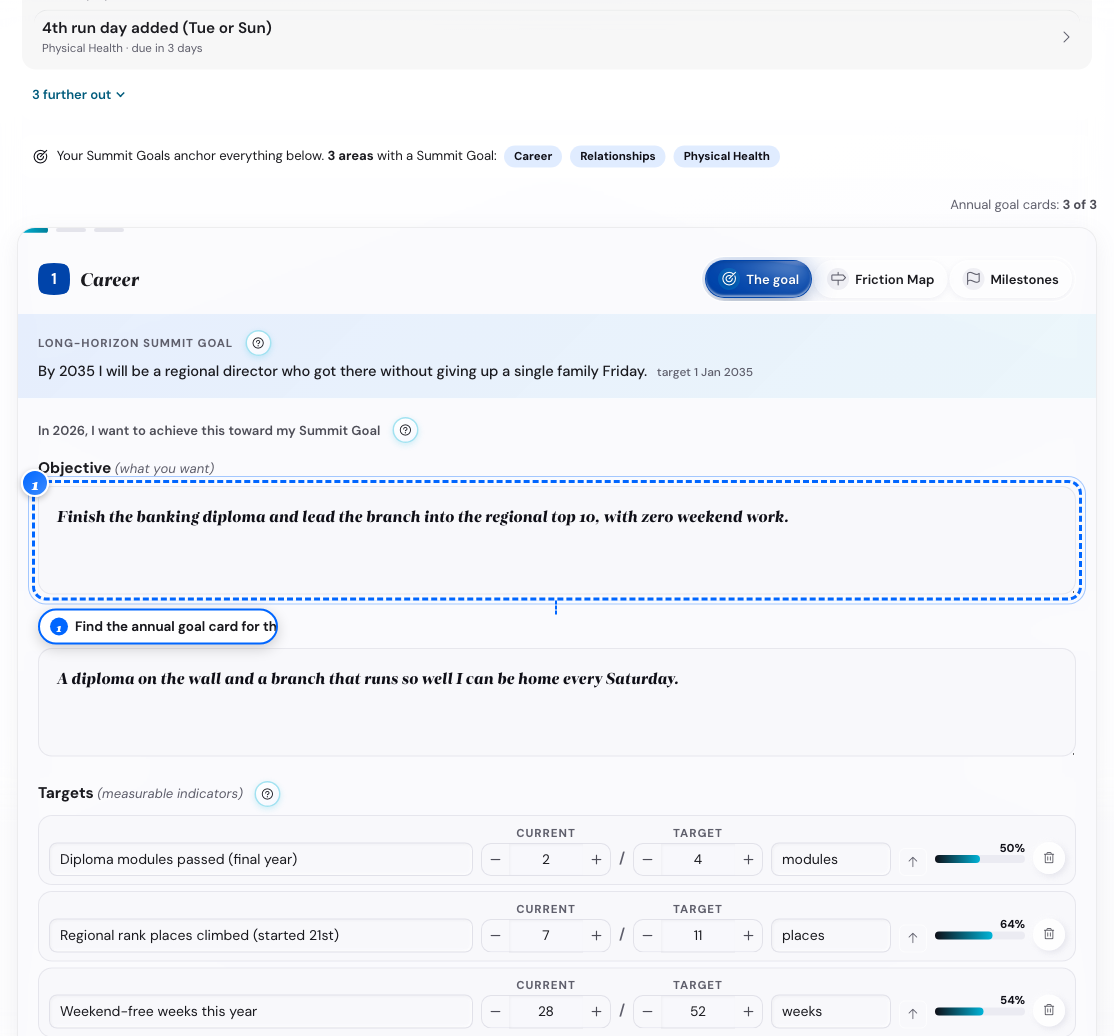
A drafted goal card. - 2
The Goal tab of that card.
Type over the drafted wording.
The gray draft styling clears.
- 3
The Friction Map tab.
Name what gets in the way, and your counter-move.
- 4
The Milestones tab.
Change the date or title of a drafted milestone.
Editing any field clears its drafted styling.
- 5
A drafted milestone you do not want.
Tap the trash icon, or tap Add milestone for your own.
What follows
- The tab opens when the goal has words; Milestones opens after one obstacle.
- You get a draft milestone at each quarter end with at least 6 weeks left.
- With fewer than two, you get a Halfway milestone plus one at the year end.
- The app never drafts a goal for a life area that already has one.
- In Settings, on Planning, switch off Draft annual goals from my Summit Goals.
Pick your top five values
Your purpose, focus areas and Summit Goals are all tested against these five.
- 1
The Values screen, from the stepper or Home.
Open the Play your hand tab.

The card hand on a phone. - 2
The Play your hand tab.
Swap a card for the next one until your five values feel right.
- 3
The Rank your five tab, on a computer.
Drag the five cards into order.
Position 1 is your North Star value.
- 4
The same tab, on a phone.
Tap each word in the order you want.
The fifth tap finishes it.
- 5
The Values screen, with your five values in order.
Tap Where it shows up.
- 6
The Where it shows up tab.
Read how the five show up in Purpose.
- 7
The Where it shows up tab, at its end.
Tap Continue to Purpose.
What follows
- You finish Values when the five are in order.
- A hand you never ranked does not count as a ranking.
Choose your focus life areas
You want to know which parts of your life need attention this year.
- 1
The Life Areas screen.
Open the Rate your areas tab.
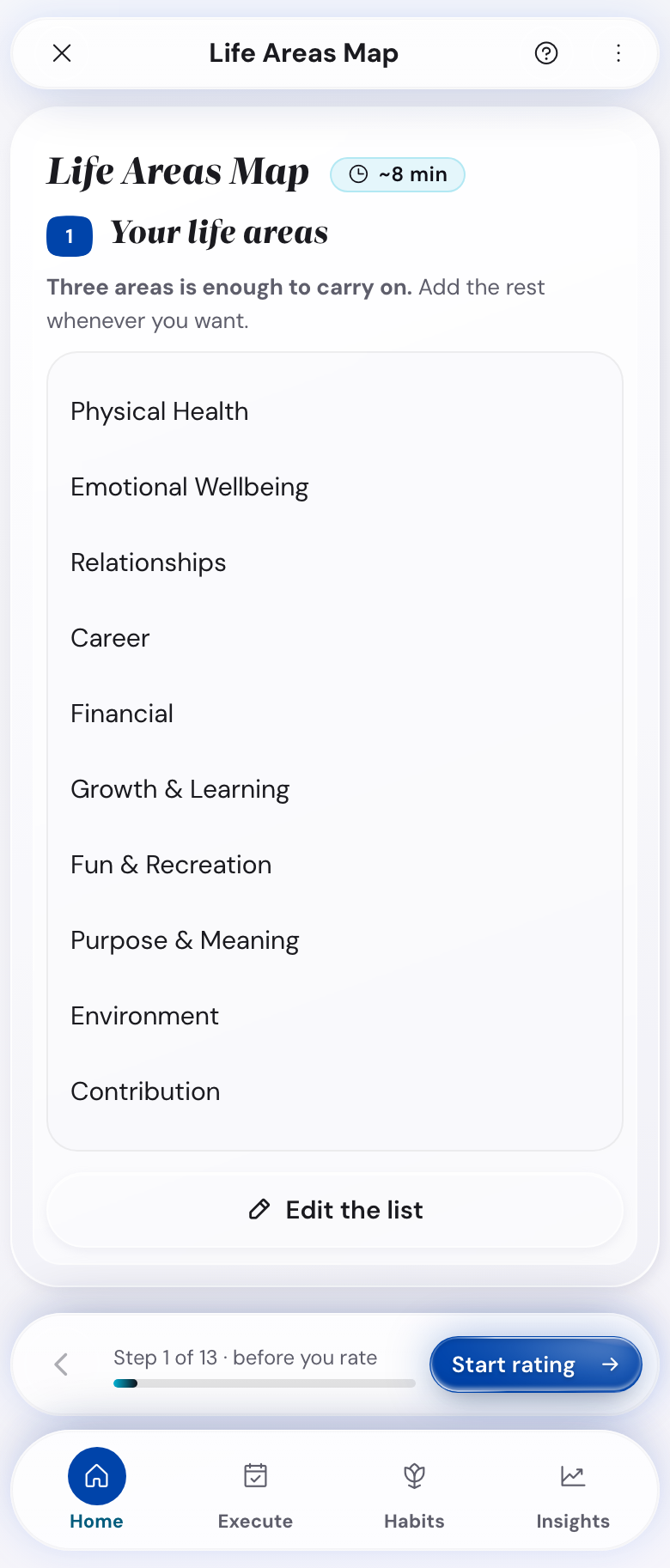
The ten areas, before you rate them. - 2
The same tab.
Set the two sliders for each of the ten areas.
Score where you are today.
- 3
The Choose your focus tab.
Check two or three areas.
The app checks its own pick until you check one.
What follows
- The screen recommends two or three areas, and nothing stops you picking a fourth.
- On Choose your focus, your focus areas come first. The other areas come next, by priority.
- You finish when three areas move off the middle score of 5 and a focus area is checked.
- The app follows your check marks from the moment you check or uncheck one yourself.
Set a Summit Goal for each focus area
You want one goal with a date per focus area, tied to a value you rank high.
- 1
The Summit Goals screen, from the stepper or Home.
Pick a focus area.

One panel for each focus area. - 2
A panel for that area.
Tap a starter example, or compose your own.
- 3
A three piece builder.
Set the Action, How you'll know and Target date.
The three pieces write the sentence.
- 4
A goal card.
Tap the sentence to edit it in your own words.
- 5
Your other focus areas.
Repeat, for two or three Summit Goals.
What follows
- A sentence you type yourself replaces what Action and How you'll know would write.
- The card shows a note when that happens.
- You can still pick a Target date for a sentence you typed.
- Under Look ahead, you pick 3, 5 or 10 years for your Summit Goals.
Write your three futures and pick one
You want a concrete five year picture to aim your Summit Goals at.
- 1
The Vision screen.
Read Plan A on the Three Futures tab.
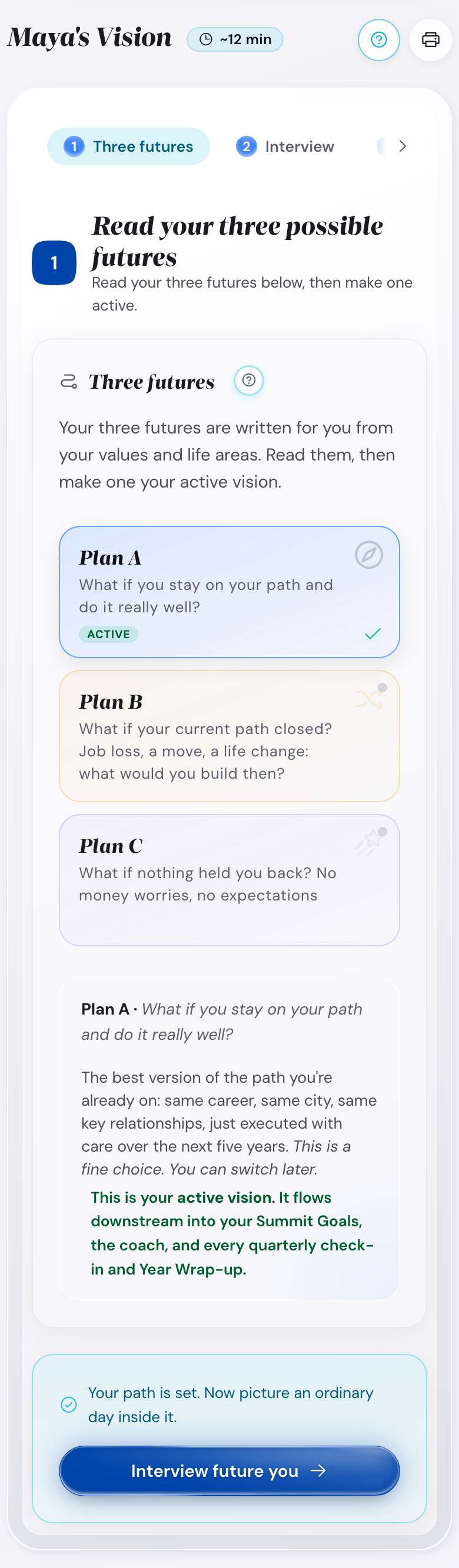
Plan A, B and C as cards. - 2
The Three Futures tab.
Tap Plan B, or Plan C.
- 3
The Interview with your future you tab.
Answer the five prompts as your future self.
Write in the present tense.
- 4
The Three Futures tab.
Tap Make Plan A active.
The other two plans stay saved.
What follows
- The B plan is another reachable path; the C plan is the stretch.
- The C plan is the one you would not pick if you played safe.
- In the interview, you describe one ordinary day, five years out.
Write your purpose sentence
You want one sentence that says what this year is for.
- 1
The Purpose screen, from the stepper or Home.
Open the Write your purpose tab.
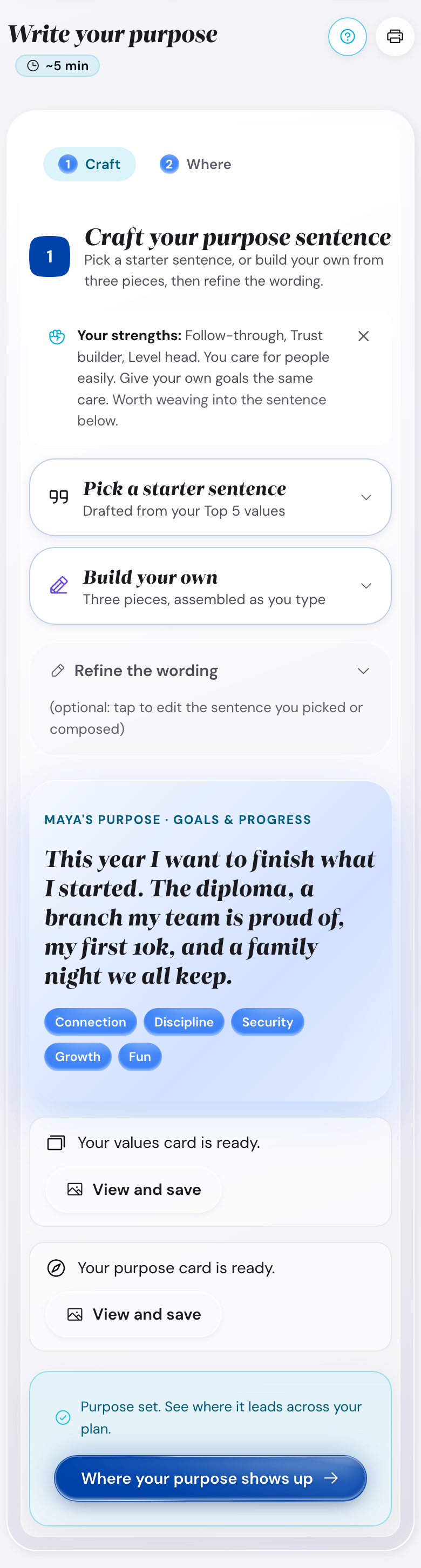
The drafts and the builder. - 2
The same tab.
Tap Pick a starter sentence.
Drafts from your top five values open.
- 3
A list of drafts.
Tap one to use it, or tap Build your own.
- 4
A three piece form.
Fill in the three fields.
A preview builds the sentence as you type.
- 5
A live preview.
Tap Use this sentence.
- 6
Your sentence.
Edit the wording until it sounds like you.
What follows
- The three fields are the action, who it serves, and the change you want.
- You finish when the sentence has at least eight characters.
- In Essentials Mode you see one draft; in Full Mode you see three.