Goals & Progress


The right habit tracker depends on how you build habits
For loss aversion, the best habit tracking apps are streak tools like Streaks (iPhone) and HabitNow (Android). For game mechanics, Habitica turns tracking into a role-playing game. For visual data, Habitify and Strides chart your progress. For a fully free option, Loop Habit Tracker on Android wins. The right pick depends less on star ratings and more on how your brain forms habits.
You downloaded a habit tracker. You used it for five days. Then you forgot it existed. Abandoning a tracker after five days is not a failure of tracking itself; it is a failure of fit. Harkin and colleagues analyzed 138 studies covering over 19,000 participants and found that self-monitoring is one of the most effective behavior change techniques available [1]. The self-monitoring mechanism works. The problem is that most people pick a daily habit tracker app based on star ratings instead of matching it to how their brain forms habits.
The best habit tracking apps align with a specific psychological mechanism: loss aversion through streaks, variable rewards through gamification, or visual progress through completion maps. Pick the wrong mechanism for your personality, and the app becomes digital clutter within a week. This guide matches each habit tracking software option to the science that makes it stick.
One disclosure up front: one of the tools below, the Life Goals App, is built by me. It is placed by category fit rather than ranked first, and its entry states the limitation.
Why does habit tracking work?
Self-monitoring is not a motivational gimmick. It is one of the most reliably effective behavior change techniques in the research literature. Harkin and colleagues found an average effect size of d = 0.40 across 138 studies, meaning the person who tracks moves from roughly the 50th percentile to the 66th percentile of goal attainment [1]. Both public and private monitoring help, and both work whether you track digitally or on paper.
The catch is consistency. A tracking habit only pays off if you keep it long enough for the behavior to become automatic, which takes a median of 66 days [2]. That is why fit matters more than features. An app you abandon in a week cannot deliver a benefit that depends on months of use.
How I evaluated these habit tracking apps
I did not score these apps on a generic feature checklist. I sorted them by the psychological mechanism each one leans on, because that is what determines whether a tracker survives past the novelty phase. For each app I looked at four things: the core mechanism it uses to keep you engaged, the platforms it runs on, what it costs (including the free tier and any limits), and practical details like wearable support and data export.
A few apps were left out on purpose rather than overlooked. Finch and similar pet-care trackers were ruled out because their mechanism (caring for a virtual companion) overlaps heavily with Habitica's gamification and did not add a distinct driver. The built-in Apple Health and Google Fit logging were excluded because they are not dedicated habit trackers. Notion and Obsidian habit templates were left out because they are general workspaces you have to build into a tracker yourself, not ready-made tools.
This is a research-based review built on the published behavioral science and the publicly documented features and pricing of each app. It is not a paid placement. App store prices, star ratings, rating counts, and free-tier limits all change often, so treat every figure here, including the ratings cited in each review, as accurate to early 2026 and a starting point only. Confirm the current number in your app store before you pay.
Best habit tracking apps at a glance
This first table is the primary comparison: the core mechanism, the platforms, the price, and who each app is for. A second table below it covers the practical details (free-tier limits, wearable support, and data export) so neither table has to cram seven columns onto a phone screen.
| App | Core mechanism | Platform | Price | Best for |
|---|---|---|---|---|
| Streaks | Streak / loss aversion | iOS, Apple Watch | $5.99 one-time | Focused daily tracking |
| Habitica | Gamification / variable rewards | iOS, Android, Web | Free or $4.99/mo | Engagement through game mechanics |
| Habitify | Visual progress / analytics | iOS, Android, Mac, Web | Free or $4.99/mo | Data-driven tracking |
| Strides | Flexible goal + habit | iOS, Apple Watch | Free or $4.99/mo | Habits tied to larger goals |
| HabitNow | Streak + scheduling | Android | Free or one-time unlock | Free Android tracking |
| Loop Habit Tracker | Minimalist / open-source | Android | Free | Privacy and simplicity |
| Way of Life | Binary yes / no awareness | iOS, Android | Free or paid upgrade | Pattern recognition |
| Daylio | Mood-habit correlation | iOS, Android | Free or $4.99/mo | Mood-linked habit insight |
| Goals & Progress Life Goals App | Habits with a lazy day version, a reason why and a comeback badge | Browser; installs on iPhone, iPad, Android | $49.99 once, no subscription | Habits that serve a bigger goal |
| Productive | Structured routines | iOS, Android | Free, $3.99 one-time, or $23.99/yr | Time-blocked daily habits |
Quick key: Streaks (iOS, $5.99 one-time, no free tier); Habitica (iOS, Android, web, free with cosmetic-only paywall); Habitify (iOS, Android, Mac, web, free for 3 habits); Strides (iOS and Apple Watch, free tier then subscription); HabitNow (Android, free then one-time unlock); Loop Habit Tracker (Android, fully free); Way of Life (iOS and Android, free for 3 habits); Daylio (iOS, Android, free with premium); Productive (iOS, Android, free with paid upgrade).
The practical details, for narrowing the shortlist once a mechanism fits:
| App | Free tier limit | Wearable support | Data export |
|---|---|---|---|
| Streaks | No free tier (one-time purchase) | Apple Watch | iOS Health sync |
| Habitica | Feature-complete (cosmetic upgrades) | None | CSV via web |
| Habitify | 3 habits | Apple Watch | CSV |
| Strides | Free tier, then subscription | Apple Watch | CSV, PDF |
| HabitNow | 7 habits; unlimited via one-time unlock | None | CSV |
| Loop Habit Tracker | Fully free (no premium) | None | CSV (local only) |
| Way of Life | 3 habits | None | CSV, JSON |
| Daylio | Core features included | Apple Watch | CSV (free), PDF (premium) |
| Goals & Progress Life Goals App | No free tier; free demo with an example plan | None | Save file, own Dropbox, calendar file, print |
| Productive | Core features included | Apple Watch | None |
The intro names the top picks per use case, but the right app comes down to which behavioral driver fits you. The reviews below are grouped by that driver so you can skip the ones that will not help you.
Streak-based apps: loss aversion that punishes the broken chain
Streak trackers work by making a broken chain feel like a loss. Loss aversion, the finding that losing something feels worse than gaining the equivalent feels good, is one of the most robust effects in behavioral economics [3]. If the thought of resetting a long streak to zero genuinely bothers you, this is your category.
Streaks
Streaks does one thing and does it fast: protect the unbroken chain, with a check-in that can take a single tap.
- Best for: iPhone users who respond to loss aversion and want zero-friction daily tracking.
- Key features: Apple Watch integration that makes daily check-ins take a few seconds, Health app sync so habits like "walk 10,000 steps" complete automatically, and a deliberately tight focus on streaks rather than extra features. On the App Store it sits at roughly 4.8 stars across tens of thousands of ratings.
- Pros: One-time $5.99 purchase with no subscription, automatic completion for health-linked habits, and one of the fastest check-in flows here because the Health auto-completion means some habits never need a manual tap at all.
- Cons: iOS only, no free tier to test first, and it caps you at roughly two dozen habits. The counter resets on a missed day, which makes some people quit.
- Who it is not for: Android users, anyone who wants to track more than about two dozen habits, and people who need to try an app free before paying.
- Verdict: Pick this if streaks motivate you and you value a fast, narrow tool over breadth; the trade-off is that you are paying upfront with no trial.
HabitNow
Streaks meet flexible scheduling here, in one of the more feature-complete free Android trackers around.
- Best for: Android users who want a capable, no-cost tracker without ads.
- Key features: Streak tracking, flexible scheduling (daily, weekly, or custom), and a home screen widget that lets you check off habits without opening the app, all with no ads in the free version. Its Google Play rating sits near 4.5 stars.
- Pros: One of the most generous free tiers among Android trackers, no ads in the free version, and a widget that removes friction from daily logging.
- Cons: Android only, no wearable support, and the free tier caps you at seven habits, with unlimited habits and the advanced features behind a one-time premium unlock.
- Who it is not for: iPhone users and anyone who wants smartwatch check-ins.
- Verdict: Choose it over Loop only if you want scheduling and a widget and can live with the richer features behind a one-off purchase; if you only need the basics for free, Loop is leaner.
Gamified apps: variable rewards that fight boredom
Gamified trackers use points, badges, and randomized rewards to sustain engagement, the same variable-reward mechanism that makes games compelling [4]. A review of empirical studies on gamification found that it generally produces positive effects on engagement and motivation, though the results depend on context and the users involved [5]. If traditional tracking feels boring or rigid to you, gamification may be the difference between week one and month three.
Habitica
Among mainstream trackers, the one that goes furthest in turning your habits into a full role-playing game.
See also: Habitica alternatives, 7 habit apps with or without the game.
- Best for: People who respond to game mechanics, especially if traditional methods feel boring or rigid.
- Key features: Experience points, health bars, and boss battles act as engagement drivers, and social features add accountability through parties where other players depend on your completion. It rates around 4.5 stars on both the App Store and Google Play.
- Pros: Feature-complete free tier (the upgrades are cosmetic), genuine social accountability, and a fun loop that can outlast the novelty phase. It runs on iOS, Android, and the web.
- Cons: No wearable support, the game layer is overhead some users find distracting, and data export is limited to CSV through the web interface.
- Who it is not for: Minimalists who want a plain checklist, and anyone who finds game mechanics more of a chore than a motivator.
- Verdict: Reach for this when boredom rather than willpower is what kills your trackers, and you actually enjoy the game layer rather than tolerating it.
If the points-and-rewards loop appeals to you, you can apply the same psychology beyond any single app; this gamification habit building system walks through building your own XP and reward structure.
Visual-progress apps: charts and heatmaps that build momentum
Visual-progress trackers lean on the endowed progress effect, the finding that seeing existing progress makes you more likely to keep going [6]. If you are the kind of person who is motivated by watching a chart fill in, this category fits.
Habitify
Habitify turns your habit history into heatmaps, success rates, and trend graphs, then syncs them everywhere you work.
- Best for: Analytical people who want to see their data and reach it from any device.
- Key features: Completion heatmaps, success rate calculations, and trend graphs, with habits organized by time of day (morning, afternoon, evening, anytime). App Store reviewers give it about 4.7 stars.
- Pros: The widest platform reach on this list (iOS, Android, Mac, and web), Apple Watch support, and strong analytics. If you respond to both loss aversion and visual data, Habitify is the strongest overlap option.
- Cons: The free tier caps you at 3 habits, and the full analytics require the $4.99/month subscription.
- Who it is not for: People who want to track many habits for free, and minimalists who find charts and stats to be clutter.
- Verdict: Worth the subscription if you genuinely act on dashboards and want the same data on your phone, laptop, and watch; skip it if three free habits already cover you.
Strides
Strides is the rare tracker that holds a daily habit and a six-month goal side by side.
- Best for: People building habits as part of a broader goal-setting system like OKRs.
- Key features: Tracks a daily habit, a target goal, a running average, or a project milestone, and its charts show rolling averages rather than binary pass or fail. It carries roughly 4.7 stars on the App Store.
- Pros: Combines habit and goal tracking so you do not need two apps, exports to both CSV and PDF, syncs to Apple Watch, and the rolling-average view is forgiving of the occasional miss.
- Cons: Apple ecosystem only, a limited free tier before you have to subscribe, and the same rolling-average view that forgives one miss can mask a genuine multi-day lapse if you are not watching the raw streak.
- Who it is not for: Android users, and people who only want simple daily habit checkmarks without goal-tracking overhead.
- Verdict: Reach for Strides when your habits ladder up to bigger goals; if you are mostly tracking outcomes rather than daily behaviors, compare it against the dedicated best goal tracking apps first.
Minimalist and specialist apps: simplicity, privacy, mood, and routine
Not every effective tracker leans on one of the three main mechanisms above. These four sit outside that model and win on a specific approach instead: stripped-down simplicity, on-device privacy, mood correlation, or a structured daily routine. The psychology is quieter here, but it is still there. Loop and Way of Life run on plain self-monitoring, where the act of recording itself makes you notice the behavior more, which is the same mechanism the research finds so effective [1]. Daylio adds how you feel, letting your mood act as feedback on what you did. Productive leans on routine and cue-based reminders rather than on loss, reward, or progress.
Loop Habit Tracker
Nothing here leaves your phone: Loop is open-source, account-free, and completely on-device.
- Best for: Privacy-conscious minimalists who want tracking without gamification or subscriptions.
- Key features: A deliberately minimal interface of checkboxes, streaks, and simple charts, with no accounts and no cloud sync, so data stays on the device. On Google Play it rates around 4.7 stars.
- Pros: Genuinely free with no premium tier at all, open-source transparency, and strong privacy since nothing leaves your phone.
- Cons: Android only, no wearable support, and CSV export is local only with no cloud backup.
- Who it is not for: iPhone users, anyone who needs cross-device sync, and people who want gamification or rich analytics.
- Verdict: If "no premium tier and nothing leaves my phone" is the deciding factor, this is the Android pick; you give up scheduling and a widget that HabitNow offers.
Way of Life
About as simple as trackers get: every day is a yes, a no, or a skip.
- Best for: Beginners who need to see their patterns before they try to optimize anything.
- Key features: Daily logging as yes, no, or skip, and a color-coded calendar (green for yes, red for no) that creates instant pattern recognition. Its App Store score hovers around 4.6 stars.
- Pros: The gentlest learning curve on this list, instant visual patterns, and a low-cost upgrade (a monthly option on iOS or a one-time purchase on Android) instead of a single fixed plan.
- Cons: The free tier caps you at 3 habits, there is no wearable support, and the upgrade model differs by platform, so check the price in your own store.
- Who it is not for: People who want analytics or gamification beyond a simple color calendar.
- Verdict: Start here if you are new to tracking and want awareness before analytics; the skip option also makes it forgiving on the days a habit just does not happen.
Daylio
Daylio asks one extra question each day: how do you feel? It then links that answer to your habits.
- Best for: People who want to connect daily habits to emotional well-being and need motivation beyond streaks.
- Key features: Pairs habit tracking with daily mood logging and generates correlation charts showing which habits associate with better mood patterns. On both the App Store and Google Play it rates around 4.8 stars.
- Pros: Runs on both iOS and Android, supports Apple Watch, and surfaces a genuinely useful link between behavior and mood that pure streak apps miss.
- Cons: The free export is CSV only, with PDF reserved for premium, and the most useful insights also sit behind the $4.99/month premium tier.
- Who it is not for: People who only want a plain habit checklist and have no interest in mood logging.
- Verdict: Choose Daylio when "does this habit actually make me feel better?" matters more than a streak count; the mood data is the reason to pick it over a pure checklist.
Productive
Your habits get slotted into morning, afternoon, and evening routines, which is the whole idea behind Productive.
- Best for: People who want a structured, time-blocked daily routine.
- Key features: Organizes habits into morning, afternoon, and evening routines with scheduled reminders, applying a structured time-blocking approach. It holds about 4.6 stars on the App Store and around 4.2 stars on Google Play.
- Pros: A clear routine-based structure, Apple Watch support, scheduled reminders that anchor habits to specific times of day, and a one-time $3.99 unlock if you prefer not to subscribe.
- Cons: No data export, premium gated behind either a $3.99 one-time purchase or a $23.99 yearly subscription, and the structure works best if your habits follow a fixed daily rhythm.
- Who it is not for: People whose days are too variable for fixed time blocks.
- Verdict: Good fit if your day already runs on a predictable rhythm; the same fixed time blocks become a liability if your schedule shifts constantly.
Best free habit tracking apps
If cost is the deciding factor, the strongest free options split by platform. On Android, Loop Habit Tracker is the best fully free choice, with streaks, charts, and open-source transparency and no ads. HabitNow is the next step up on Android, offering a generous free tier (up to seven habits) with a widget and no ads, while keeping unlimited habits and its advanced features behind a one-time unlock rather than a subscription. On iOS, the picture is tighter: Way of Life tracks three habits free before a paid upgrade, and Habitify and Strides both offer free tiers before asking you to subscribe. Habitica is also worth noting as a cross-platform free option whose free tier is feature-complete, with only cosmetic upgrades behind the paywall.
How should you choose a habit tracking app?
Choosing well is a three-step process, and it starts with you rather than the app store rankings.
- Step 1: Identify your driver. Decide which mechanism actually motivates you: loss aversion (you hate breaking a streak), variable reward (you need novelty and play), visual progress (you are moved by a filling chart), or simplicity (you want the least friction possible).
- Step 2: Match it to a category. Loss aversion points to streak apps like Streaks or HabitNow. Variable reward points to Habitica. Visual progress points to Habitify or Strides. Simplicity points to Loop or Way of Life. Mood and routine needs point to Daylio and Productive.
- Step 3: Filter by platform and budget. Narrow the shortlist by your device (iOS or Android), whether you want a wearable check-in, and what you are willing to spend. The comparison table above does this filtering for you at a glance.
If you are weighing a habit tracker as part of a bigger system, it is worth seeing the broader category too; the best goal-setting apps roundup covers the tools that sit one layer up from daily habits.
ADHD-friendly and parent-friendly picks
For readers with ADHD, the single most important detail is the number of steps between the reminder and the completed tap. Linking a specific cue to a specific action this way is the core of an implementation intention, a planning strategy with a strong track record for turning goals into follow-through [7], and it matters more here because the challenges in ADHD center on inhibition and executive function rather than effort alone [8]. Widget support and flexible scheduling help, but the most overlooked detail is notification type: set vibration-only reminders so completing a habit requires only a tap, with no unlocking and no app-opening. HabitNow's widget lets you check off habits from the home screen without ever entering the app, and on Android, Loop's notification-based check-in achieves the same result. The fewer steps between reminder and completion, the higher the follow-through.
For busy parents, the priority is an app that survives an interrupted day. Trackers with forgiving rolling averages (Strides) or a simple skip option (Way of Life) tend to outlast trackers that punish a single missed day, because a missed day is inevitable when you are caring for others. The practical setup that works here is to track a single keystone habit against a weekly target rather than a daily one: aim for, say, five workouts a week instead of one every day, so a chaotic Tuesday does not read as failure and the streak stays intact. A structured starter run can help too; a 30-day habit challenge framework gives an unpredictable schedule a clear, finite target to aim at.
When to quit a tracker (and when to push through)
Switching apps is not always avoidance, and sometimes it is. The honest test is whether the friction you feel is about the app or about the habit. If the daily check-in itself feels like a chore, if the mechanism does not match your driver, or if you dread opening the app, that is a fit problem and switching is reasonable. If the check-in is easy but you keep skipping the underlying behavior, no app will save you, and the fix is a smaller habit rather than a new tool. Give any app a fair trial before judging it. Habit formation takes a median of 66 days, and the full range runs much wider; how long it takes to form a habit breaks down why the popular 21-day figure is a myth [2]. Anything less than a few weeks is too short to know whether the mechanism is working.
Three setup principles that keep trackers alive
The app matters less than how you set it up. These three principles do more for follow-through than any feature.
- Start with three habits or fewer. Each additional habit adds decision friction and competes for the same limited daily attention, which lowers your completion rate across every habit you track.
- Anchor tracking to an existing routine. Pair the check-in with something you already do, like morning coffee or an evening commute. This is habit stacking, and it removes the need to remember.
- Give the app at least two months before switching. A trial has to run that long before it can honestly tell you whether the mechanism fits; a shorter run cannot.
The science behind each tracking style
Each tracking style maps to a documented psychological mechanism. The table below connects the three main approaches to the research that explains why they work.
| Tracking type | Psychological mechanism | How it works |
|---|---|---|
| Streak-based | Loss aversion (Kahneman and Tversky) [3] | Breaking a built streak feels like a loss, which motivates continued daily completion |
| Gamified | Variable reward schedules (Skinner) [4] | Points, badges, and random rewards sustain engagement past the novelty phase |
| Visual progress | Endowed progress effect (Nunes and Dreze) [6] | Seeing existing progress on charts and heatmaps creates momentum to continue |
For the full mechanics of how habits form in the brain, see my neuroscience of habit formation guide.
Goals & Progress Life Goals App (browser, installs to phone)
Disclosure: this one is built by the author of this site. It is listed here because the category has a gap, and the limitation at the end says who it will not suit.
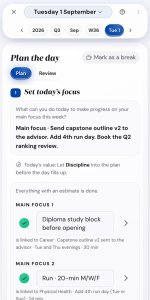
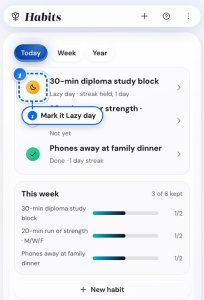
Most trackers on this list are built around the day you succeed. This one is built around the day you miss. Every habit carries a lazy-day version, a smaller form of the same thing for when willpower is gone, so a hard day does not have to become a broken streak. A fully empty day resets the current streak, but your longest streak stays, and the app records the comeback.
The Habit Library holds 250 ready-made habits, 25 for each life area. Each comes with its identity, trigger, reason why, reward and lazy day version already written. So you pick a design instead of inventing one. The reason why stays on the habit, which stops a tracker filling up with habits nobody remembers choosing. Beyond habits, the app links what matters to you with what you do today. When your days start to drift from your goals, you see it the same week. You pay $49.99 once, and the free demo needs no sign-up.
The limitation is that this app is a full life goals system. It is not built for quick habit logging only. The first setup takes about 90 minutes, and you can stop halfway. There are no leaderboards, no team or sharing features and no home-screen widget. If the streak number is the thing that gets you out of bed, a dedicated streak app does that better.
Ramon's take
I've abandoned more habit trackers than I've maintained, and the pattern is always the same: download something new, feel inspired for three days, then the friction of checking it daily outlasts the motivation. What finally stuck was realizing I respond to simple streaks, so I switched to Streaks with just one habit (writing 500 words) and the Apple Watch integration made it frictionless enough to survive past the novelty phase. The streak hit 120 days before I stopped counting, and writing is now automatic enough that I don't even check the app most mornings. The insight: the best tracker is rarely the one with the best reviews. It is the one that does not require willpower to use.
Conclusion
The best habit tracking apps are not the ones with the highest star ratings. They are the ones whose mechanism matches how you stay motivated. Streaks and HabitNow reward loss aversion, Habitica rewards play, Habitify and Strides reward visual progress, and Loop, Way of Life, Daylio, and Productive cover simplicity, privacy, mood, and routine. Pick the driver first, then the app, then start with a single habit. The tracker that survives is the one that does not ask you to spend willpower just to use it.
Next 10 minutes
- Decide which behavioral driver fits you: loss aversion, gamification, visual data, or simplicity.
- Download the matching app from the comparison table above.
- Add exactly one habit to track starting tomorrow.
This week
- Track your one habit for seven consecutive days without adding more.
- Anchor the tracking action to an existing daily routine so it becomes automatic.
- At the end of the week, add one or two more habits only if the first felt effortless.
Frequently asked questions
What is the best habit tracking app?
There is no single best app, because the right one depends on the behavioral driver that keeps you going. As shortcuts: pick Streaks (iPhone) or HabitNow (Android) if loss aversion drives you, Habitica if you need game mechanics, Habitify or Strides if you act on visual data, and Loop Habit Tracker if you want a fully free, private option. Match the mechanism first, then the platform and budget.
Do habit tracking apps actually work?
Yes. The research is clear that self-monitoring delivers a meaningful boost to goal attainment, and it works whether you track in public or in private, digitally or on paper (see "Why does habit tracking work?" above for the underlying numbers) [1]. The key is consistent use long enough for the tracking behavior itself to become automatic [2].
What is the best free habit tracking app?
Loop Habit Tracker on Android (no premium tier at all), with Habitica the strongest cross-platform free pick since its paywall is cosmetic only. See the "Best free habit tracking apps" section above for the iOS picks and the HabitNow alternative.
What is the best habit tracking app for Android?
For Android, HabitNow is the strongest all-around free pick, with streaks, flexible scheduling, a home screen widget, and no ads in the free version. Loop Habit Tracker is the best choice if you want a fully free, open-source app that keeps your data on the device. Habitica and Habitify are the cross-platform options that also run on Android if you want gamification or analytics.
What is the best habit tracking app for iPhone?
Streaks is the strongest iPhone option, with Apple Watch integration and a one-time $5.99 purchase. For cross-platform access, Habitify offers iOS, Android, Mac, and web. Strides is best if you want to combine habit and goal tracking in one app, and Way of Life is the simplest free starting point for beginners.
What is the best habit tracking app for beginners?
Way of Life is the best app for beginners, because it asks only for a yes, no, or skip each day and turns that into an instant color-coded pattern with no analytics to learn. Streaks is a strong beginner pick on iPhone if you respond to streaks and want the fastest possible check-in. Whichever app you choose, start with just one to three habits so the system does not overwhelm you in the first week.
What is the best daily habit tracker app for ADHD?
The deciding factor is how few steps sit between the reminder and the completed tap, so a home screen widget or a tap-to-complete notification matters more than any feature list. HabitNow (widget) and Loop on Android (notification check-in) both deliver that. The "ADHD-friendly and parent-friendly picks" section above covers the vibration-only reminder setup in full.
What is the difference between a habit tracker and a goal tracker?
A habit tracker monitors daily recurring behaviors like exercise or reading. A goal tracker monitors progress toward specific outcomes like running a marathon. Strides handles both in one app, using rolling averages for habits and milestone tracking for goals.
How many habits should I track at once?
One to three. The real question is not "how many habits can I track?" but "which habits should I NOT track?" Do not track habits you already do reliably (brushing teeth, drinking coffee), and do not track aspirational habits you are not ready to start. Track only behaviors where daily accountability would make a genuine difference, and add new ones only after the existing ones feel automatic. The "Three setup principles" section above explains why a crowded list lowers your completion rate without you noticing.
There is more to explore
If you want to go deeper than the app itself, these guides cover the behavior change underneath the tracker:
- Habit Formation complete guide
- Goal-setting frameworks compared
- Goal tracking systems
- Deep work strategies
- Set life goals that stick
- Time management techniques
- Why your habits keep failing
References
- Harkin, B., Webb, T. L., Chang, B. P. I., Prestwich, A., Conner, M., Kellar, I., Benn, Y., and Sheeran, P. "Does Monitoring Goal Progress Promote Goal Attainment? A Meta-Analysis of the Experimental Evidence." Psychological Bulletin, 2016.
- Lally, P., van Jaarsveld, C. H. M., Potts, H. W. W., and Wardle, J. "How Are Habits Formed: Modelling Habit Formation in the Real World." European Journal of Social Psychology, 2010.
- Kahneman, D. and Tversky, A. "Prospect Theory: An Analysis of Decision Under Risk." Econometrica, 1979.
- Skinner, B. F. Science and Human Behavior. Macmillan, 1953.
- Hamari, J., Koivisto, J., and Sarsa, H. "Does Gamification Work? A Literature Review of Empirical Studies on Gamification." 2014 47th Hawaii International Conference on System Sciences, 2014.
- Nunes, J. C. and Dreze, X. "The Endowed Progress Effect: How Artificial Advancement Increases Effort." Journal of Consumer Research, 2006.
- Gollwitzer, P. M. and Sheeran, P. "Implementation Intentions and Goal Achievement: A Meta-Analysis of Effects and Processes." Advances in Experimental Social Psychology, 2006.
- Barkley, R. A. "Behavioral Inhibition, Sustained Attention, and Executive Functions: Constructing a Unifying Theory of ADHD." Psychological Bulletin, 1997.
Guides for the Life Goals App