Goals & Progress


From workbook to app: how the Life Goals Program ecosystem works
“A system you use is infinitely more valuable than a system you admire.”
Suzaan Sayed, on the productivity-tool graveyard
The goal setting workbook market and the goal setting app market both have the same blind spot, and they are mirror images of each other. The book teaches a system you would never actually run by yourself, then leaves you on Monday morning with a closed PDF and a half-written intention. The app runs a system that was never explained, so the daily check-in turns into a tracking ritual the user no longer remembers the reason for. Stawarz and colleagues (2015) audited 115 habit-formation apps and found that almost none scaffolded the context-cue or built in a recovery rule; almost all reduced to reminders and self-tracking [7]. The same audit applied to printed goal setting workbooks would find an inverted version of the same gap.
The Life Goals Program is a three-layer ecosystem designed to close both halves of that gap at once. The goal setting workbook teaches the system, the Goals & Progress Life Goals App runs the system, and the cadence (Daily Reflection, Weekly Reflection, Monthly Check-in, Quarterly Check-in, Annual Wrap-up) keeps the system alive across the year. Each layer has a specific job. The combination is the offering.
Norcross and colleagues tracked New Year’s resolvers across two years and found roughly 19% reported continuous success at the two-year mark [3]. That number is not a motivation problem. It is a synthesis problem, which is what the three-layer ecosystem is designed to close.
This article walks through what each layer does, how they interlock, when one layer alone is enough, who each combination is for, and how to decide what fits your week. Reading time approximately 11 minutes.
The goal setting workbook teaches the system. The Life Goals App runs the system. The cadence keeps the system alive. Each is incomplete alone. The combination is the offering.
Layer 1: The goal setting workbook (the system, on paper)
The Life Goals Workbook is a 29-page fillable PDF available in A4 and US Letter, priced at $39.99 on Gumroad. It is the teaching layer of the ecosystem. The reader sits with it once a year for an annual fill, and returns to it for the longer reflections (Monthly Reflection on the last Sunday of the month, Quarterly Reflection at the end of March, June, September, December, Annual Reflection in late December).
What it teaches: 4 phases, 11 templates
The life goals workbook is organized into 4 phases and 11 reusable templates (T1A through T4A). The phases trace the Goal Cascade from values at the top through daily action at the bottom.
- Phase 1 (Discovery, one-time): core values (T1A), purpose statement (T1A), Life Areas Map (T1B). The upstream work that makes Phase 2 possible.
- Phase 2 (Planning, annual): vision per chosen focus area (T2A, paired with Vision Interview and Three Futures), Summit Goal (T2A), Goal Plan (T2B), key activities and milestones via the Goal Cascade template (T2C).
- Phase 3 (Working on Goals, recurring): Quarterly Reflection (T3A), Monthly planning and review (T3B + T3C), Weekly planning (T3D), Daily planning (T3E), plus the 2-minute daily reflection and 5-minute weekly reflection.
- Phase 4 (Habit Tracking, optional but recommended): Habit Tracker (T4A) with Trigger / Action / Reward, Lazy Day version, and the 90-day Habit Garden grid. The Two-day rule applies to consecutive empty days only.
How the workbook draws on established frameworks
The workbook draws on established frameworks: long-horizon goal thinking (Collins and Porras) [11], outcome-and-obstacle planning in the spirit of OKRs and mental contrasting [2], the habit loop (Duhigg) [12], and habit-recovery rules (Clear) [13]. What we contribute is a single coherent system and a plain, slow-living vocabulary that fits how people actually plan. The attribution is transparent in the Foundations callout, and the system feels coherent rather than borrowed.
What it does best
The goal setting workbook does the long-form thinking work better than any digital tool. Phase 1 (values, vision, three futures) and the longer Phase 3 reflections (Monthly, Quarterly, Annual) produce better outputs on paper than on a screen. Mueller and Oppenheimer (2014) showed that handwritten input produces better conceptual recall than typed input because the slower input forces more in-the-moment processing rather than verbatim transcription [6]. Handwritten reflection benefits from the friction the workbook adds.
The life goals workbook is the teaching layer. It produces the values, the vision, the Summit Goal, the Goal Plan, and the system that the Life Goals App then runs.
Layer 2: The Life Goals App (the system, running)
The Life Goals App is a web app. It runs in any modern browser and installs to the home screen on iPhone, iPad and Android. It works offline, and you need no account. The Life Goals App does not require the goal setting workbook to function, but it works best when the workbook has done the upstream thinking first.
What it runs: the 4 phases, step by step
The app follows the workbook’s 4 phases as guided steps that run in order.
- Welcome: a welcome guide, then a row of steps with the time each one takes.
- Values: a card game with 28 value cards. You keep five and rank them (T1A).
- Purpose: one-sentence purpose statement (T1A).
- Life Focus Areas: Life Areas Map (T1B), rating each of ten candidate areas for satisfaction and importance.
- Vision: three futures five years out, with one made active, and the Vision Interview prompts (T2A).
- Summit Goals: one long-horizon goal per chosen area, 3, 5 or 10 years out, with a date and a measure (T2A).
- Friction Map: what could stop each goal, with an if-then plan for each obstacle. The obstacles come back at each month and quarter check-in (T2B).
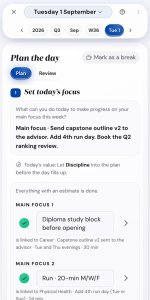
- Goal Cascade (Execute screens): you break your Summit Goal down into the year, quarter, month, week and today. Each of today’s tasks shows the goal it serves. A short review closes each level (T3A through T3E).
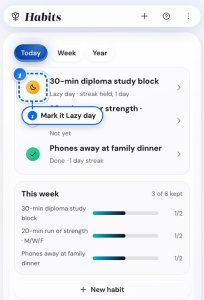
- Habits: Habit Tracker (T4A) with Trigger / Action / Reward, Lazy Day, identity statement, and a habit grid with your streak. Green marks the full habit, amber the Lazy Day version.
- Insights: how much of your plan you closed, your habit history, and this year against last year.
The design gap it closes
Stawarz and colleagues (2015) analyzed 115 habit-formation apps and found that almost all focused on reminders and self-tracking, with few scaffolding the context-cue or building in a recovery rule [7]. The Life Goals App closes that design gap. The Trigger field is the context cue. The Lazy Day field is the minimum-viable fallback (built on the behavior-design principle Fogg formalizes in Tiny Habits [14]). The Two-day rule is the recovery rule. The habit grid shows a Lazy Day in amber, so a hard day keeps the streak going.
What it does best
The Life Goals App wins on speed and on catching drift. It links what matters to you with what you do today. When your days start to drift from your goals, you see it the same week. The daily round takes a few minutes on your phone. The week review starts from the week you planned, so it goes faster than the workbook version. On the computer, the Goal Cascade map shows your whole plan on one page, from Summit Goals down to today. The workbook can only show that by turning pages.
What it costs and how you get it
The Life Goals App costs $49.99, one payment, with no subscription. You buy it on Gumroad, and a 14-day money back guarantee covers it. There is no app store version. You install the app to your home screen from the browser. Your plan stays in your browser. You can connect your own Dropbox to use one plan on your phone and your computer. You can try the demo first, with an example plan and no sign-up.
The Life Goals App is the running layer. It runs the system the goal setting workbook teaches, and each task shows the goal it serves.
Layer 3: The cadence (the system, alive)
The cadence is the rhythm that keeps the system alive across the year. It is not a single artifact (no separate PDF, no separate app screen). It is the schedule of when the goal setting workbook gets opened and when the Life Goals App gets opened.
| Cadence | Job | Time | Layer |
|---|---|---|---|
| Daily Check-in | What did I commit to today, what got done | 3 minutes | App |
| Weekly Check-in | What worked this week, what shifts next week | 5 to 15 minutes | App (fast) or Workbook (slower, paper) |
| Monthly Reflection | What patterns emerged this month | 10 to 30 minutes | Workbook (paper holds the longer reflection better), or the app’s short month check-in |
| Quarterly Reflection | Did the Focus Quarter close out as intended | 20 to 60 minutes | Workbook, or the app’s short quarter check-in |
| Annual Reflection | Did the year resemble the Summit Goal trajectory | 2 to 3 hours | Workbook, or the app’s year wrap-up |
The cadence is the layer that goal setting workbooks and goal setting apps in the wider market routinely ignore. A workbook without a cadence becomes a one-time fill that gets shelved by February. An app without a cadence becomes a tracking ritual the user forgets the reason for. The cadence is what makes the workbook’s annual fill produce real outcomes across the next 12 months, and what makes the app’s daily check-in feel meaningful instead of mechanical.
The app can put the cadence into your own calendar. A short wizard makes a calendar file with repeating reminders for your reviews. If you use the workbook alone, its printed schedule and your own calendar hold the cadence.
The cadence is the third layer. It is not a separate artifact; it is the schedule that interlocks the goal setting workbook and the Life Goals App across the year.
How the workbook and app fit a real week
The workflow is straightforward once the upstream thinking is done. A first-time reader sits with the goal setting workbook on a Saturday morning, coffee at hand, and runs Phase 1 (Discovery: values, life areas, three futures, vision interview) across Saturday and Sunday morning. Phase 2 (Planning: Summit Goal for one chosen focus area, then a Goal Plan with the Outcome Map and Friction Map) runs Sunday afternoon. Phase 4 (Habits: two habits set up with Trigger / Action / Reward / Lazy Day fields) takes 30 minutes Monday evening. Total first-time fill across the weekend: approximately 5 to 6 hours across two and a half days, depending on how thorough the reader is on the long-form Phase 1 exercises.
After the workbook fill, the reader opens the Life Goals App in the browser on Monday morning. The app walks through its steps with the answers already gathered. The setup goes much faster because the thinking is already done. The app becomes the operational layer; the workbook becomes the reference document. This workbook app combo is the configuration the ecosystem is designed around.
Then the cadence kicks in. The app holds the Daily Check-in (3 minutes after morning coffee) and the Weekly Check-in (about 10 minutes on Sunday evening, faster than the workbook version because the app pulls forward last week). The workbook holds the longer reflections (Monthly on the last Sunday of the month, Quarterly at the end of March / June / September / December, Annual in late December). When the cadence is held, the system survives the year. When the cadence drops, the workbook and the app both gradually go silent.
A typical week three weeks into regular use: the workbook stays open at the desk on Sunday for the 15-minute Weekly Check-in, the Life Goals App runs on the phone for the 3-minute Daily Check-in. A 5 am flight left room only for the Lazy Day version. The habit grid showed that day in amber. The streak held, so one hard day did not start the abandonment cascade.
One weekend for the first-time fill. Fifteen minutes per week for the ongoing cadence. Three minutes per day for the tactical layer. The math is small once the upstream thinking is done.
Where the workbook wins vs the app and vice versa
Six months into regular use, the trade-off becomes clear. Neither layer is universally better than the other. Each wins on specific work.
The life goals workbook wins on the long-form thinking exercises. Vision Interview, Three Futures, the Annual Reflection, and the side-by-side Outcome Map + Friction Map layout (on facing pages in the printed workbook) all produce better outputs on paper than on a screen. Mueller and Oppenheimer’s pen-vs-laptop research generalizes: the slower input of handwriting forces deeper processing [6]. The longer the reflection, the more paper pays off.
The Life Goals App wins on the tactical recurring layer. The Daily Check-in is always in pocket. The Weekly Check-in is faster because the app pulls forward last week. The habit grid scans better on screen than on the printed grid. The Goal Cascade map on the computer shows the chain from Summit Goal to today on one page. The workbook can only point to it.
| Use case | Goal setting workbook (paper) | Life Goals App (browser) |
|---|---|---|
| Vision Interview / Three Futures | Wins, by a wide margin | Functional but feels truncated |
| Annual Reflection | Wins, by a wide margin | Functional but feels mechanical |
| Goal Plan (Outcome Map + Friction Map) | Wins, side-by-side on facing pages | Functional, linear |
| Daily Check-in | Functional, requires the workbook open | Wins, in pocket, 3 minutes |
| Weekly Check-in | Functional, slower, more deliberate | Wins, faster, pulls forward last week |
| Habit Tracker (T4A / Habit Garden grid) | Functional, monochrome | Wins, color-coded green / amber / empty |
| Whole plan from Summit Goal to today | Cannot show directly, requires page flipping | Wins, one page on the computer (Goal Cascade map) |
The split is functional, not preferential. Long reflections benefit from handwriting. Daily and weekly tactical work benefits from speed. The two layers cover the spectrum.
Paper wins the long reflections. The app wins the daily and weekly tactical layer. Neither replaces the other.
When one layer alone is enough (the honest counterargument)
The three-layer ecosystem is not universally better than each layer alone. Three specific cases where one layer is enough.
Case 1: workbook-only is enough. If the reader writes long-form on paper as a thinking practice already, treats annual goal-setting as a slow weekend ritual, does not want daily tracking on the phone, and is comfortable building their own ongoing cadence from the templates, the life goals workbook alone is sufficient. The 11 templates and the printed cadence prompts give the reader a complete system. The app links each task to its goal and shows drift the same week. A reader who keeps their own calendar and writes weekly reviews on paper does not need that. The Direction Seeker persona often runs this configuration; long-form paper writing is the thinking they came for.
Case 2: app-only is enough. If the reader is allergic to printed PDFs, runs all planning digitally already, needs the phone-in-pocket Daily Check-in to actually happen, has read enough of the underlying frameworks in other forms (Atomic Habits, Designing Your Life, Measure What Matters) that the workbook’s teaching layer is redundant, and is willing to skip the longer paper-based reflections (or run them in a separate journaling app), the Life Goals App alone is sufficient. The Restart Veteran persona often runs this configuration; the app’s Lazy Day version, which keeps a streak going on a hard day, is the specific feature they came for, and they have already absorbed the surrounding theory.
Case 3: both is the higher-leverage default. If the reader has not read the underlying frameworks before, treats the goal setting workbook as the teacher and the Life Goals App as the runner, wants the long reflections on paper plus the daily tactical layer on the phone, and values vocabulary discipline (one consistent set of terms across both layers), this workbook app combo is the higher-leverage default. The Reset Optimizer, the Methodical Builder, and the Family Anchor personas all tend toward this configuration.
The combination wins when the use-case maps to the strengths of each medium. The combination loses when it forces the reader into work they would skip on either layer alone.
The three-layer ecosystem is not universally superior. The combination wins for readers whose use-case maps to the strengths of each layer.
Five examples (which combination fits which reader)
The Reset Optimizer (workbook for the annual weekend, app for the weekly cadence)
A 38-year-old senior product designer, partnered, no kids. Has watched three prior productivity systems collapse around the eight-week mark each time. Bought the life goals workbook in late November for a long Christmas-week annual reset. Spent Saturday and Sunday between Christmas and New Year filling Phase 1 and Phase 2 at the kitchen table. Opened the Life Goals App the following Monday morning. Setting up the app went fast because the workbook had done the thinking. By March, the daily 3-minute check-in had become automatic; by June, the habit grid showed eight habits running at 70%+ adherence. The workbook stays in the desk drawer and comes out the last Sunday of each month for the Monthly Reflection.
The Restart Veteran (app-only, because the workbook felt like more pressure)
A 34-year-old freelance illustrator with ADHD, recovering from a year of two-week starts and abandonments. Bought the workbook in spring, opened it twice, closed it both times because the 29-page PDF felt like another thing to fail at. Pivoted to the Life Goals App three months later. The Lazy Day version meant a hard day still counted, and that felt safer. Ran the app’s Discovery and Vision screens in a single 40-minute sitting. Set two habits with Lazy Day versions. By month two, the habit grid showed mostly green with weekly ambers (the Lazy Day version of each habit); the hard days still counted, and the abandonment cycle did not trigger. The workbook is on the shelf for the next Annual Reflection.
The Direction Seeker (workbook-only, because long-form paper writing was the thinking she came for)
A 29-year-old who just left a five-year media role and moved cities. Bought the life goals workbook in the second month of the move because she needed to figure out what she actually wanted before setting goals about it. Spent a weekend with the Vision Interview and Three Futures exercises in a notebook on the couch. The output was three handwritten pages: one for each future, plus a one-page Vision document. Did not open the app; she is not ready for daily tracking. The workbook is her thinking tool. She will revisit it quarterly with the Quarterly Reflection template, and decide about the app after the first six months of clarity.
The Methodical Builder (both, treating the workbook as source-of-truth and the app as operational mirror)
A 47-year-old engineering director, married, two children. Read the underlying frameworks (Locke and Latham, Gollwitzer, Fogg, Burnett and Evans, Collins and Porras) over the prior 24 months. Bought the workbook and read it end to end first (as a research document), then ran the Phase 1 + Phase 2 fill across a long weekend. Moved a save file between the laptop and the phone. Treats the workbook as source-of-truth (the printed Goal Plan stays in the desk drawer) and the app as operational mirror (the Daily Check-in and the Weekly Check-in run there). The two layers reconcile at the Monthly Reflection on the last Sunday of each month.
The Family Anchor (workbook for monthly reflections, app for daily check-ins squeezed between caregiving)
A 41-year-old part-time consultant, parent of two school-age children, household calendar manager. Has 30 minutes of unbroken time per day on a good day. Bought the workbook in February and ran Phase 1 and Phase 2 across three Sunday mornings (kids at grandparents). Uses the app for the Daily Check-in (3 minutes after morning coffee, before the school run), the Weekly Check-in (about 10 minutes Sunday evening), and the Habit Tracker (two habits: a 20-minute walk and a 5-minute evening gratitude practice, both with Lazy Day versions). Uses the workbook for the Monthly Reflection (30 minutes on the last Sunday of the month). The app is the speed layer; the workbook is the depth layer.
The same ecosystem produces five different reader configurations. None of the configurations are wrong. The right combination depends on the reader’s existing tools, available time, and prior framework familiarity.
The ecosystem adapts because the layers are independent. The combination is the reader’s choice, not the product’s prescription.
The decision rubric (which combination to start with)
The decision rubric below maps reader conditions to the recommended starting combination. The combination can change over time as the reader’s setup evolves.
| Start with | If you… |
|---|---|
| Goal setting workbook only | Already write long-form on paper, treat annual goal-setting as a slow ritual, do not want daily tracking on a phone, are comfortable building your own cadence |
| Life Goals App only | Are allergic to printed PDFs, run all planning digitally, need a phone-in-pocket Daily Check-in to actually happen, have read the underlying frameworks before |
| Workbook app combo (recommended default) | Have not read the underlying frameworks before, want a system that teaches and runs at the same time, value the long reflections on paper plus the daily tactical layer on the phone |
| Add the cadence to your calendar | Are running either or both layers and want a calendar reminder at each review (the app makes the calendar file) |
The honest framing: starting with the full workbook app combo is the higher-leverage default for first-time users. Starting with the goal setting workbook alone is reasonable if the reader already has a strong digital tactical layer. Starting with the app alone is reasonable if the reader has already absorbed the framework theory in other forms. The app can add the cadence to your own calendar as repeating review reminders.
Three configurations cover the typical reader. The default for first-time users is the workbook app combo. The reader’s existing setup determines the alternative.
Pricing and what you get
The current pricing of the Life Goals Program offering.
- Goal setting workbook: $39.99 USD on Gumroad. Fillable PDF in A4 and US Letter, 29 pages, all 11 templates included.
- Life Goals App: $49.99 USD on Gumroad, one payment, no subscription. A 14-day money back guarantee covers it. It runs in any modern browser and works offline, with no account. The Life Goals App page has the details and a free demo.
- Goal setting bundle: there is no bundle at the moment. The workbook and the app are sold separately.
What you get when you buy the app.
- Your licence code: it comes on your Gumroad receipt. You enter it once in each browser.
- Updates: the app updates itself when you open it. Every update to version 1 is included.
- Review reminders: the app makes a calendar file with repeating reminders for your reviews. You add it to the calendar you already use.
The goal setting workbook costs $39.99. The Life Goals App costs $49.99, one payment. Each is sold on its own.
How to get the Life Goals App
You can start in two ways:
- Try the Life Goals App demo with an example plan. It needs no sign-up and no licence code.
- Buy the app on the Life Goals App page. You pay $49.99 once through Gumroad.
Your licence code comes on your Gumroad receipt. You enter it once in each browser. The app installs to your home screen on iPhone, iPad and Android, and it works offline. Your plan stays in your browser. Dropbox is optional: connect your own to use one plan on your phone and your computer.
Before the app went on sale on 30 September 2026, a group of beta testers used earlier versions. Their feedback led to changes in the version you get today.
Try the demo first. When you are ready, buy the app once for $49.99.
A note before you start
The reader who buys the goal setting workbook in the first sentence of this article and the reader who starts the Life Goals App in the last paragraph are often the same person at different moments in the year. The ecosystem exists because no single artifact (no book, no app, no course, no coaching) carries the full system across all of the cadences. The workbook teaches it. The app runs it. The cadence keeps it alive. Each is incomplete alone. The combination is the offering.
If you are not sure where to start, start with the workbook. The teaching layer comes first because the app’s screens make more sense when you have already done the Phase 1 thinking on paper. If you already know the frameworks and you want the running layer first, start with the app and use the workbook as the reference document later.
The full life goals workbook (29 pages, all 11 templates including the Habit Tracker T4A) is $39.99 on Gumroad. The Life Goals App is $49.99, one payment, on the Life Goals App page. You can try the demo first, with no sign-up.
For the wider system, see the hub: How to set effective life goals: complete framework. For the why behind the build, see Why I built the Life Goals Program: founder essay. For the architecture: The Goal Cascade from Summit Goal to daily action. For the habit layer: The Habit Tracker: Trigger / Action / Reward and the Two-day rule.
Ramon’s Take
This pairing suits some situations and not others. If you already have a reflection habit that holds, the workbook alone may be plenty. I built both because I wanted the teaching and the rhythm in one place.
Frequently asked questions
What is the Life Goals Program ecosystem?
The Life Goals Program ecosystem is a three-layer offering: the goal setting workbook (PDF, $39.99, 29 pages, 4 phases, 11 templates) teaches the system; the Life Goals App (a web app, $49.99 once, no account) runs the system; the cadence (Daily Check-in, Weekly Check-in, Monthly Reflection, Quarterly Reflection, Annual Reflection) keeps the system alive across the year. Each layer has a specific job. The combination is the offering.
Do I need to buy the goal setting workbook to use the Life Goals App?
No. The Life Goals App works without the goal setting workbook. Both follow the same method, so readers who already know the underlying frameworks can run the app alone. Readers who do not know the frameworks tend to get more out of the app when the workbook has done the upstream Phase 1 thinking first.
Is there a goal setting bundle that includes both the workbook and the app?
No, not at the moment. The life goals workbook is $39.99 on Gumroad. The Life Goals App is $49.99, one payment, also on Gumroad. Each is sold on its own.
How long does the goal setting workbook take to fill the first time?
Approximately 5 to 6 hours across two to three sittings, typically a weekend. Phase 1 (Discovery: values, life areas, three futures, vision interview) is the longest at roughly 60 minutes per area. Phase 2 (Planning: Summit Goal, Goal Plan with Outcome Map and Friction Map) is roughly 30 minutes per chosen focus area. Ramon advises focusing on two or three life areas per annual cycle, not all ten.
How long does the Life Goals App take to walk through?
The first setup takes about 90 minutes, and you can stop halfway. With the workbook's answers at hand, it goes faster, because the thinking is done on paper. After that, the daily round takes about 3 minutes and the weekly review about 10 minutes.
Can I try the Life Goals App before I buy it?
Yes. The Life Goals App demo fills the app with an example plan. It needs no sign-up and no licence code. If you buy and change your mind, a 14-day money back guarantee covers your purchase.
Can I sync the app across devices?
Yes, if you connect your own Dropbox. Then you use one plan on your phone and your computer. Dropbox is optional. Without it, your plan stays in the browser you use. You can also save your plan as a file and load it on another device.
Can the app remind me of my reviews?
Yes, through your own calendar. A short wizard in the app makes a calendar file. It holds repeating reminders for your reviews and habits, plus your milestone dates. You add the file to the calendar app you already use.
Which combination should I start with?
If you have not read the underlying frameworks before, start with the workbook app combo: the goal setting workbook teaches the system, the Life Goals App runs it. If you already write long-form on paper as a thinking practice and prefer a slow weekend ritual over daily tracking, start with the workbook alone. If you have already absorbed the framework theory in other forms (Atomic Habits, Designing Your Life, Measure What Matters) and want the running layer first, start with the app alone.
Glossary
- Goal setting workbook | the 29-page fillable PDF (A4 + US Letter) that holds the 4 phases and 11 reusable templates of the Life Goals Program. $39.99 on Gumroad.
- Life Goals App | the web app that runs the workbook's 4 phases as guided steps. $49.99, one payment, on Gumroad. No account. It works offline, and your plan stays in your browser, and in your own Dropbox if you connect it.
- Cadence | the rhythm of the system: Daily Reflection (3 min), Weekly Reflection (10 min), Monthly Check-in (10 min), Quarterly Check-in (20 min), Annual Wrap-up (30 min). The app can put these reviews into your own calendar as repeating reminders.
- Goal setting bundle | the workbook and the Life Goals App sold together. There is no bundle at the moment; each is sold on its own.
- Workbook app combo | the recommended default reader configuration: workbook for the annual fill and the longer reflections, the Life Goals App for the Daily Check-in and Weekly Check-in.
- Phase 1 / Discovery | the upstream work: values (T1A), purpose statement (T1A), Life Areas Map (T1B), Vision Interview, Three Futures.
- Phase 2 / Planning | the annual work: Summit Goal (T2A), Goal Plan = Outcome Map + Friction Map (T2B), key activities and milestones (T2C).
- Phase 3 / Working on Goals | the recurring work: Quarterly Reflection (T3A), Monthly planning and review (T3B + T3C), Weekly planning (T3D), Daily planning (T3E).
- Phase 4 / Habits | the consistency layer: Habit Tracker (T4A) with Trigger / Action / Reward, Lazy Day version, identity statement, and the 90-day Habit Garden grid.
- Summit Goal | the long-term (5 to 10 year) goal that anchors annual goals. Draws on the BHAG (Collins and Porras, 1994).
- Goal Plan | the annual goal-setting exercise. Combines the Outcome Map (what success looks like, measurably) and the Friction Map (what could stop you, with an if-then plan).
- Trigger / Action / Reward | the three-field structure of any habit row. Draws on Duhigg's cue-routine-reward.
- Two-day rule | the maintenance rule of the Habit Tracker. One missed day is data; two missed days in a row is the signal. Draws on Clear's never miss twice.
- Lazy Day version | the minimum-viable form of a habit, paired to the same trigger as the full version. The operational mechanism that makes the Two-day rule usable.
- Habit Garden grid | the 90-day visualization in the Habit Tracker. Green (full day), amber (Lazy Day day), empty (missed day). No broken chain.
References
- Locke, E. A., and Latham, G. P. (2002). Building a practically useful theory of goal setting and task motivation. American Psychologist, 57(9), 705-717. DOI: 10.1037/0003-066X.57.9.705.
- Gollwitzer, P. M. (1999). Implementation intentions: Strong effects of simple plans. American Psychologist, 54(7), 493-503. DOI: 10.1037/0003-066X.54.7.493.
- Norcross, J. C., Mrykalo, M. S., and Blagys, M. D. (2002). Auld lang Syne: Success predictors, change processes, and self-reported outcomes of New Year's resolvers and nonresolvers. Journal of Clinical Psychology, 58(4), 397-405. DOI: 10.1002/jclp.1151.
- Lally, P., van Jaarsveld, C. H. M., Potts, H. W. W., and Wardle, J. (2010). How are habits formed: Modelling habit formation in the real world. European Journal of Social Psychology, 40(6), 998-1009. DOI: 10.1002/ejsp.674.
- Wood, W., and Neal, D. T. (2007). A new look at habits and the habit-goal interface. Psychological Review, 114(4), 843-863. DOI: 10.1037/0033-295X.114.4.843.
- Mueller, P. A., and Oppenheimer, D. M. (2014). The pen is mightier than the keyboard. Psychological Science, 25(6), 1159-1168. DOI: 10.1177/0956797614524581.
- Stawarz, K., Cox, A. L., and Blandford, A. (2015). Beyond self-tracking and reminders. CHI '15, 2653-2662. DOI: 10.1145/2702123.2702230.
- Fogg, B. J. (2009). A behavior model for persuasive design. Persuasive Technology Conference Proceedings. DOI: 10.1145/1541948.1541999.
- Burnett, B., and Evans, D. (2016). Designing Your Life. Knopf.
- Hershfield, H. E. (2011). Future self-continuity. Annals of the New York Academy of Sciences, 1235, 30-43. DOI: 10.1111/j.1749-6632.2011.06201.x.
- Collins, J. C., and Porras, J. I. (1994). Built to Last. HarperBusiness.
- Duhigg, C. (2012). The Power of Habit. Random House.
- Clear, J. (2018). Atomic Habits. Avery.
- Fogg, B. J. (2019). Tiny Habits. Mariner Books.
Guides for the Life Goals App