Open the app, set up your plan, keep it going
This page takes you from your first unlock to a plan you run for a year.
On a phone? The app on your phone covers the four tabs and how to add the app to your home screen.
Want more detail? The beginners guide covers every step at length, with six finished plans.
See what the app does
The app is a guided version of the workbook. You pick your values, write a vision, set your goals, then plan and tick them day by day.
Everything runs in your browser. Your plan stays on your device, and no copy goes to a server.
Read the workbook once as well. It explains why each step matters. The app takes care of the doing.
How the method works
The welcome guide shows four parts: Discovery, Planning, Execute and Habits. Each step uses an established method. Open a method to see how it works.
Values: pick a hand of five from a deck of value cards and rank them
You pick the five values that fit you best. The dealer offers five cards at a time. You swap cards between the table and your hand. You keep swapping until the five cards in your hand fit you.
- Play your hand. Tap a card on the table, then a card in your hand. They trade places.
- See all cards opens the whole deck of 28 cards. You can read every card while you play. Your game does not change.
- Rank your five values. Drag them left and right until the order feels right.
- The card in position 1 is your North Star. Use it to decide when two values lead to different choices.
You use your top five in the rest of the app. They shape how you score your life areas and what you write in your vision. They also help you choose which goals to keep in a busy week.
Strengths Profile: an optional three-minute check on how you work best
This step gives you a quick picture of how you work. You pick words in two rounds. First you pick five words that feel most like you. Then you pick three words that describe what trips you up. The words reshuffle every 20 seconds, so you answer on instinct. You can switch that timer off.
- Your profile covers five dimensions: energy, cooperation, structure, sensitivity and curiosity.
- Answer 20 more statements later to make your scores firmer. This part is optional.
- Give each watch-out a plan that uses one of your own strengths.
You see your result again later in the app. It adds a hint to your purpose line. It adds a strengths view to your Summit Goals. It also suggests habit ideas that suit you. The step is optional. You can skip it and go on to the next step.
Life Areas Map: rate 10 life areas and see where to focus
You score ten areas of your life twice. First you rate how satisfied you are today. Then you rate how much the area should count in the years ahead.
- Rate your satisfaction from 1 to 10: how content you are with this area now.
- Rate its importance from 1 to 10: how much it should count from now on.
- Your priority is ten minus satisfaction, times importance. A low score in an important area gets the highest priority.
The two areas with the highest priority get a star in the rest of the app. Your goals come from those two areas. You also note what is outside your control. That changes which kind of goal fits.
Interview with your future you: a detailed picture of your future self in five years
You write about one specific day, five years from now. You answer questions about that morning: where you are, what you hear, who is there and what you do first. You answer in the present tense, as if you were already there.
- Write Plan A: the best version of the path you are on now.
- Write Plan B: what you would build if that path disappeared tomorrow.
- Write Plan C: the version where nothing holds you back, with no money worries and no expectations.
The more concrete your picture is, the more it changes what you decide today. You reread it at each monthly check-in. The Summit Goal you write next comes from this picture.
Summit Goal: one bold outcome with a date, 3, 5 or 10 years out
Set one Summit Goal per focus area. Make it concrete enough that someone else could check whether you reached it. Make it far enough away that it takes years. You pick the distance under Look ahead: 3, 5 or 10 years.
- Write it as one sentence with a single verb, number and date.
- Make it big enough to feel out of reach today. If it feels comfortable, push it further out.
- Connect it to what you care about. It has to matter on hard days too.
Everything you plan under it points back to this goal. That includes your annual goals, quarter, week and today. You review the wording once a year, and you can change it.
If-then plan: decide your counter-moves in advance
You decide your counter-move before the obstacle comes. Each annual goal has a Friction Map. You write down what you want and what success would look like. You also name the things that stopped you before, in specific words.
- Sort each obstacle two ways: in your control or context, and one-off or recurring.
- When it is in your control, write an if-then line: if this happens, then I do that.
- When it is recurring context, change your setup so it happens less often.
- If you cannot control it, decide in advance when to re-scope the goal. That is your Plan B trigger.
It is easier to decide on a calm day than in the moment. When the obstacle shows up, you already have your answer written down.
Annual goals: one measurable outcome per focus area for this year
Set one headline outcome per focus area for this year. It turns your Summit Goal into something you can finish in twelve months. It also stops you from working on ten things at once.
- Set three to five targets per goal. Each target is something you can measure, with a date.
- Add milestones with dates, about three per quarter.
- Set the traffic light to green, amber or red at each review. This way you spot delays early.
A good target is one you would recognise when you reach it. Published twelve essays is a better target than wrote more. If you cannot measure a goal, reword it until you can.
Goal Cascade: from year to day, each level gets its focus from the next level up
The cascade has six levels: Summit Goal, year, quarter, month, week and day. Each level repeats the same loop. Each level takes its direction from the next level up. So the work you do today links back to your Summit Goal.
- In the quarter, choose the milestones to work on now. Then give each month its focus.
- In each month and week, write a short focus list. Then pick your three main focus items.
- On each day, pick three main focus items from the week. End with a two-minute reflection.
Each level ends with a review, and the day has a short one too. If today feels disconnected from your goals, go back up the levels. Find the level where the connection broke.
Habit grid: a streak tracker with a lazy-day version for hard days
The grid is a calendar with one square per day. Green means you did the full habit. Amber means you did the small version. An empty square means you did neither. Green and amber both keep your streak going. An empty day resets the counter.
- Write the lazy-day version early, on a good day. It takes two minutes or less.
- Use the small version on hard days: a sick child, a late deadline or a day that goes wrong.
- Go back to the full habit the next day. You then get the comeback badge.
Three lazy days in a row are a sign that the full habit is too big. Then make the full habit smaller.
Open the app
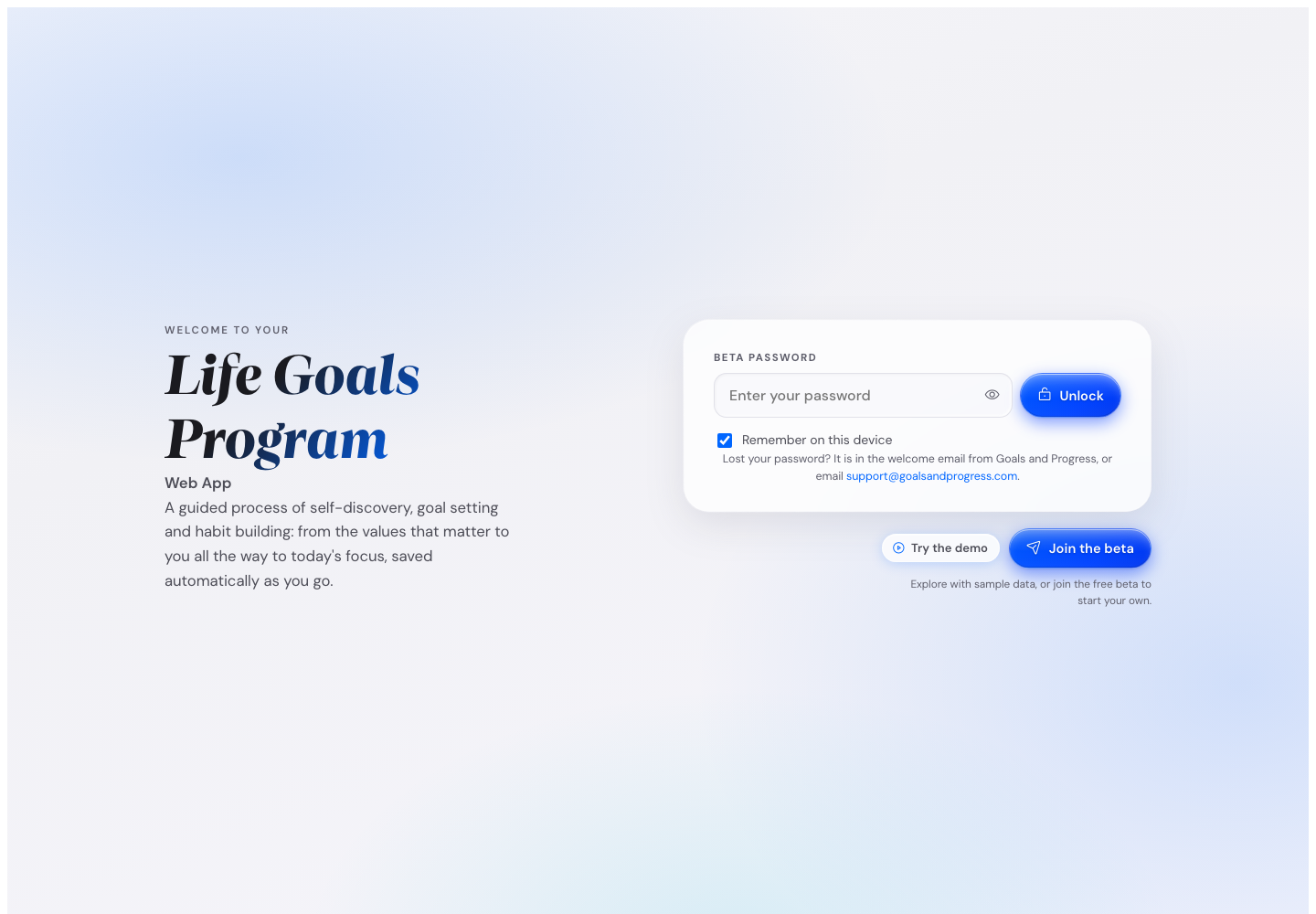
- Paste the code from your Gumroad receipt into Your licence code.
- Press Unlock.
To look around before you unlock, press Try the demo on the code screen.
Your beta password works in the same box until 5 November 2026. After that date, a browser you opened with the beta password shows the code box at the next start. Until you enter a code there, you can read your plan and download it.
The welcome guide runs after your first unlock. Its first page has two buttons.
New here? Press I'm new here. On the next page, set your first name, Essentials or Full, and Show examples. The last page takes you to Values.
Used the app before? Press I have used the app before. Then press Restore from Dropbox or Load. After the restore, press Open my plan.
Your first name stays on your device. You can change all of this later in Settings.
How your licence code works
Your code is in the receipt email from Gumroad.
One code is for one person. It works on your phone and your computer, on the browsers you use yourself. You enter it once per browser, and the app keeps it in that browser.
A code that is passed around reaches too many browsers. You can then read your plan and download it, but not edit it. Write to support@goalsandprogress.com and you get it back.
The app checks your code with Gumroad every seven days. You see nothing while the code is good.
On an iPhone, Safari forgets your code after about seven days without a visit. You then enter it again. Add the app to your home screen and your code stays.
A refunded code opens the app in View only. View only means you can read your plan and download it, but not edit it. When the weekly check finds a refund, you can edit your plan for 14 more days first.
After a chargeback, or when the code is disabled, the app opens in View only straight away. When Gumroad wins the dispute, editing returns at the next check.
Have a new licence code? In View only, press Enter licence code and paste it.
You can also enter a code in Settings, on the Profile tab. Press Enter licence code under Licence code. The row shows if your code is active. It does not show the code.
From 20 October 2026, a card reminds you to enter your code if you use the beta password. You see it on Home on a phone and on Execute on a computer, until 5 November 2026. Press Enter licence code to enter it. Testers get the code for free with Get the free code.
If you think View only is an error, write to support@goalsandprogress.com.
Cannot reach Gumroad? The app opens and checks later. After three opens with no check, the app opens in View only until a check works.
When the weekly check cannot reach Gumroad, you can edit for 14 more days from that first failed check. Then the app opens in View only until a check works.
Lost your code? Get it again at gumroad.com/license-key-lookup with the email you bought with.
Set up your plan in 90 minutes
Block 90 quiet minutes and work through these in order.
- Pick and rank your five Values, about 5 minutes.
- Write your Purpose sentence, about 5 minutes.
- Give each life area a score and choose your focus, about 8 minutes.
- Write your Vision, about 12 minutes.
- Set one Summit Goal per focus area, about 6 minutes each.
- Set your annual goals in Execute, about 8 minutes each.
- Set the quarter, month, week and day plans, 2 to 4 minutes each.
- Pick one to three habits for the year.
Each step shows a time estimate at the top, scaled to how many focus areas you chose.
You can stop half way. The app saves your plan to this browser as you type.
Only have 30 minutes? Do Values, Purpose and Life Areas, and leave the rest for the weekend.
Go through the steps
The steps run across the top of the app, in order, and each one shows up in the next. Strengths is optional. Wall of Wins appears once you earn your first win.
| Step | What you get |
|---|---|
| Values | Your top five values, ranked |
| Strengths | Five strengths, three watch-outs, one action each |
| Purpose | One sentence on why |
| Life Areas | A score for ten areas, and your focus areas |
| Vision | A picture of your life in five years |
| Summit Goals | One big goal per focus area, 3, 5 or 10 years out |
| Execute | Your year, quarter, month, week and day plans |
| Habits | One to three daily habits |
| Insights | Charts and recaps built from your own entries |
| Wall of Wins | Every win you have earned, in one place |
Every step opens with a short brief, then your work area. Press an earlier step to go back and change it.
Many fields show examples. To write without them, turn off Show examples in Settings, on the Profile tab. Each place then shows a Show examples button instead.
The last tab of each early step is Where it shows up. It shows how your answers show up in the steps that come after.
Pick and rank your five values
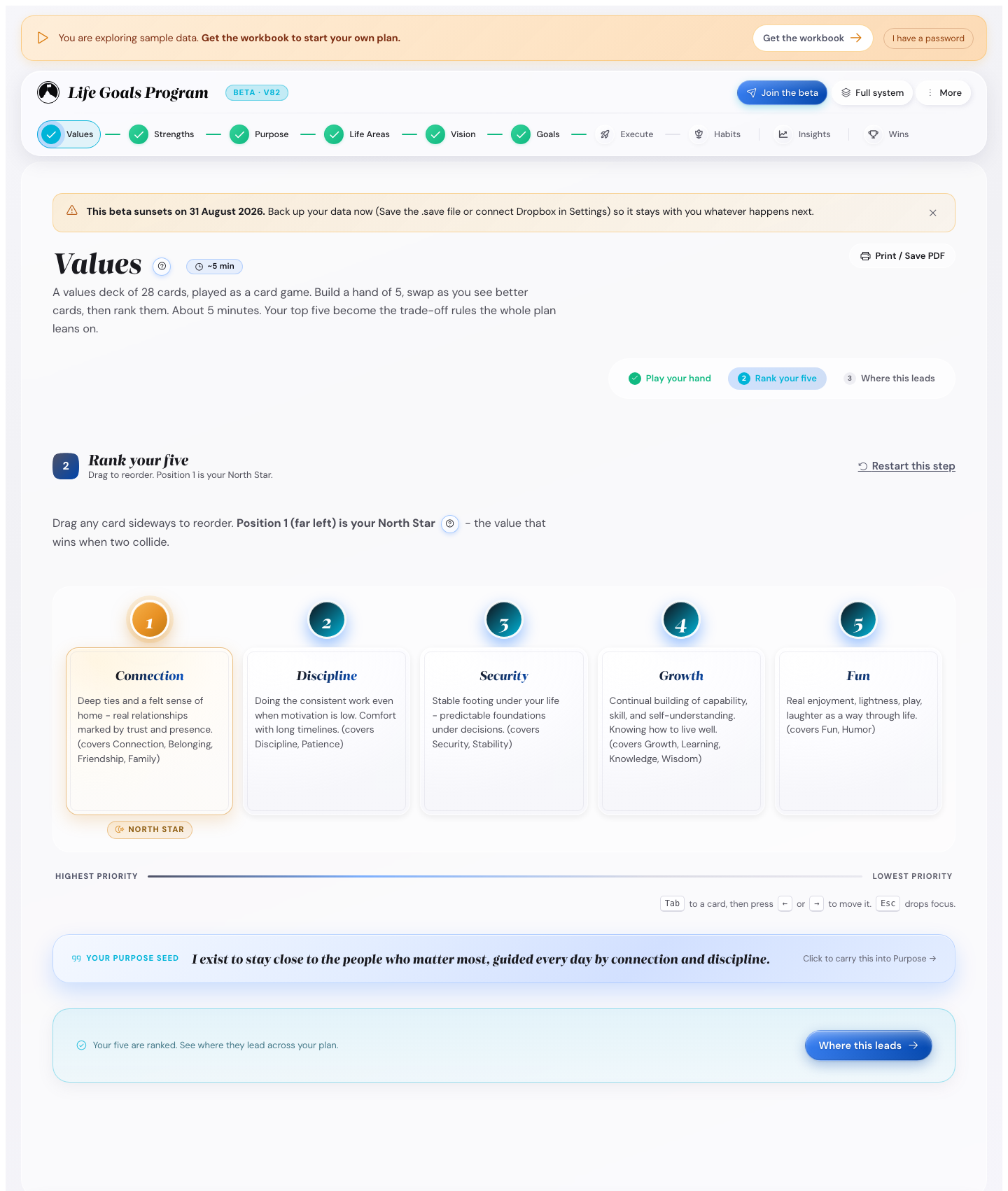
Values has three tabs: Play your hand, Rank your five and Where it shows up.
- Press Play your hand to deal five cards from the deck of 28.
- Put back any card you do not love, and take the next one.
- Drag your five into order on Rank your five.
To read all 28 cards while you play, press See all cards. Your game does not change.
The card in first place is your North Star. You follow it when two values point different ways.
To deal the whole deck again, press Restart this step.
Find your strengths (optional)
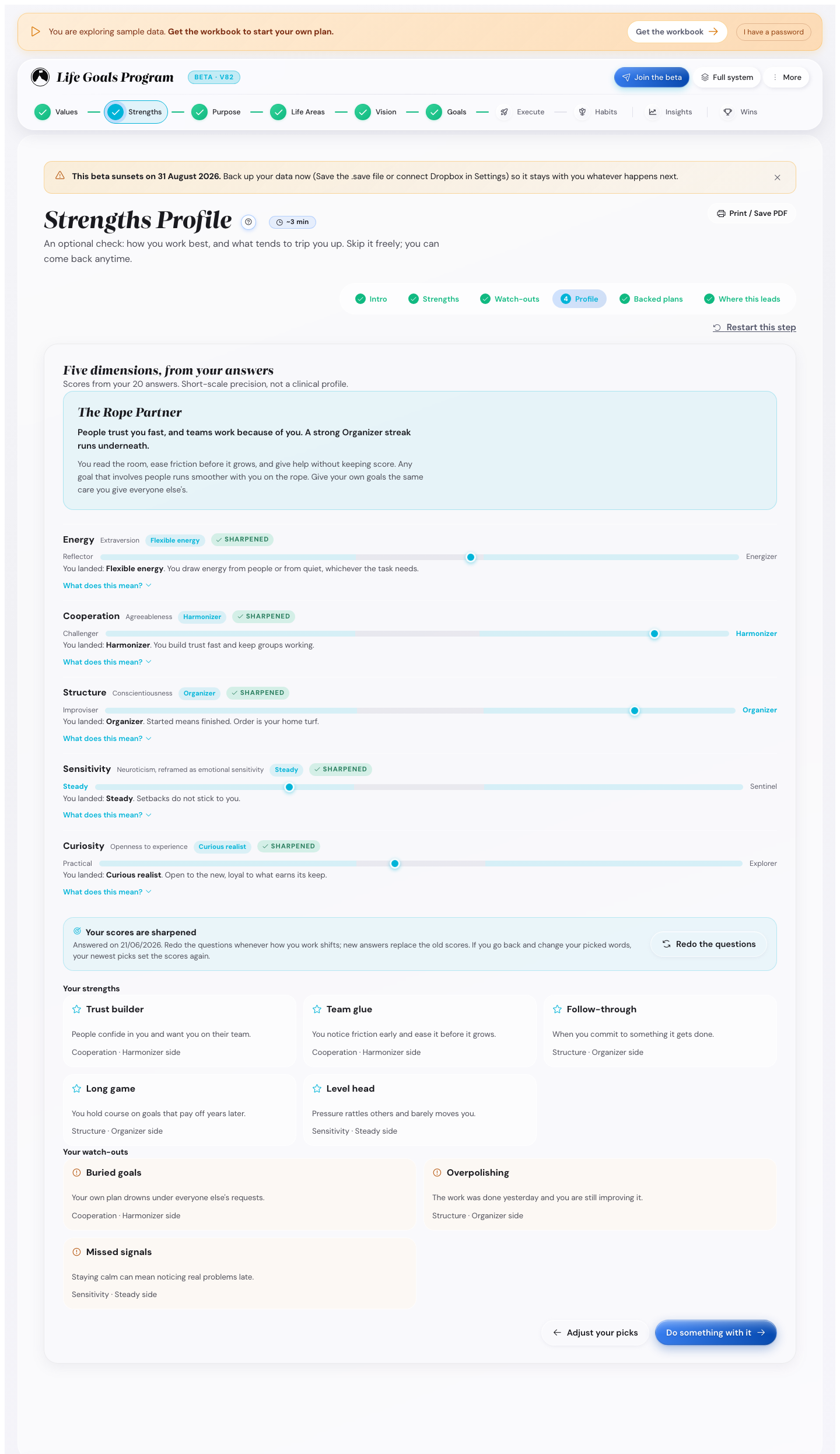
This step comes between Values and Purpose. In Essentials Mode the step row on a computer leaves it out. There, press Take the 3-minute strengths check on Purpose. On a phone, open Home and tap Strengths Profile, under Discovery.
- Pick the five strength words most like you from the word cloud.
- Pick the three watch-outs most likely to get in your way.
- Read your profile on the Profile tab.
For sharper scores, answer 20 short statements. It takes about 3 minutes.
Your strengths then show up on your purpose, on your Summit Goals and in your week plan.
Write your purpose sentence
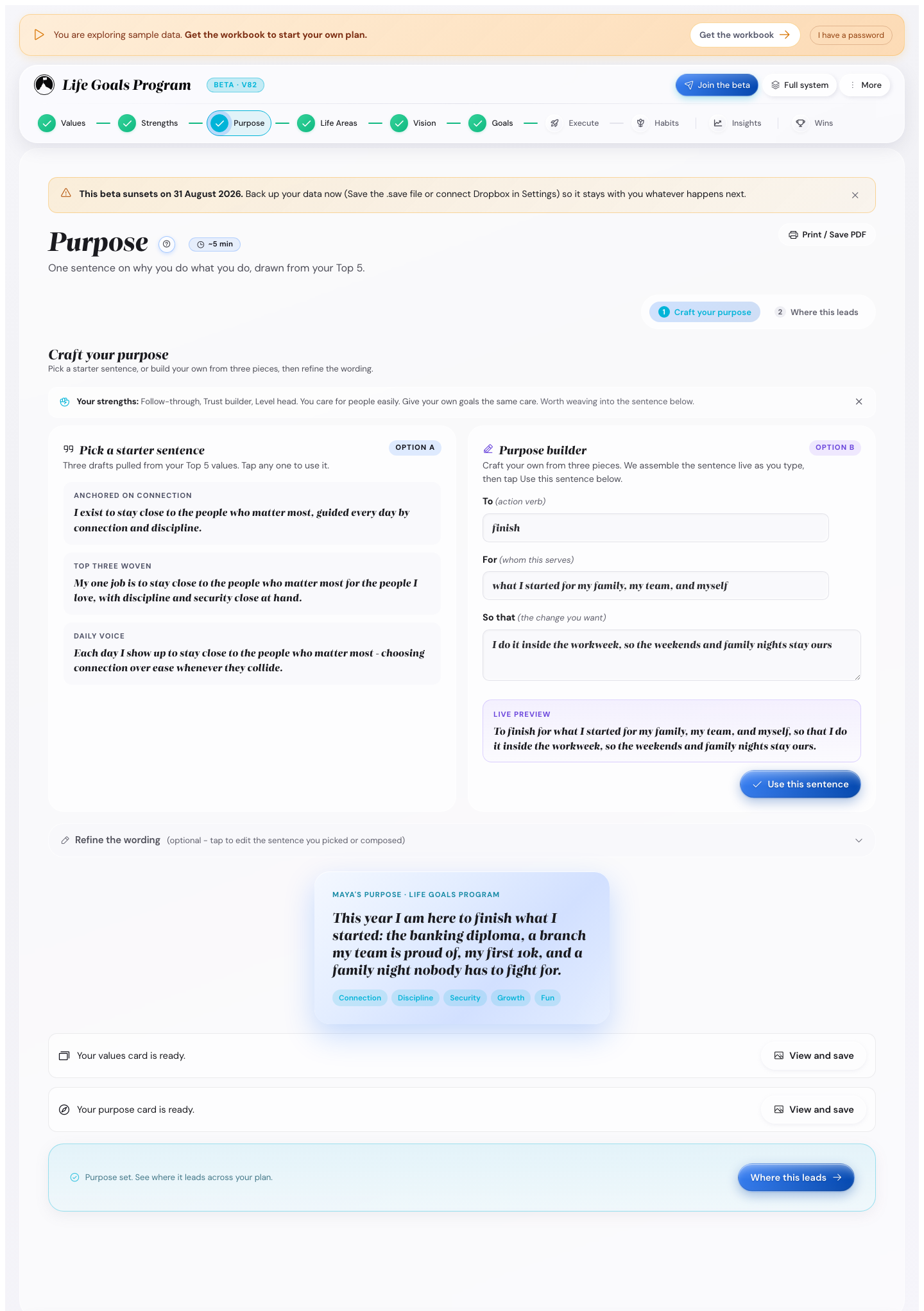
One sentence on why you do what you do, drawn from your top five values.
- Press Pick a starter sentence and take one of the three drafts.
- Enter three pieces: the action verb, whom it serves, and the change you want.
Change the sentence whenever you like.
Give each life area a score
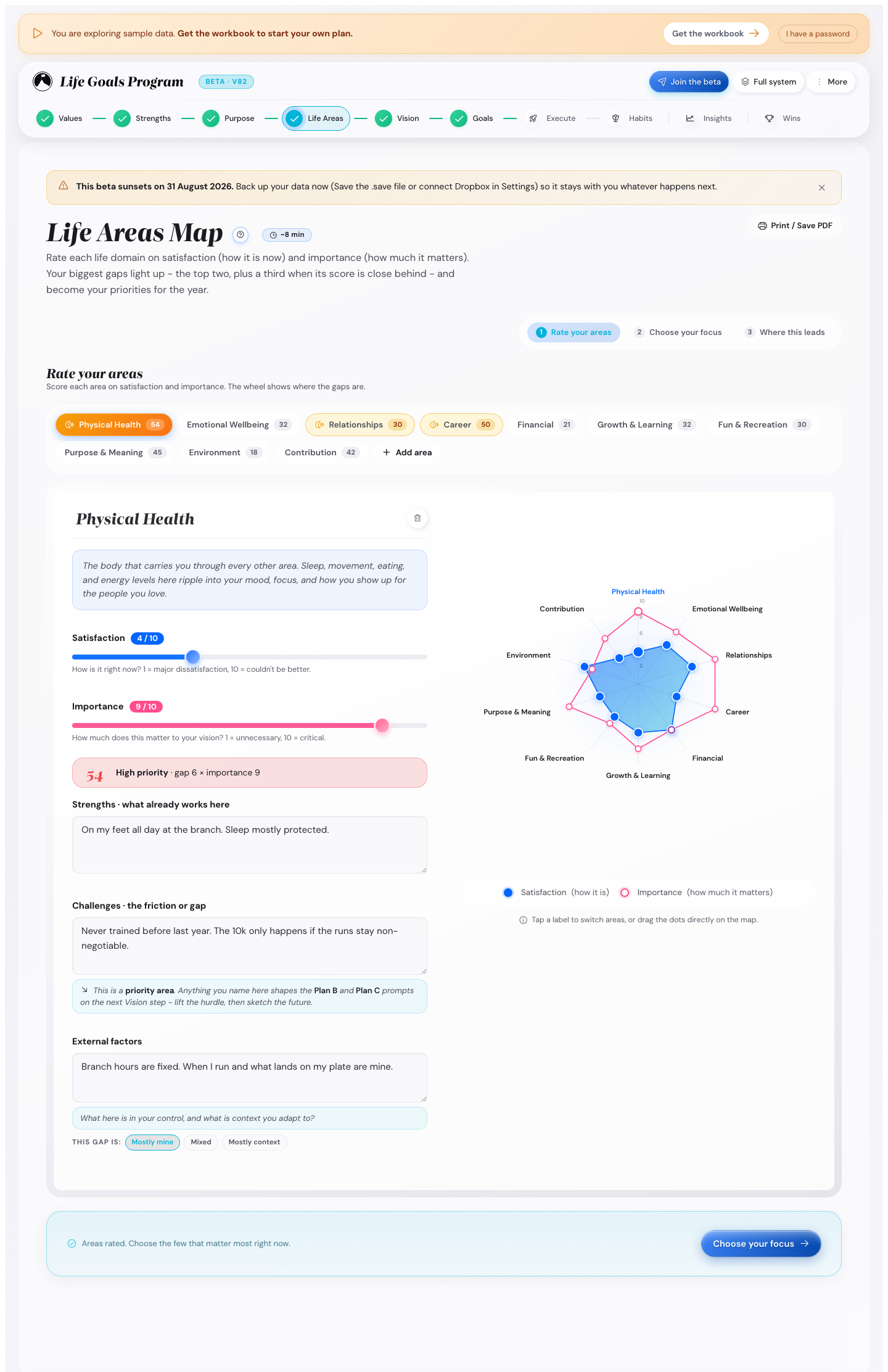
Life Areas has three tabs: Rate your areas, Choose your focus and Where it shows up.
- Give each area a satisfaction score, 1 to 10, in blue.
- Give each area an importance score, 1 to 10, in pink.
- Choose two or three focus areas on Choose your focus.
The map marks your biggest gaps: high importance with low satisfaction. Those gaps make good focus areas.
Open an area to write an External factors (optional) note. Mark the area Mostly in my control, Mixed, or Mostly outside my control.
An area marked Mostly outside my control gets goals about how you respond, not about an outcome you cannot move.
The ten areas are Physical Health, Emotional Wellbeing, Relationships, Career, Financial, Growth & Learning, Fun & Recreation, Purpose & Meaning, Environment and Contribution. Press Add life area for one of your own.
Ramon recommends two or three areas a year. The other areas keep their score without a Summit Goal.
Write your vision
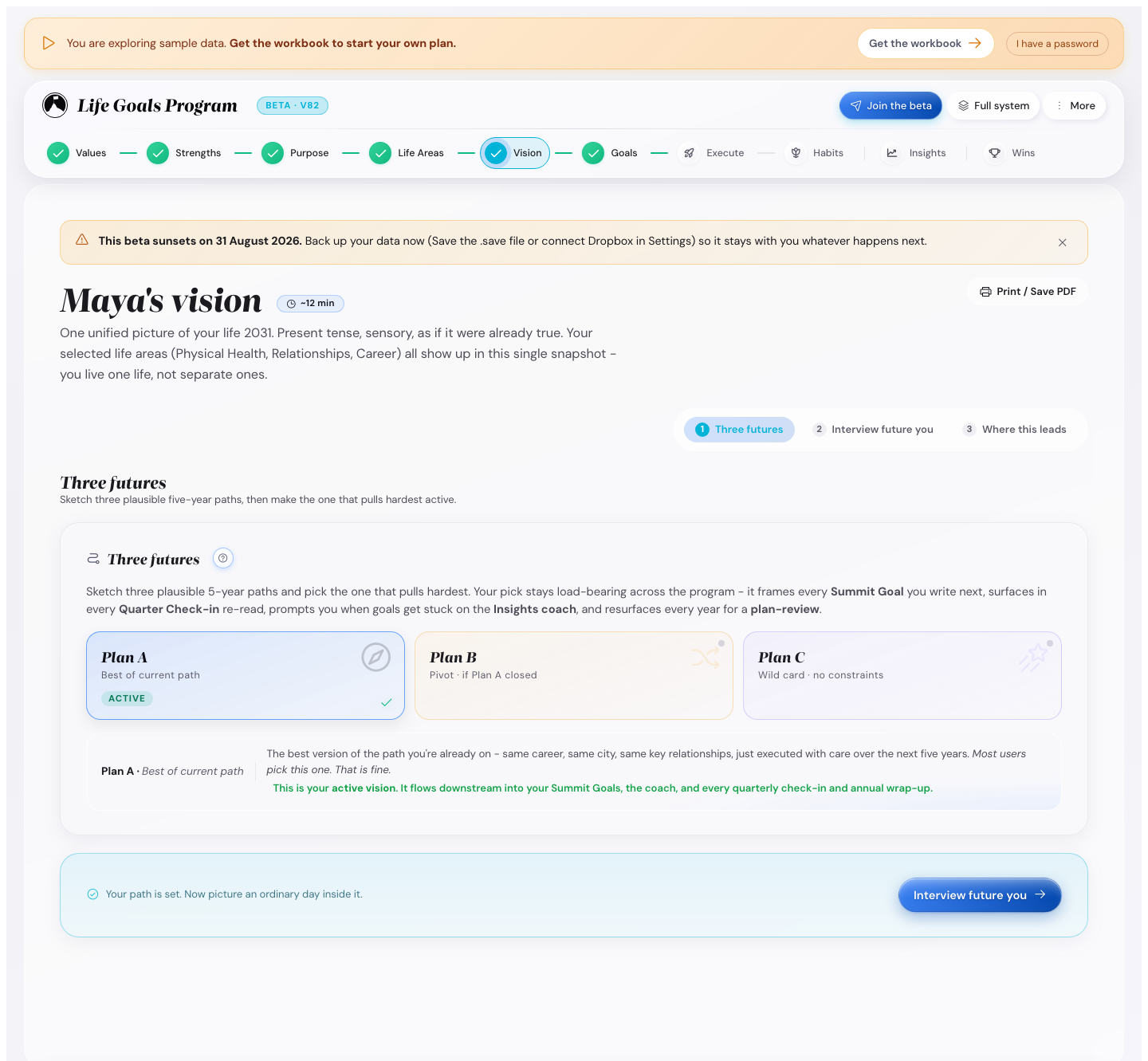
Vision has three tabs: Three Futures, Interview with your future you and Where it shows up.
- Write three five-year futures on Three Futures.
- Press one card to make it your active vision.
- Write the full vision on Interview with your future you, in the present tense.
Future one is the best version of the path you are on. Future two is a pivot. Future three has no limits.
Write as if it were already true, with what you see, hear and do on an ordinary day.
Your active vision frames every Summit Goal and comes back at each quarter check-in. The other two stay for comparison.
Set your Summit Goals
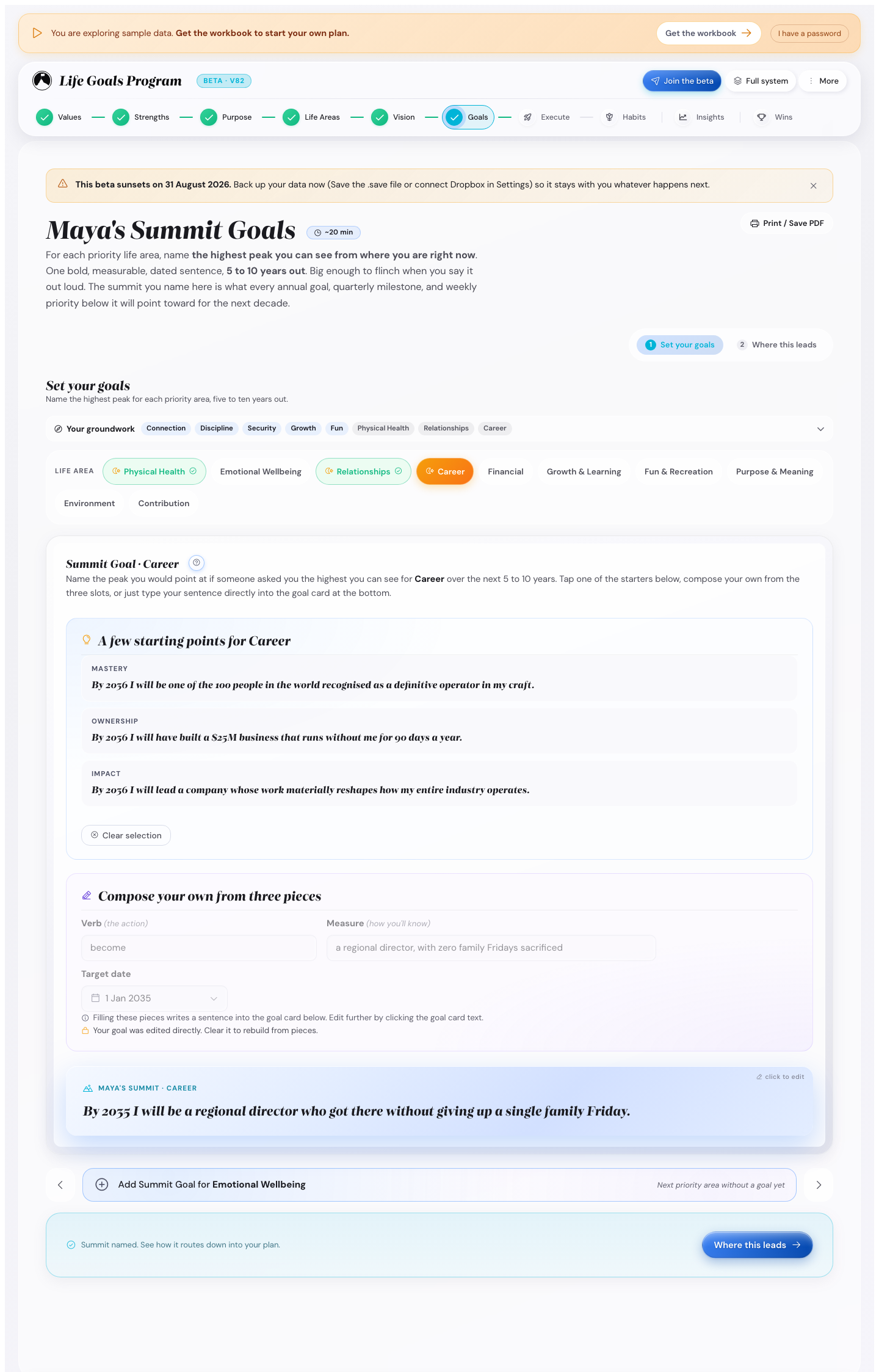
Summit Goals has two tabs: Set your Summit Goals and Where it shows up.
For each focus area, name your biggest long-term goal. One sentence with a date, 3, 5 or 10 years out. Pick the years under Look ahead.
- Type your own sentence in the goal card.
- Press a starter sentence when you do not know how to begin.
Your earlier answers show on this screen. Expand the panel to see the values, focus areas, purpose and vision line you wrote.
The time estimate grows with the number of focus areas. Two areas take about 14 minutes, one about 8.
Plan the year, quarter, month, week and day
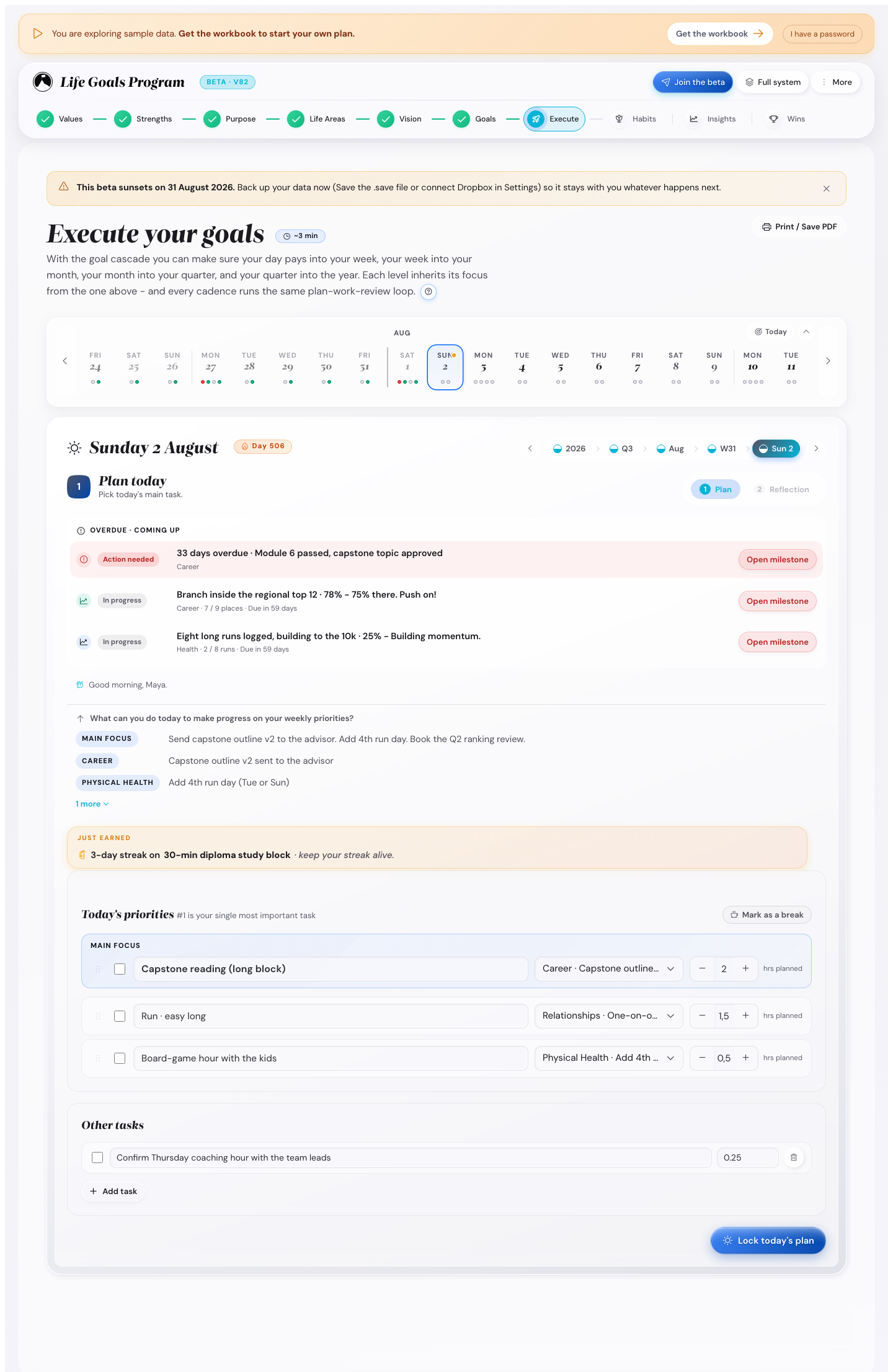
Execute has five levels. The year sets the quarter, the quarter sets the month, and so on down to the day.
- Your Year: up to three annual goals across all areas.
- Your Quarter: a theme, the milestones you commit to, and monthly priorities.
- Your Month: a main focus, the milestones due, and small goals you tick.
- Your Week: the Sunday plan and this week's priorities.
- Your Day: three priorities and a short reflection.
Each level has a plan tab and a review tab. The review tab opens once you set the plan.
Before your first annual goal, the year plan asks Which year do you want to plan? Pick Calendar year, or My own year for 12 months from the next 1st of a month. Change it later under Settings, Planning, Your year.
See every goal in one place
The quarter, month, week and day screens have a Goal Check button next to the period switcher.
It shows every annual goal in one view, with targets, milestones and this quarter's share. Tick a milestone or change a number right there. Press Edit on a goal to change its words and targets.
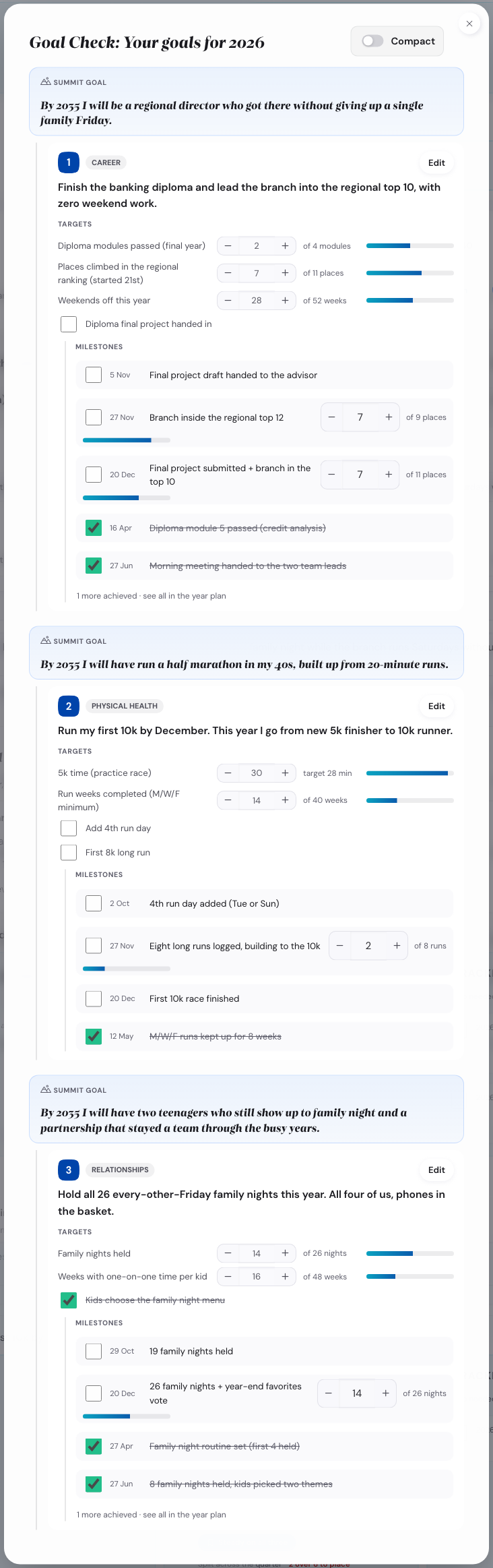
Turn on Compact to read one goal at a time, with a tab for each life area.
Start from a draft
When a focus area has a Summit Goal with no annual goal yet, the app writes a first draft. It also adds a checkpoint at the end of each remaining quarter.
- A draft shows in grey until you type over it.
- You get a checkpoint only when its date is at least two months away.
- Turn drafts off under Settings, Planning, Draft annual goals from my Summit Goals.
Turning drafts off never deletes what you already have.
Read the calendar bar
The calendar bar follows the level you are on. Day, week and month show the next two weeks. A quarter shows its three months, a year its four quarters.
Each cell shows what is planned, due and overdue. Press a cell to jump there.
Plan for what could go wrong
Each annual goal has a Friction Map tab. Name the obstacles that could stop you, then sort each one twice.
- Mark it yours to move, or context you adapt to.
- Mark it a one-off, or something that keeps coming back.
You then get the counter-move that fits: an if-then plan, a change to your setup, or a Plan B trigger.
Each month you answer whether the obstacles came up. One tap retires an obstacle that never happens.
Find what needs you
Overdue and due-soon items show at the top of every level, in three cards: Still open, Due today and Coming up. Only Still open has a colour, so a quiet week does not look urgent.
Change how much you plan
- Turn Daily planning off under Settings, Cadence, to plan by week only.
- Turn Reflect and plan on separate days on under Settings, Cadence.
- Turn Show the calendar bar off under Settings, Appearance.
- Set Header density to Compact, or to Expanded, under Settings, Appearance.
- Change the limit of three annual goals under Settings, Planning.
Hide a small message
Your purpose quote and your daily value line each have a small cross. Press it and that line is gone for good.
To bring them back, open Settings, Reminders, Hidden hints.
An overdue milestone has no cross. To change it, open the milestone and set a new date.
Set up your habits
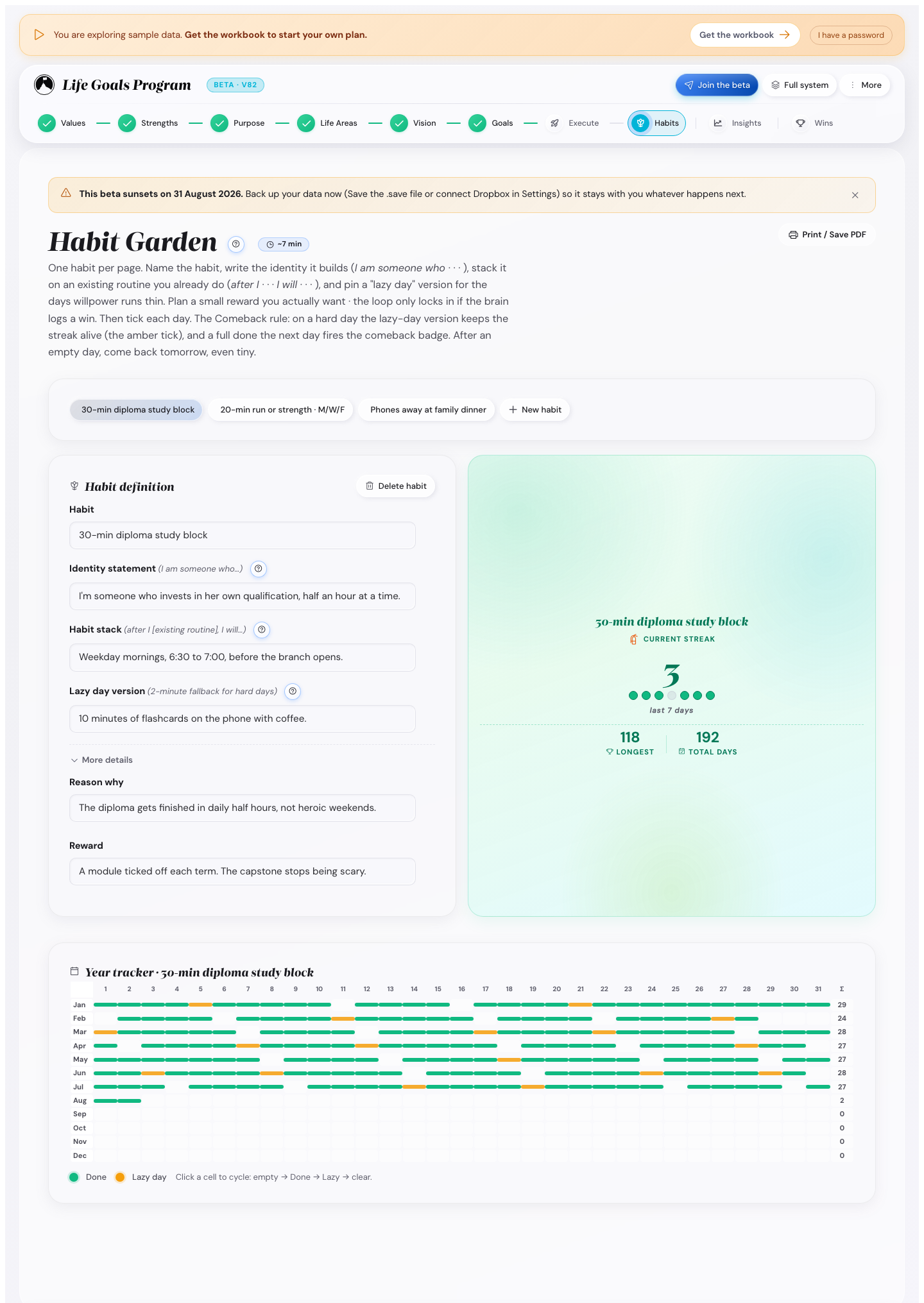
One habit per page, with five fields.
- The Habit definition: what you will do, in one line.
- The Identity statement: the person you become each time you do it.
- The Habit stack: the routine you already have, then this habit.
- The Lazy day version: what counts on a five-minute day.
- The Reason why and reward: why it matters, and a small reward you want.
Then tick each day on the grid. Press a day for Done, again for Lazy day, again for Not yet.
Aim never to miss twice. Miss a day and you have one day to come back. A Lazy day keeps the streak in amber, and a full day after it earns a comeback badge.
Start with one to three habits. Add more once the first ones run by themselves.
The Habits screen is open from the start. You can set up a habit before you plan your first week.
Read your numbers in Insights
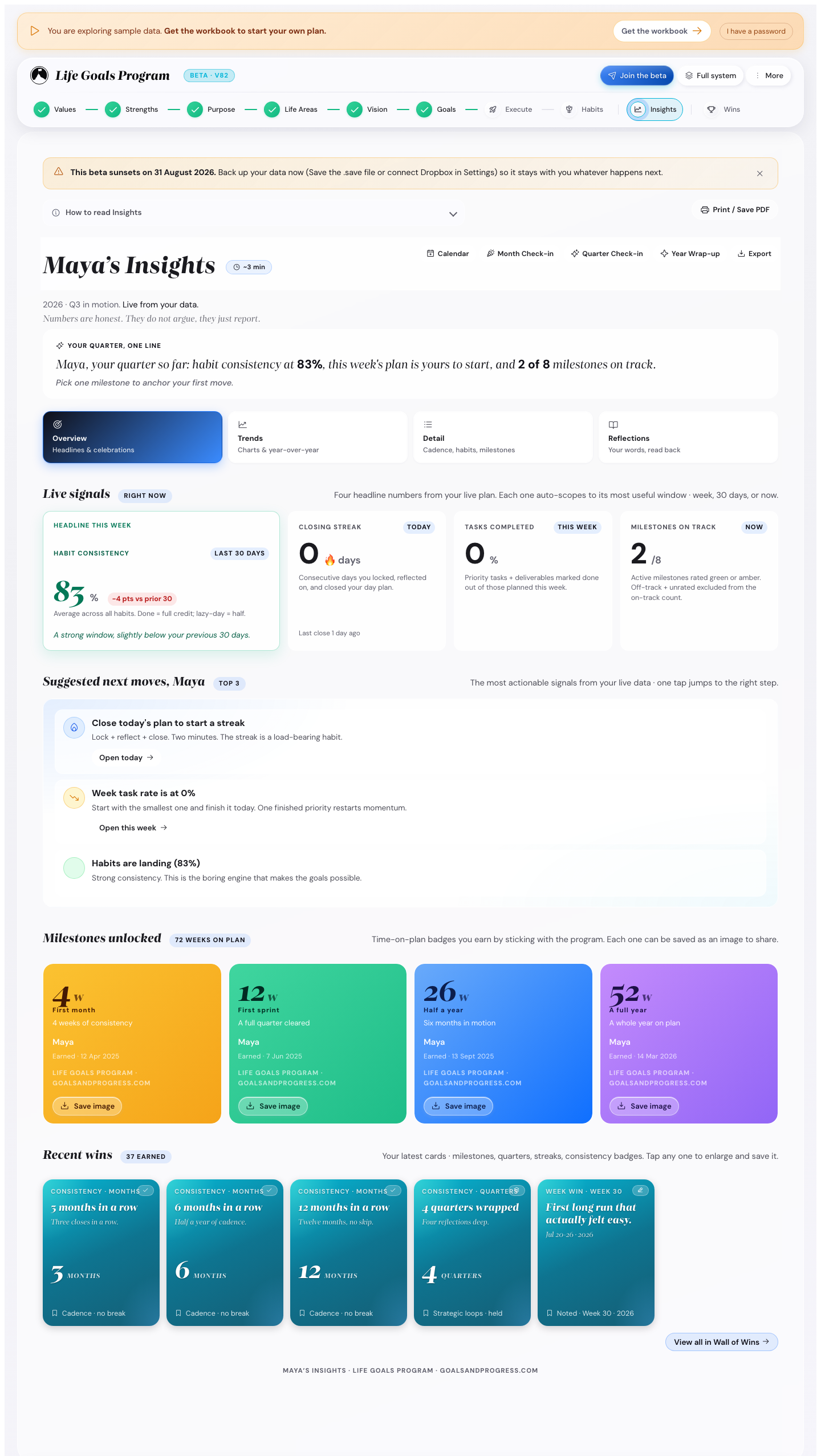
Insights turns your own entries into a small dashboard. You cannot edit the charts, but you can set the status of a milestone from its card.
- The Summary tab shows headlines and things to celebrate.
- The Trends tab shows charts and year-over-year numbers.
- The Detail tab shows habit history and the milestone log.
- The Reflections tab shows everything you have written, with a search box.
Press Month check-in, Quarter check-in or Year Wrap-up to export a printable summary.
See your wins
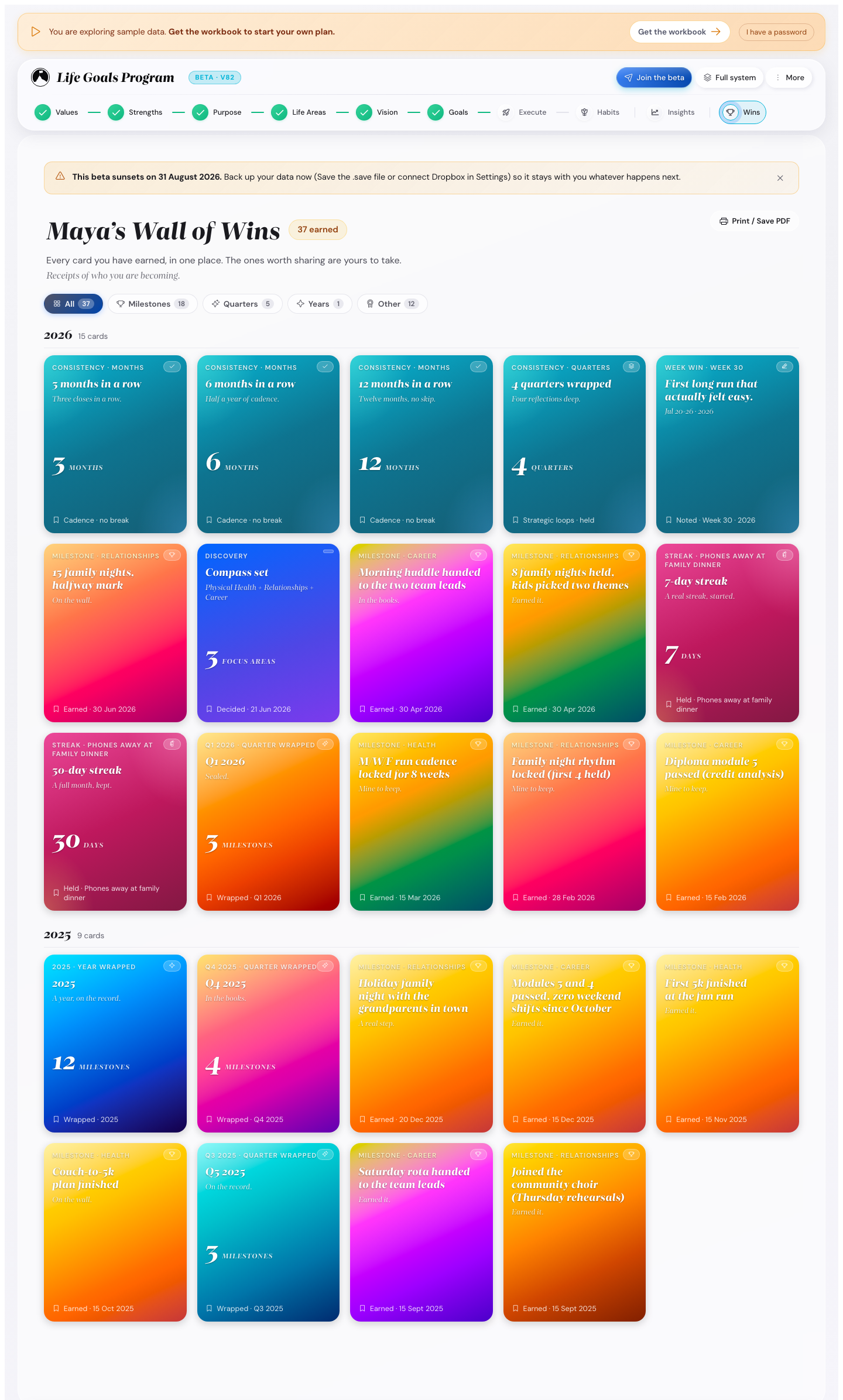
Every win you earn becomes a card here: closed milestones, wrapped quarters, habit badges and finished annual goals.
Wall of Wins appears the first time you mark a milestone done, wrap a quarter or earn a habit badge.
Filter the wall by All, Milestones, Months, Quarters, Years, or Other. Export the whole wall as a printable poster.
Keep the rhythm
The thinking happens once a year and once a quarter. The rest is doing.
Do this every day, about 3 minutes
- Tick today's habits.
- Tick each main focus item you finished, or move it to tomorrow.
- Answer the one-tap value question.
- Write a two-minute reflection.
The value question brings your values into an ordinary day. One of your top five comes with a way to use it in what you planned. In the evening you tick whether you did.
A day you never answered counts as unanswered, never as a failure. Re-ranking your values changes tomorrow's question, never yesterday's.
Turn it off under Settings, Appearance, Daily value line. What you already ticked stays.
Do this every Sunday, about 10 minutes
- Read your numbers in Insights.
- Pick next week's three priorities from the month.
- Check Coming up for anything overdue.
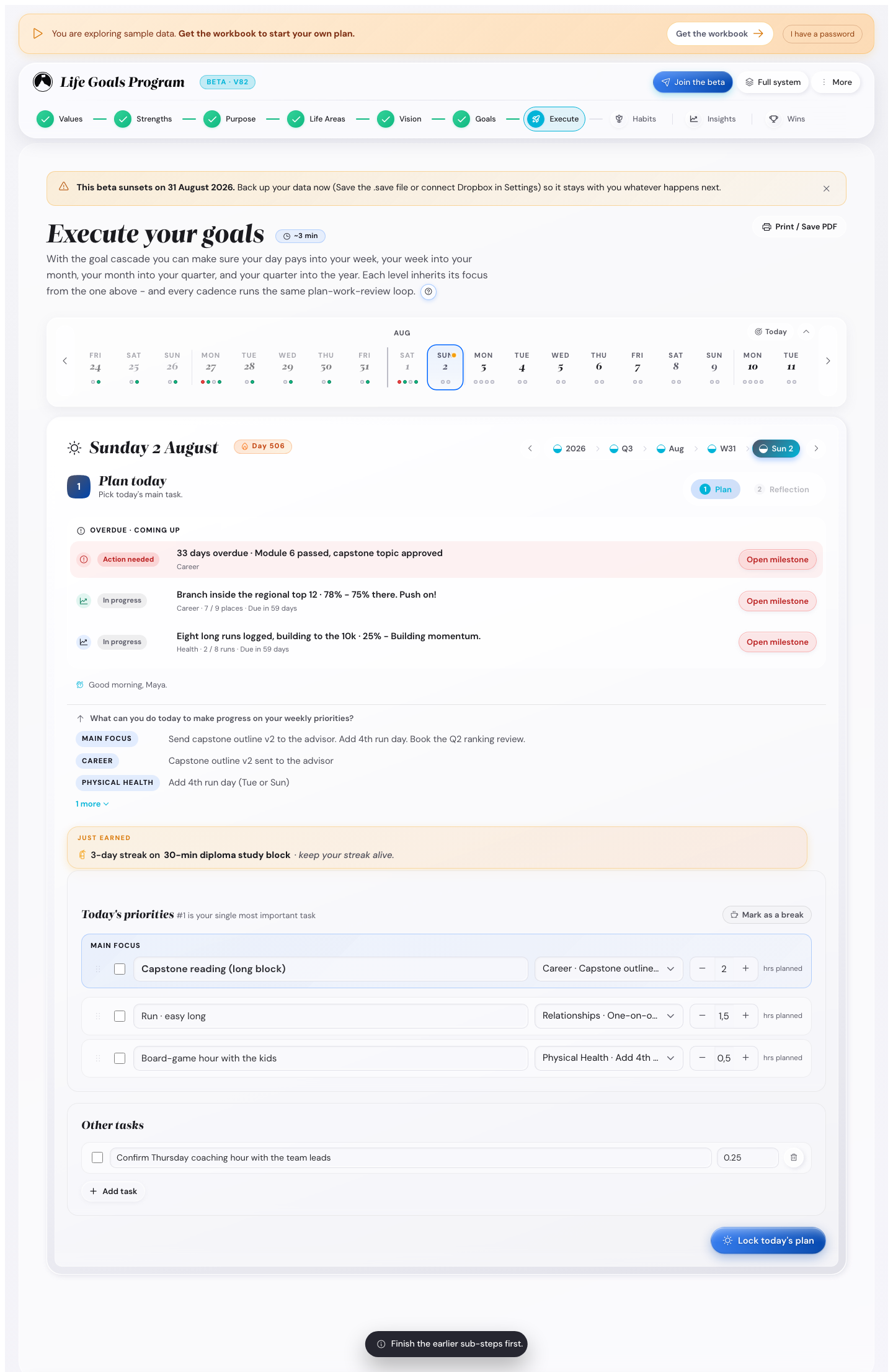
In Full Mode the weekly reflection also takes one win. Write a line and it becomes a card on your Wall of Wins.
Do this every month, about 10 minutes
- Set On track, At risk or Off track for each milestone that is due.
- Read your Month check-in.
- Set next month's focus.
Do this every quarter, about 20 minutes
- Go through the Quarter check-in for each focus area.
- Change your annual goals when the numbers show you were wrong.
- Read your active vision again.
Do this every year, about an hour
- Read your Year Wrap-up.
- Choose which of your three futures is still the active one.
- Pick your two or three focus areas for next year.
- Write next year's Summit Goal, or keep the one you have.
Missing one Sunday costs you nothing. Get back to it the next Sunday.
Take a planned break
Open the day, week or month sheet and press Mark as a break. A break stops the prompts and keeps that time out of your numbers. Press the same button again to undo it.
Pick up after a few missed days
A catch-up bar shows when you come back: how long you were away, and one thing to do. Write one short summary, then plan forward from today. You never have to fill in the days you missed.
Come back after months away
After 90 days or more, the Welcome back screen gives you two ways on: read your vision and Summit Goals again, or plan today. Your plan is exactly as you left it. Days you marked as a break do not count toward the 90.
Save your plan and download a save file
The app saves your plan to this browser as you type. The status button shows Saved on this device · Not backed up yet.
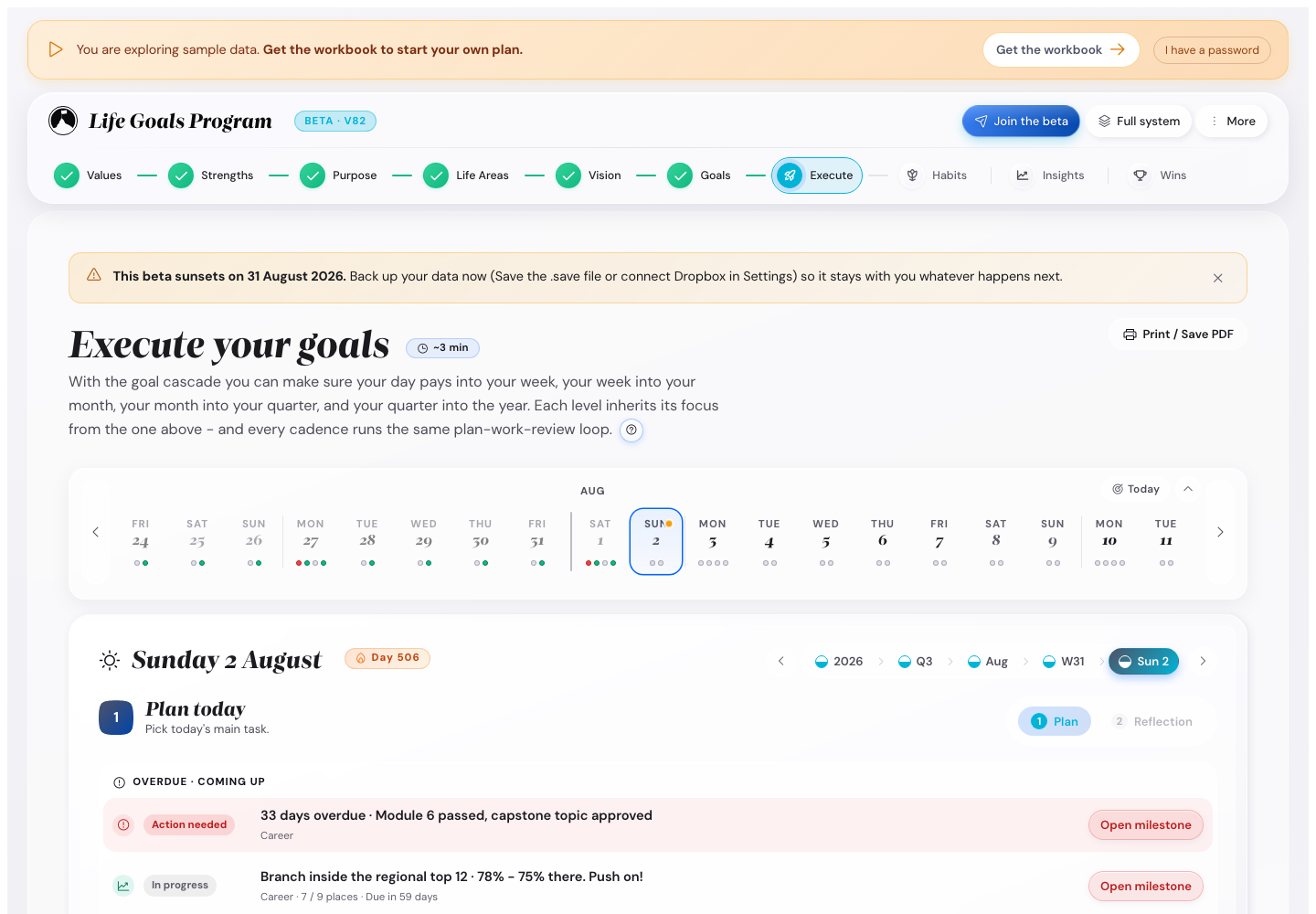
Press the status button to see What gets saved? It lists what the app keeps, where it keeps it, and when you last saved.
Download a save file and load it back
- Press Save in the top bar, or Ctrl+S.
- Press Load, or Ctrl+O, to open the file picker.
Loading replaces your current plan. Read the preview, then press Replace my data.
A save file from a newer version of the app does not load. Reload the page while you are online to get the new version, then load the file again.
Download a save file before you change browser or device, and before any big change.
Keep your plan when Safari deletes data
Safari on a Mac, and every browser on an iPhone or iPad, deletes the data of a website after 7 days without a visit. Your plan is part of that data.
Download a save file every few days and after long sessions. After a deletion, press Load and pick your newest file.
The installed app on an iPhone or a Mac keeps its own data, apart from Safari. It is not backed up either, so keep downloading a save file.
Get your plan back after a week away in Safari
Safari on a Mac, and every browser on an iPhone or iPad, deletes a website's data after about 7 days without a visit. Your plan and your code are then gone from the browser. You are also no longer connected to Dropbox. Your plan in Dropbox stays.
The app then looks like a first visit. It shows no message, because the deletion also removes what the app needs to notice it.
- Enter your licence code. Until 5 November 2026 your beta password works too.
- Press Unlock.
- Press I have used the app before.
- Press Restore from Dropbox and sign in to Dropbox.
The screen shows Your plan is back.
No Dropbox? Press Load in the same place and pick your newest save file.
The app on your iPhone home screen keeps its own storage. Safari does not delete it.
Keep your plan in Dropbox
Dropbox keeps your plan for you. It is optional and free.
In Settings, under Your data, press Connect Dropbox and say yes on the Dropbox page.
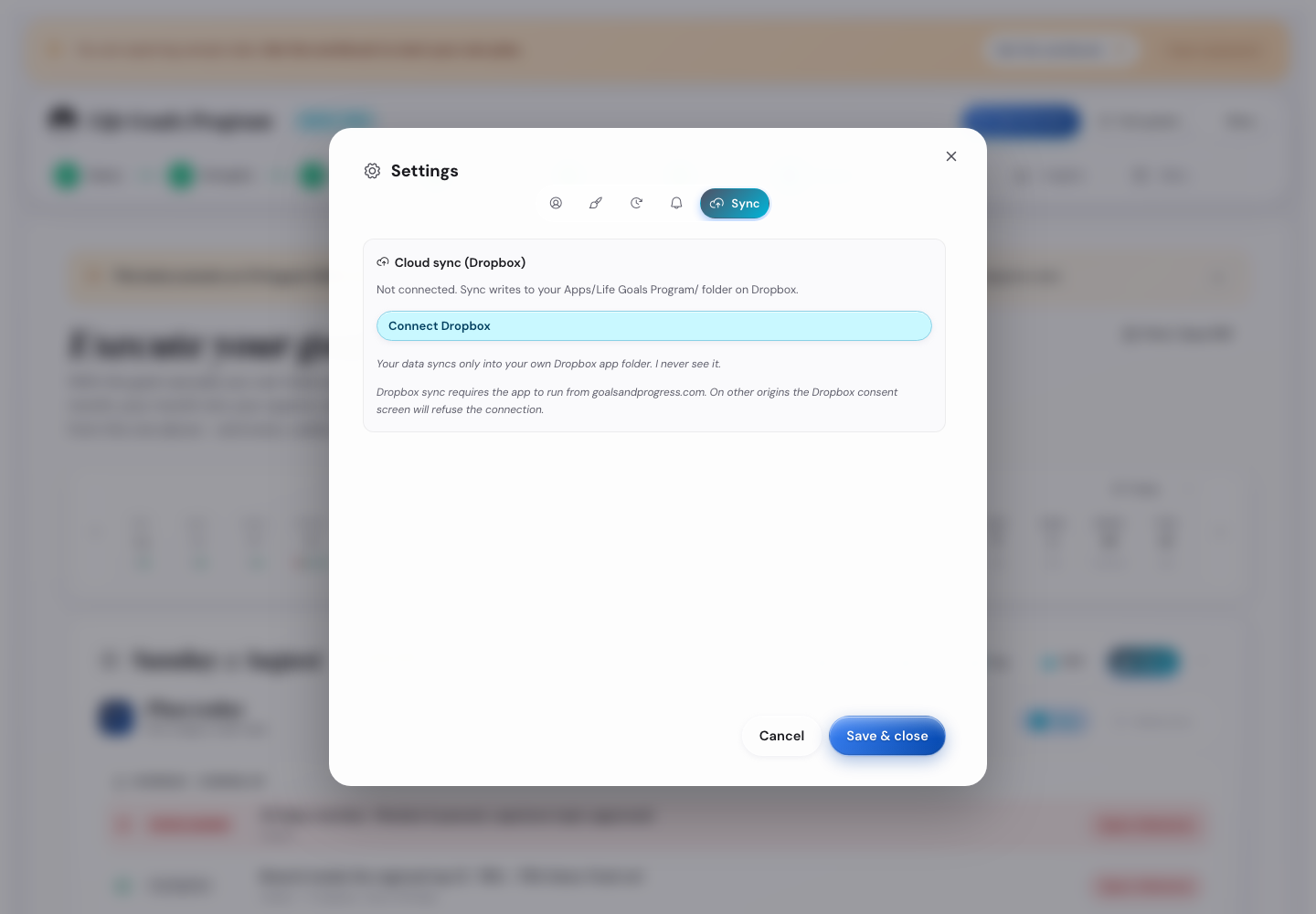
From then on your plan goes into the folder Apps/Goals & Progress Life Goals App/ in your Dropbox. No other app can see that folder.
On your other device, press Connect Dropbox. An empty device brings the plan in by itself. A device with its own plan shows the card A newer plan is in your Dropbox with two buttons. Use the Dropbox plan keeps the Dropbox plan. Keep this device's plan keeps the plan on this device. The plan you do not keep goes into your Dropbox folder first. You can also press the red status label Dropbox plan is newer · sync paused. It opens the same two buttons in a small window.
A device that changed nothing since its last upload takes a newer plan by itself. A device with the same plan asks nothing.
Before the app replaces a plan, it keeps a dated copy in your Dropbox folder. Restore from Dropbox and loading a save file keep one too. In Settings, under Your data, the card lists these copies. Press Restore next to one to bring it back.
When the app cannot reach Dropbox, it keeps your plan in this browser. It tries again when you are back online and when you come back to the app.
Dropbox sync is not available in View only. You need a valid licence code.
Press Disconnect Dropbox to stop. Your files stay in your Dropbox. To delete them, delete the folder Apps/Goals & Progress Life Goals App/ in your Dropbox.
Print your plan
Every main screen has a Print / Save PDF button. It builds a paper layout from your entries, not a picture of the screen.
For several parts in one file, open More, then Print plan. Pick the sections and the date range, then choose Save as PDF in your browser's print window.
Try the demo
The demo fills the app with the example plan, so you can see every screen with real content. Your own plan stays untouched, and the demo saves nothing over it.
- On a computer, open Settings, then Your data. On a phone, tap More.
- Press Try the demo.
- Press Start the demo in the window that opens.
The example plan belongs to Maya Chen, a bank branch manager with three focus areas: Career, Physical Health and Relationships.
It has 30 days of reflections and three habits with month-long grids. One quarter is half done and one year is finished.

To leave the demo, press Back to my data.
If you have unsaved work, download a save file before you start.
Change the colours
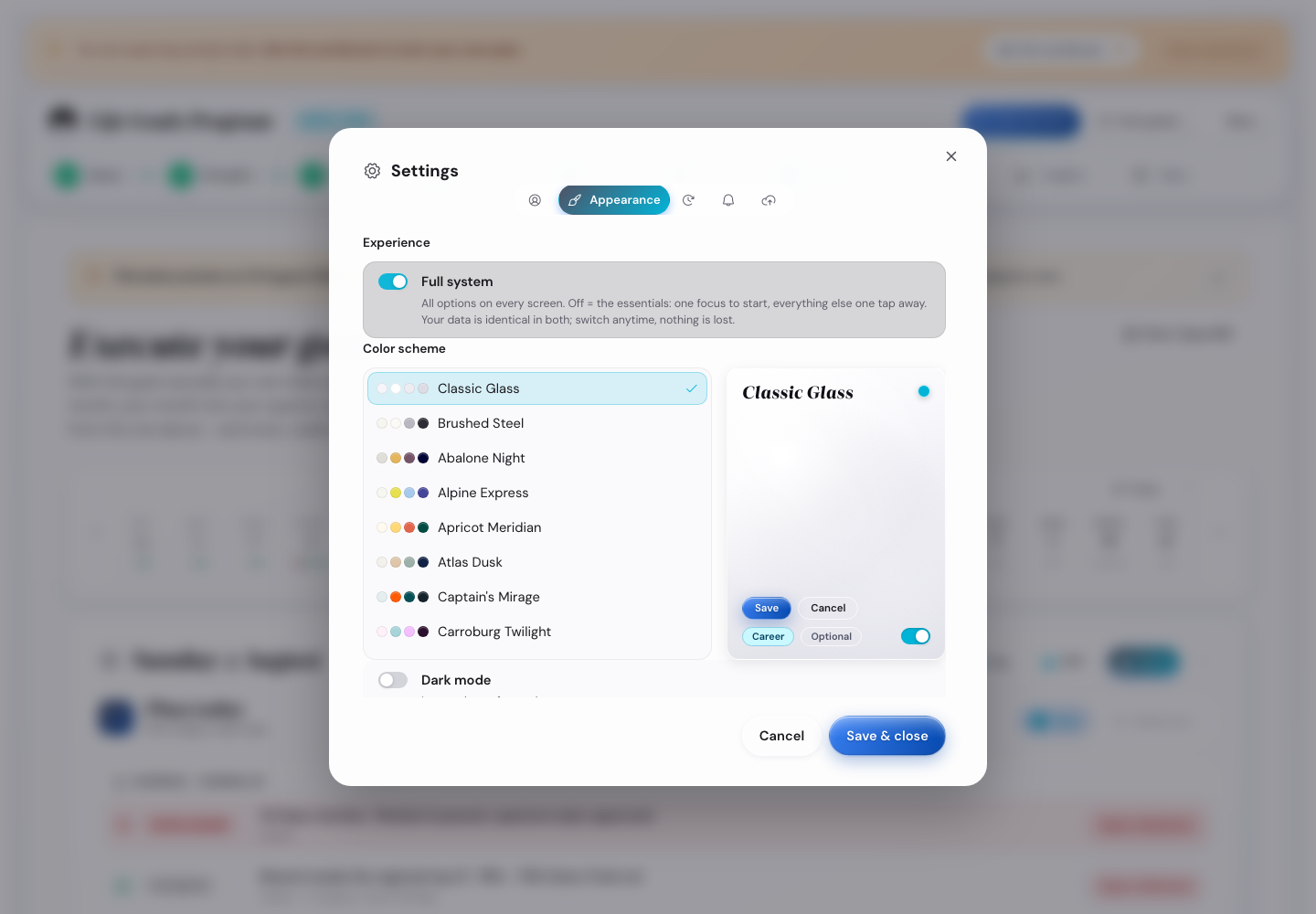
- Open More, then Settings.
- Open Appearance, then Color scheme.
- Press a theme to use it straight away.
Browse by tag: Simple, Vivid, Colourful, Deep, Muted, Balanced, Monochrome.
Classic Glass and Brushed Steel are the two you start with.
Dark mode gives the current theme a dark background. Set your computer to dark if you want the app to follow it.
The bold themes suit a short session. Classic Glass is easier on the eyes for hours of work.
Use the keyboard
Eight keys work anywhere in the app.
| Keys | What happens |
|---|---|
| Ctrl/Cmd + K | Jump to any screen |
| Ctrl/Cmd + S | Save your plan as a file |
| Ctrl/Cmd + O | Load a save file |
| Ctrl/Cmd + Z | Undo your last change |
| Alt + 1 to 4 | Go to Discovery, Planning, Execute or Habits |
| [ | Previous step |
| ] | Next step |
| F | Fullscreen |
Alt + 1 to 4 and the last three keys work only outside a text box. F also works only when no button has the focus.
To read the same list in the app on a computer, open More, then Keyboard shortcuts.
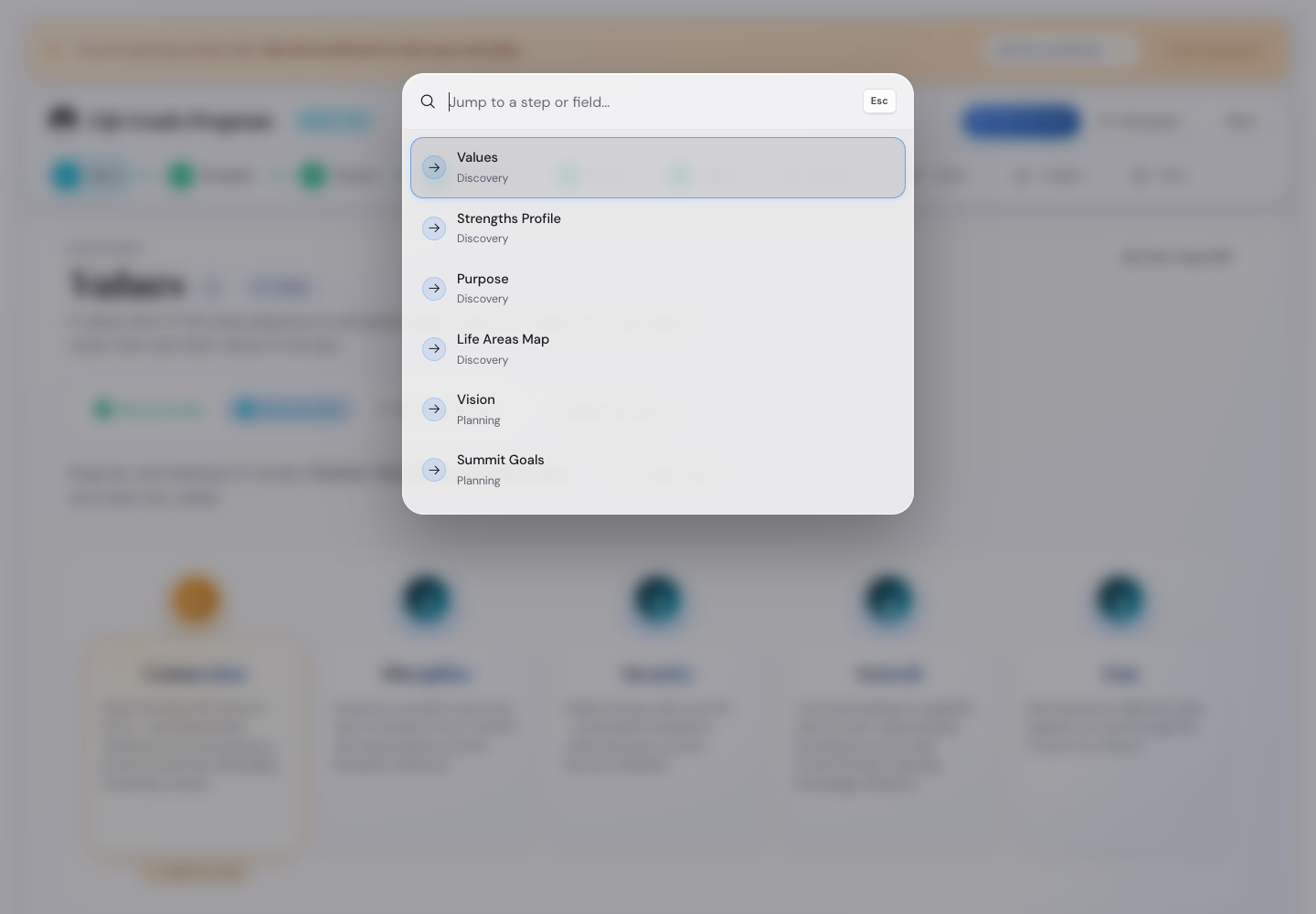
Press Ctrl+K anywhere, type a few letters of a step, then press Enter. The same box finds a single field inside a step.
Turn the small reminder off under Settings, Appearance, Show Ctrl/Cmd+K hint.
Check what went wrong
Find a lost plan
- Open the same browser on the same device you used before.
- Check the other browsers on that device, which keep their own copies.
- Look in your downloads for a save file.
- Press Load and pick it.
Nothing comes back after you clear the browser or use a private window. No copy of your plan reaches a server.
Download a save file every few days and after long sessions.
Fix a theme that looks wrong
- Open Settings, then Appearance.
- Pick Classic Glass.
- Try the same theme with Dark mode on, then off.
- Reload the page with Ctrl+Shift+R or Cmd+Shift+R.
Keep your work when storage is full
When the browser has no room left for the app, you see a bar with Browser storage is full. Changes are not saved.
- Press Save in the bar.
- Then write to support@goalsandprogress.com for help.
Your save file has your whole plan, also the changes the browser did not save.
Start over
- Press Ctrl+S to download a save file first.
- Open Settings, then Your data.
- Tick I understand these actions are permanent.
- Press Reset all data.
The app then opens as it did on your first unlock.
Send a bug report
Press Send feedback in the top bar, or write to support@goalsandprogress.com.
- Write what you were doing when it broke.
- Write what you expected to happen.
- Write what happened instead.
- Add your browser and its version.
- Add a picture of the screen, if you have one.
Ramon reads every message during the beta.
Send feedback, get the finished app free
The beta ends on 30 September 2026. Here is the trade.
- You use the whole app, with no limits.
- You send feedback at least once during the beta.
- You get the finished app free, and your beta plan comes with it.
Two lines are enough. A crash counts. So does the step that confused you.
Press Send feedback in the app, or write to support@goalsandprogress.com. Both reach Ramon.