Goals & Progress


Where habit stacks usually break
A habit stack is one sentence: after something you already do, you do one new thing. Writing that sentence is easy. Picking an anchor that actually holds, and stopping before the chain gets too long to learn, is where it usually goes wrong.
This builder does both. Pick an anchor, chain habits onto it from a library of 250 that each carry their own lazy day version, and it tells you when the chain has grown past what you can reasonably learn at once. Nothing to install, nothing to sign up for, and your stack stays in your browser.
Build a habit stack that holds
Pick an anchor you already do without thinking, chain one or two habits onto it, and keep a lazy day version of each so a bad day costs you the volume rather than the chain. The habits come from the Life Goals App library, and each one already knows which habits it pairs well with.
What already happens, every single day?
A good anchor happens daily, costs no willpower, sits at a consistent point in your day and has a clear endpoint. Pick one below or write your own.
Or start from a common one
What follows the anchor?
Keep each habit short enough to finish before your attention moves on. Two minutes is a good starting size.
Your stack
Say it out loud

How to build your stack
- Name the anchor. Something that already happens daily without willpower and has a clear endpoint. Pick one of the suggestions or write your own.
- Chain one or two habits onto it. Filter the library by life area or search it. Once you have picked one, the habits it pairs well with move to the front.
- Read the sentence out loud. The builder writes the "After I [anchor], I will [habit]" line for every link in the chain.
- Keep the lazy day version. Each habit carries the smallest form that still counts, so a bad day costs you the volume rather than the chain.
- Print it or save the file. Browser storage is not a backup.
What the builder looks like


Why it caps the chain
Add a fourth and fifth habit and the builder says so. That is not an arbitrary limit. While a chain is still being learned, each item in it occupies part of a working memory that holds only about four chunks at a time, so a long chain stops feeling automatic and starts feeling like a list you have to remember. At that point it has become the thing it was supposed to replace.
The cap is guidance rather than a block. If you have a reason to keep five, keep five. It is usually faster to run two until they fire on their own, then extend. The reasoning is in the full guide to habit stacking, along with the four qualities of an anchor that holds and the fixes for a stack that keeps breaking.
Where the habits come from
The 250 habits in the library are the same ones inside the Life Goals App, across the ten life areas. Each one carries the trigger it usually attaches to, a lazy day version, and the habits it pairs well with. That last field is why the suggestions get better as you build: the pairings are hand-picked rather than generated from whatever shares a keyword.
- Ten life areas, from Physical Health through to Contribution
- A lazy day version on every habit, so the chain survives a bad week
- Curated pairings, surfaced as you build the stack
- Drag to reorder, with everything reachable by button and keyboard too
- Your stack saved in your browser, plus save and load your own file
Who it is for
People who have tried habit stacking, watched it work for a fortnight and then collapse, and want to know which part was wrong. Usually it is the anchor. Occasionally it is that the chain got long enough to need remembering.
It is built for one person planning their own habits. There are no teams, no shared boards, no streak leaderboards.
A stack card is a plan. The app is the practice.
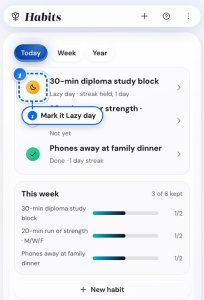
This page builds the chain. The Life Goals App runs it day to day, on the same habit library: a grid where one tap marks a day done and two taps marks it a lazy day, and check-ins that tell you when a stack has quietly stopped firing. Try the demo first, no sign-up needed. You pay once, with a 14-day money back guarantee.
Related guides and tools
- Habit stacking: the full guide - anchors, the working memory ceiling, and the fix for each way a stack breaks
- Habit formation: the complete guide - how habits form in the first place
- Why habits fail - the diagnosis when the stack is not the problem
- Printable habit tracker - the paper version, if you would rather not use a screen
- Core Values Finder - the step before habits, when you are not sure which ones are worth building