

Most New Year’s goals fail within six months. Your app choice might be why.
The best goal tracking apps match your goal type, review cadence, and tolerance for setup friction. After testing 10 options across SMART goals, OKRs, and visual motivation styles, the top picks for 2026 are Strides for structured personal tracking, Goalify for a free full-featured option, Weekdone for OKR tracking, and Habitica for gamified motivation.
Norcross, Mrykalo, and Blagys tracked 159 New Year’s resolvers over two years and found that fewer than half maintained their goals past six months [1]. You set a goal, download an app, log your first entry, and then nothing. Three weeks later, the app sits unopened on your second home screen.
The best goal tracking apps match how you actually think about your goals, not which app has the most features.
A 2016 meta-analysis published in Psychological Bulletin by Harkin and colleagues found that progress monitoring increases goal attainment (d = 0.40 across 138 studies) [2]. But monitoring only works when the tool fits your goal type. This guide matches 10 goal tracking apps to specific frameworks, working styles, and budgets so you can pick the best app to track goals and start today.
How we tested: Each app was evaluated across 4 criteria over a 2-week period: setup time, daily tracking friction, review feature quality, and framework support. Apps were tested on iOS and Android where available. Pricing verified as of February 2026.
What you will learn
- How to pick the right goal tracker based on your goal type and working style
- Which goal tracking apps rank best overall for personal goal management
- The strongest free goal tracking apps with no paywall surprises
- Which apps handle OKR tracking for personal and professional goals
- Visual and gamified trackers that work for ADHD and motivation-driven users
- A side-by-side comparison table of all reviewed apps
Key takeaways
- The right goal tracking app depends on your goal type: SMART goals, OKRs, and habit-based goals each need different app architectures.
- Strides and Goals on Track rank as the best overall goal trackers for personal use in 2026.
- Goalify and Notion offer the strongest free tiers for goal tracking without upgrading.
- Weekdone and 15Five lead for OKR-based tracking with built-in key result measurement.
- Visual and gamified trackers like Habitica and Lifetick work well for ADHD users who need external motivation cues.
- Goal tracking apps and habit tracking apps solve different problems, and confusing them leads to abandoned tools.
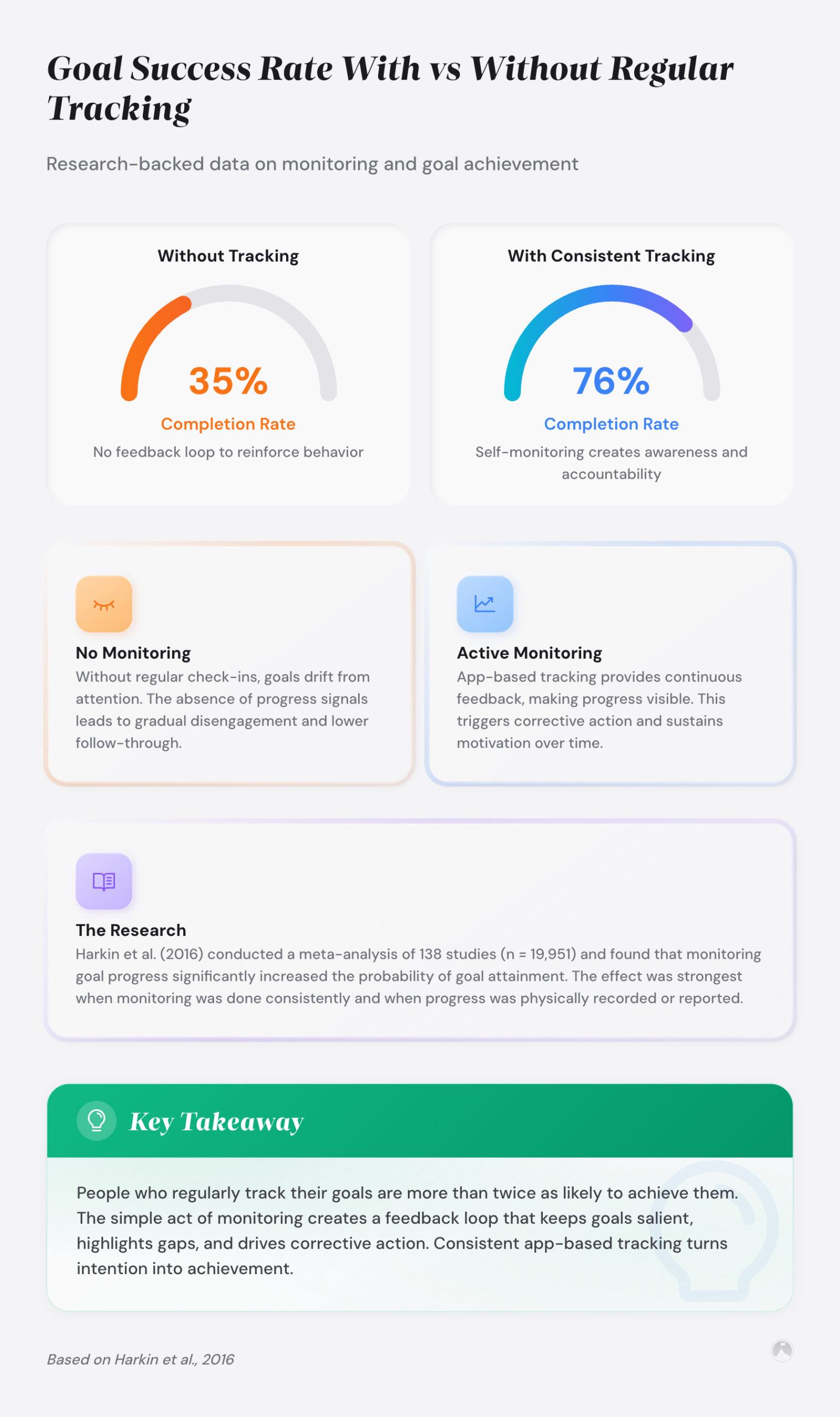
- Progress monitoring increases goal attainment (d = 0.40 across 138 studies), and frequent monitoring amplifies the effect [2].
- Notion and Google Sheets suit system-builders willing to invest 30-60 minutes of setup over 5-minute dedicated app onboarding.
How do you choose the best goal tracking app for your situation?
Before scrolling through app reviews, you need to answer one question: what kind of goals are you tracking? A goal tracker app designed for daily habits won’t help you manage quarterly OKRs. And a project-based tool won’t give you the visual streak motivation that keeps some people going.
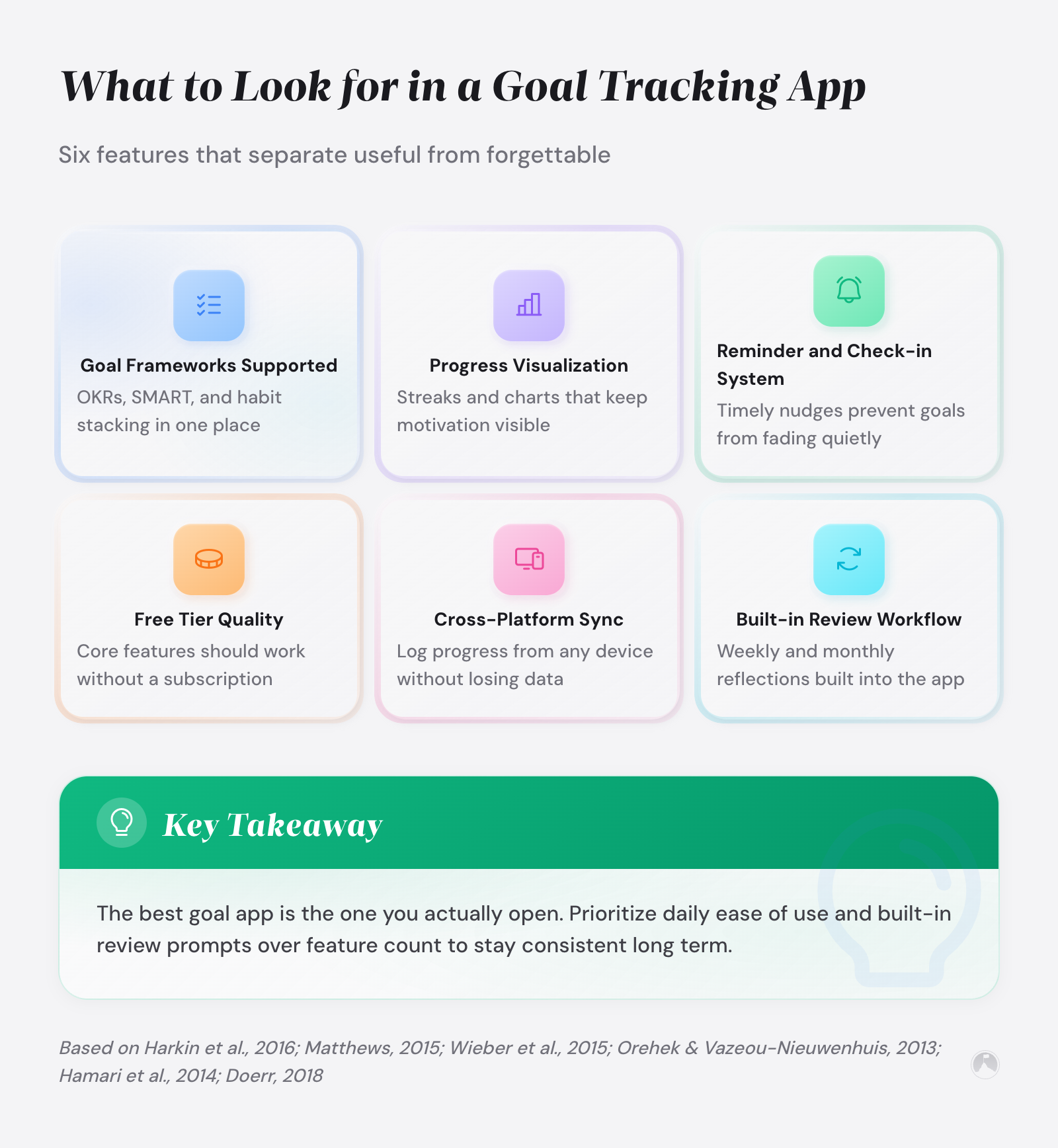
Goal tracking apps should match three criteria – The Goal-Tracker Fit Test: your goal framework, your review cadence, and your tolerance for setup friction. If even one is off, the app gets abandoned within a month.
Here’s how those criteria break down:
| Criteria | What to look for |
|———-|—————–|
| Goal framework | Does the app support SMART goals, OKRs, milestone-based tracking, or free-form goals? |
| Review cadence | Does it prompt daily check-ins, weekly reviews, or let you set custom intervals? |
| Setup friction | Can you start in under 5 minutes, or does it require extensive configuration? |
| Visualization | Progress bars, charts, streaks, or numerical dashboards? |
| Platform | iOS, Android, web, or desktop? Cross-device sync matters for consistency. |
| Price | Free tier limitations vs. paid features you’ll actually use. |
If you already use a goal setting framework like SMART or OKR, pick an app that natively supports that structure. Forcing a framework into a generic to-do list creates friction that kills consistency.
And if you’re not sure whether you need a goal tracker or a habit tracker, the distinction matters. Goal trackers measure progress toward an outcome with a defined endpoint (run a marathon, save $10,000, launch a product). Habit trackers measure consistency of a repeated behavior (exercise daily, read 30 minutes, meditate). Some apps do both, but most do one well and the other poorly.
For habit-specific tracking, see our guide to habit tracking apps.
Here’s the thing: Harkin et al.’s meta-analysis of 138 studies found that monitoring goal progress produces a reliable positive effect on goal attainment, and the effect grows when monitoring happens more frequently [2]. So your choice of goal tracking software isn’t trivial.
“Progress monitoring had a positive effect on goal attainment, and this effect was larger when the monitoring was reported or made public, and when the information was physically recorded.” – Harkin et al. [2]
Apps that prompt regular check-ins turn research-backed progress monitoring into a built-in advantage.
What are the best overall goal tracking apps for 2026?
These apps scored highest across flexibility, ease of use, and framework support for personal goal management.
Strides (iOS, Web)
Strides is the strongest all-around best goal tracker for iPhone users. It supports four tracking types (target, habit, average, and project milestones), which means it handles both outcome-based goals and daily consistency tracking in one place.
Strides stands out because it supports SMART goal structure natively, with measurable targets, deadlines, and progress percentages built into each goal entry. The dashboard gives you a clean overview without requiring manual calculations.
- Best for: Personal goal setters who want structured tracking with visual progress
- Platforms: iOS, web (no Android)
- Pricing: Free with limits (4 trackers); Premium at $5.99/month (2026 pricing)
- Framework support: SMART goals, milestone tracking, flexible targets
The lack of Android support is its biggest limitation. If you switch between platforms, Strides becomes unreliable.
Goals on Track (Web, iOS, Android)
Goals on Track takes a more structured approach with built-in vision boards, subgoal hierarchies, and action plan breakdowns. It’s the closest thing to a dedicated goal tracking system in app form.
- Best for: People who want to break large goals into structured subgoals and action steps
- Platforms: Web, iOS, Android
- Pricing: Free trial; $9.95/month or $68/year
- Framework support: SMART goals, goal hierarchies, vision boards
Goals on Track is one of the few apps that connects daily tasks directly to long-term goals through a cascading hierarchy, making it easier to see how today’s work serves next year’s targets. The price point is higher than most personal trackers, but the depth justifies it if you’re managing 5+ concurrent goals.
Trakstar (Web)
Trakstar bridges personal and professional goal tracking with OKR-style objectives, key results, and completion percentages. It’s heavier than a personal app but useful if your workplace already uses it. Trakstar leans more toward performance management than pure OKR tracking, making it a better fit for aligning personal development goals with workplace reviews. The main limitation is no free tier or transparent pricing.
- Best for: Professionals who want one system for work and personal goals
- Platforms: Web
- Pricing: Custom pricing (team-based)
- Framework support: OKRs, performance goals, cascading objectives
The best goal tracker fits your working style rather than forcing you to adapt to its interface.
What are the best free goal tracking apps that don’t lock core features?
The best free goal tracker is the one that doesn’t cripple its tracking features behind a paywall. These apps offer meaningful free tiers.
Goalify (iOS, Android)
Goalify provides unlimited goal creation on its free tier (which is rarer than it should be). You can set recurring goals, one-time targets, and track progress with charts. The social accountability feature lets you share goals with friends for mutual tracking.
- Best for: Budget-conscious goal setters who still want full-featured tracking
- Platforms: iOS, Android
- Pricing: Free (full-featured); Premium at $4.99/month adds detailed analytics
- Framework support: Flexible goal types, recurring targets, social sharing
Notion (Web, iOS, Android, Desktop)
Notion isn’t a goal tracker by default, but its database and template system lets you build exactly the tracker you need. Pre-built goal tracking templates get you started in minutes. The trade-off is setup time: Notion rewards people who enjoy building systems (and punishes those who don’t).
If you prefer the flexibility of a spreadsheet approach, see our guide on goal tracking with spreadsheets for a comparison of Notion databases vs. Google Sheets templates.
- Best for: System builders who want total customization
- Platforms: Web, iOS, Android, macOS, Windows
- Pricing: Free for personal use; Plus at $10/month
- Framework support: Any framework you build into it (SMART, OKR, custom)
Notion’s strength as a goal management app is its flexibility, and its weakness is that flexibility requires effort. If you enjoy tinkering with databases, Notion works. If you want to open an app and log progress in 10 seconds, pick a dedicated tracker instead.
Free goal tracking apps trade configuration time for subscription dollars, and that trade-off favors system-builders.
What are the best goal tracking apps for OKR tracking?
OKRs (Objectives and Key Results) need apps that separate qualitative objectives from measurable key results. Standard goal trackers rarely handle this distinction well. For a deeper look at OKR methodology, read our guide on how to track personal OKRs.
Weekdone (Web, iOS, Android)
Weekdone was purpose-built for OKR tracking (which immediately puts it ahead of most generic tools). It separates objectives from key results, supports quarterly cycles, and includes weekly check-in prompts that keep OKRs visible instead of forgotten.
- Best for: OKR practitioners who want a purpose-built tool
- Platforms: Web, iOS, Android
- Pricing: Free for up to 3 users; paid plans start at $9/user/month (as of 2026)
- Framework support: OKRs (native), weekly check-ins, team alignment
15Five (Web, iOS, Android)
15Five combines OKR tracking with weekly check-ins and manager feedback loops. It’s designed for teams but works for individual OKR tracking if you want structured weekly reviews.
Research by Wieber, Thürmer, and Gollwitzer on implementation intentions suggests that structured review intervals strengthen the mental link between situations and planned responses [4], which apps with built-in review cadences replicate. Structured check-ins strengthen the link between goal intentions and follow-through, which is why built-in review cadences outperform manual reminders.
- Best for: Professionals tracking OKRs alongside team performance
- Platforms: Web, iOS, Android
- Pricing: Starts at $4/user/month (base plan)
- Framework support: OKRs, weekly reviews, 1-on-1 feedback
The right OKR tool separates what you want to achieve from how you’ll measure it. Most generic trackers blur that line.
What are the best visual and gamified goal trackers for motivation and ADHD?
Some brains don’t respond to progress percentages. They need color, movement, rewards, or social pressure. These apps are built for people who need external motivation cues to stay on track. Visual and gamified goal trackers can help ADHD users by replacing internal motivation systems with external feedback loops.
Habitica (Web, iOS, Android)
Habitica turns your goals into a role-playing game. You create a character, earn experience points for completing goals, lose health for missing them, and can join parties with friends for group accountability. It sounds gimmicky, but a literature review by Hamari, Koivisto, and Sarsa found that gamification can increase participation and follow-through, though the effects are context-dependent and vary based on user type and task characteristics [6].
Many ADHD users report that game mechanics provide motivation that standard progress bars don’t, because immediate reward feedback compensates for dopamine-regulation challenges common in ADHD. For more ideas on adding game mechanics to your workflow, see our guide on ways to gamify your task list.
- Best for: People who need gamification to stay motivated, especially ADHD users
- Platforms: Web, iOS, Android
- Pricing: Free; Subscription at $4.99/month for cosmetic extras
- Framework support: Habits, dailies, and to-dos (flexible goal types)
Way of Life (iOS, Android)
Way of Life uses a simple color-coded system (green/yellow/red) to give you instant visual feedback on whether you’re trending up or down. The simplicity is the point. No complex dashboards, no extensive setup. Just daily yes/no tracking with a visual streak. Binary yes/no tracking creates cognitive simplicity that more complex apps lack – open the app, tap green or red, and close it in under five seconds.
- Best for: Minimalists who want low-friction daily check-ins
- Platforms: iOS, Android
- Pricing: Free (3 goals); Premium at $4.99 one-time
- Framework support: Binary yes/no tracking, streak-based motivation
Lifetick (Web)
Lifetick organizes goals by life areas (career, health, relationships, finances) and connects them to your personal values. It’s one of the few goal setting apps that asks why before asking what. This values-first approach aligns with Sheldon and Elliot’s self-concordance model, published in the Journal of Personality and Social Psychology, which found that goals aligned with personal values predict sustained effort and well-being more strongly than goal achievement alone [7]. Lifetick’s main limitation is web-only access, which makes daily check-ins less convenient than phone-based alternatives.
- Best for: People who want goals connected to personal values and life vision
- Platforms: Web
- Pricing: Free (4 goals); Premium at $5.50/month
- Framework support: SMART goals, values alignment, life area categories
The tracker you’ll actually open every day beats the tracker with the best feature list every time.
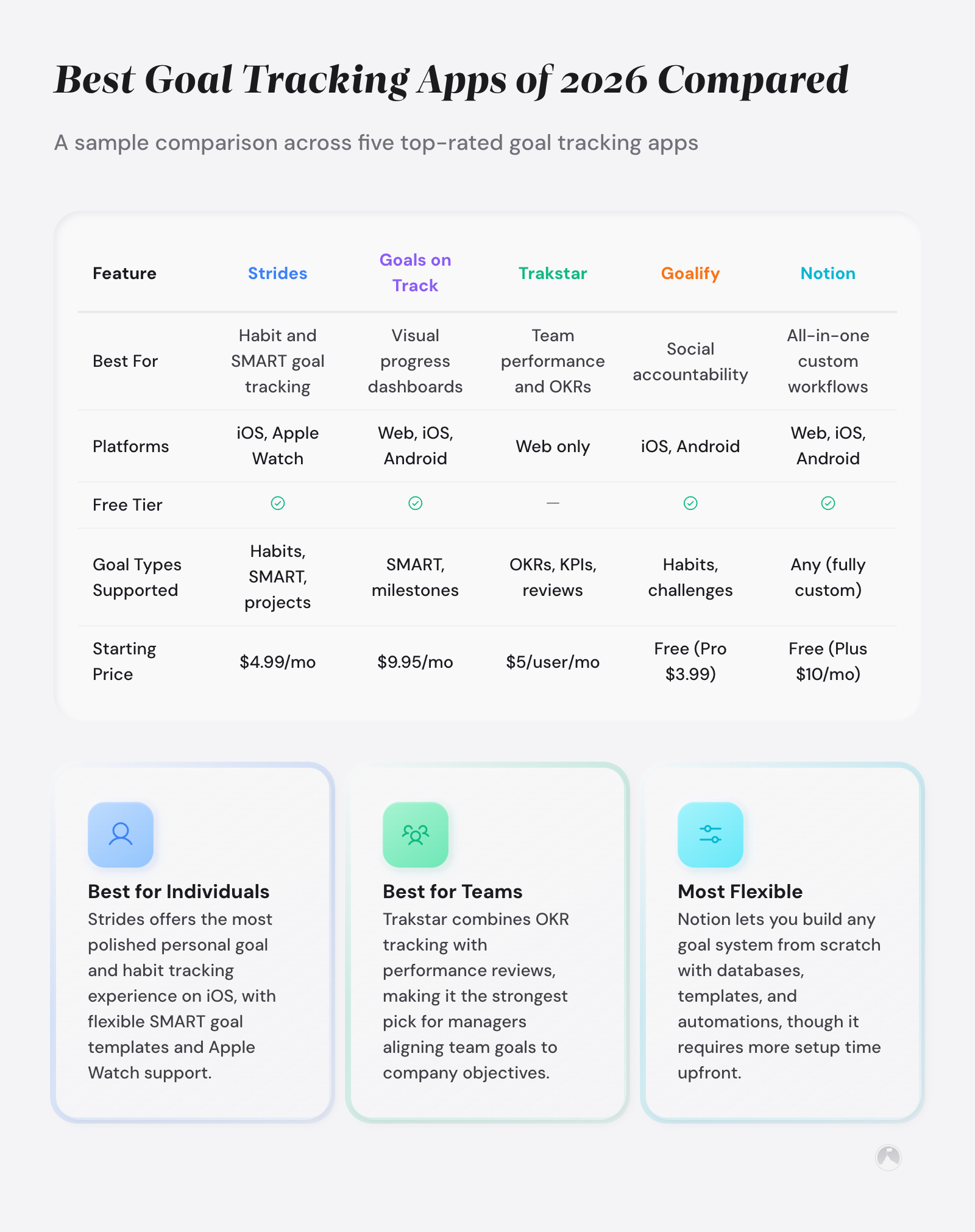
Goal tracking app comparison table
Pricing and features current as of February 2026. We update this comparison quarterly. Apps evaluated but not included: Google Tasks (too limited for goal tracking), Any.do (better as a to-do list), and Todoist (lacking goal-specific tracking).
| App | Best For | Free Tier | Paid Price | Platforms | Framework |
|---|---|---|---|---|---|
| Strides | Best Overall (iOS) | Yes (4 trackers) | $5.99/mo | iOS, Web | SMART, Milestones |
| Goals on Track | Structured Planning | Trial only | $9.95/mo | Web, iOS, Android | SMART, Hierarchies |
| Goalify | Best Free | Yes (unlimited goals) | $4.99/mo | iOS, Android | Flexible |
| Notion | System Builders | Yes (full personal) | $10/mo | All platforms | Any (custom) |
| Weekdone | OKR Tracking | Yes (3 users) | $9/user/mo | Web, iOS, Android | OKRs |
| 15Five | Team OKRs | No | $4/user/mo | Web, iOS, Android | OKRs, Check-ins |
| Habitica | Gamification / ADHD | Yes (core features) | $4.99/mo | Web, iOS, Android | RPG-based |
| Way of Life | Minimalist Tracking | Yes (3 goals) | $4.99 once | iOS, Android | Yes/No streaks |
| Lifetick | Values-Based Goals | Yes (4 goals) | $5.50/mo | Web | SMART, Values |
| Trakstar | Work + Personal | No | Custom | Web | OKRs, Performance |
So which one do you pick? That depends on what comes next: how you set it up and whether you actually use it.
How to get the most out of your goal tracking app
Picking the right app is step one. Getting consistent value from it is where most people fail. In a study presented at the American Psychological Association, Gail Matthews at Dominican University found that people who wrote down goals and shared weekly progress reports achieved significantly more than those who kept goals in their heads [3]. The accountability group completed around 70% of their goals compared to roughly 35% for the thinking-only group.
The mechanism wasn’t the writing itself (though that helps). It was the regular review cycle.
According to Matthews’ research, the combination of written goals, progress tracking, and social accountability outperformed every other condition [3]. That’s what a well-chosen goal tracking app replicates digitally.
“Participants who wrote their goals, created action commitments, and sent weekly progress reports to a supportive friend accomplished significantly more than those who simply thought about their goals.” – Matthews [3]
Here are three setup practices that turn a downloaded app into an actual tracking habit:
1. Set a weekly review reminder. Block 15 minutes every Sunday to review your goals, update progress, and adjust targets. As John Doerr describes in Measure What Matters, regular review cadences are what keep OKRs and goal systems alive rather than forgotten [8]. For more on building review systems, see our guide on goal achievement reviews.
If you want a structured template for that Sunday session, our weekly goal review process breaks down exactly what to cover.
2. Start with 3 goals maximum. Research by Orehek and Vazeou-Nieuwenhuis in Review of General Psychology found that managing fewer concurrent goals leads to higher completion rates, because attentional resources aren’t spread thin across competing priorities [5]. Three goals keeps tracking manageable and focused. People download tools for 15 goals and abandon them all.
3. Pair your app with an accountability partner. The tracking app gives you data. An accountability partner gives you social pressure. Matthews’ research showed that social commitment increases follow-through more than private tracking alone [3]. See our accountability partner strategies guide for how to set up this pairing.
You can also pair tracking with a commitment device to add stakes beyond social accountability.
As a practical rule, tracking frequency should match the natural feedback cycle of the goal itself, not an arbitrary daily reminder schedule. Daily check-ins work for habit-adjacent goals. Weekly reviews fit project milestones. Quarterly reviews fit OKRs. For a broader look at how to track progress on personal goals, including analog methods, see our dedicated guide.
The app is the infrastructure. The weekly review is the engine.
Ramon’s take
I’ve tested six goal tracking apps over two years and my honest take is this: most people should start with three goals on a sticky note and a Sunday review habit before downloading any goal tracking software, because the tracking habit matters more than the tracking tool. The pattern I keep seeing, both in my own experience and with people I’ve worked with, is that the app becomes the project – you spend more time configuring your goal tracker than working toward the goals themselves, and that’s backwards. My recommendation is to try low-tech tracking for four weeks first, and if you’re still reviewing goals every Sunday after that month, pick an app from this list that matches your goal type. If you do go with an app, Strides (iOS) and Goalify (Android) have the best ratio of useful features to setup friction, and Weekdone is worth the investment for OKR tracking because its weekly check-in structure builds the review habit into the tool automatically.
Conclusion
The best goal tracking apps reduce friction between setting a goal and regularly reviewing progress. Whether you choose Goals on Track, Goalify, or Habitica, the app only works if you open it. Harkin et al.’s 2016 meta-analysis in Psychological Bulletin confirms that progress monitoring drives achievement [2], and the tool you’ll consistently use beats the theoretically perfect tool collecting dust on your phone.
The real question isn’t which app has the best features. It’s whether you’ll still be tracking next month.
In the next 10 minutes
- Write down your top 3 goals on paper or in a note (don’t open an app yet)
- Identify what type each goal is: outcome-based, habit-based, or OKR
- Download one app from this list that matches your primary goal type
This week
- Set up your 3 goals in the app with clear targets and deadlines
- Schedule a 15-minute weekly review in your calendar for Sunday
- Ask one person to be your accountability partner for monthly goal check-ins
More to explore
For a broader look at how to build a complete tracking system, explore our complete guide to goal tracking systems. If you’re exploring broader productivity tools, see our best productivity tools roundup for apps beyond goal tracking.
Related articles in this guide
- commitment-devices-that-help-you-stick-to-goals
- dependency-mapping-for-goals
- goal-setting-frameworks-proven-systems-for-success
Frequently asked questions
What is the best free goal tracking app in 2026?
Goalify offers the strongest free tier with unlimited goal creation, recurring targets, and progress charts at no cost. Notion is a close second for users who want full customization, since its personal plan is free and supports database-based goal tracking. Both outperform most paid apps’ free tiers in terms of features available without upgrading.
What is the difference between a goal tracker and a habit tracker?
Goal trackers measure progress toward a defined outcome with an endpoint, such as saving $10,000 or completing a certification. Habit trackers measure consistency of a repeated behavior, like exercising daily or reading for 30 minutes. Some apps overlap, but dedicated goal trackers focus on milestones and deadlines while habit trackers focus on streaks and frequency. Picking the wrong type leads to tracking fatigue because the interface doesn’t match the behavior you’re monitoring.
What is the best goal tracking app for ADHD?
Habitica ranks highest for ADHD users because its game mechanics provide immediate external rewards for goal completion, compensating for dopamine-regulation challenges that ADHD creates. Way of Life is a simpler alternative with color-coded visual feedback that requires almost no setup. Both apps emphasize visual feedback over text-heavy dashboards, which reduces cognitive load during daily check-ins.
Can I use Notion for goal tracking?
Notion works well for goal tracking if you enjoy building systems. Its database features let you create custom goal dashboards with progress bars, linked tasks, and filtered views. The trade-off is setup time: expect 30-60 minutes to configure a functional tracker from a template, compared to 5 minutes with a dedicated app like Strides or Goalify. Notion is best for people who track goals as part of a larger personal productivity system.
Are goal tracking apps actually worth using?
Research supports the value of systematic progress monitoring. Harkin et al.’s meta-analysis in Psychological Bulletin found that progress monitoring significantly increases goal attainment across 138 studies (d = 0.40) [2]. The key factor is consistent use, not app sophistication. A simple app used weekly outperforms a complex app used once. The main risk is spending more time configuring the tool than working toward the goal.
What features should a good goal tracking app have?
At minimum, a goal tracking app should offer measurable targets with deadlines, visual progress indicators, and customizable review reminders. Framework support (SMART, OKR, or milestone-based) separates strong trackers from glorified to-do lists. Cross-platform sync matters if you switch between phone and computer. Analytics that show trends over weeks or months help you spot patterns in your follow-through.
References
[1] Norcross, J. C., Mrykalo, M. S., & Blagys, M. D. (2002). “Auld Lang Syne: Success Predictors, Change Processes, and Self-Reported Outcomes of New Year’s Resolvers and Nonresolvers.” Journal of Clinical Psychology, 58(3), 295-313. https://doi.org/10.1002/jclp.1151
[2] Harkin, B., Webb, T. L., Chang, B. P. I., et al. (2016). “Does Monitoring Goal Progress Promote Goal Attainment? A Meta-Analysis of the Experimental Evidence.” Psychological Bulletin, 142(2), 198-229. https://doi.org/10.1037/bul0000025
[3] Matthews, G. (2015). “Goals Research Summary.” Presented at the American Psychological Association. Dominican University of California. https://www.dominican.edu/sites/default/files/2020-02/gailmatthews-harvard-goals-researchsummary.pdf
[4] Wieber, F., Thürmer, J. L., & Gollwitzer, P. M. (2015). “Promoting the Translation of Intentions into Action by Implementation Intentions: Behavioral Effects and Physiological Correlates.” Frontiers in Human Neuroscience, 9, 395. https://doi.org/10.3389/fnhum.2015.00395
[5] Orehek, E., & Vazeou-Nieuwenhuis, A. (2013). “Sequential and Concurrent Strategies of Multiple Goal Pursuit.” Review of General Psychology, 17(3), 339-349. https://doi.org/10.1037/a0032584
[6] Hamari, J., Koivisto, J., & Sarsa, H. (2014). “Does Gamification Work? A Literature Review of Empirical Studies on Gamification.” Proceedings of the 47th Hawaii International Conference on System Sciences. https://doi.org/10.1109/HICSS.2014.377
[7] Sheldon, K. M., & Elliot, A. J. (1999). “Goal Striving, Need Satisfaction, and Longitudinal Well-Being: The Self-Concordance Model.” Journal of Personality and Social Psychology, 76(3), 482-497. https://doi.org/10.1037/0022-3514.76.3.482
[8] Doerr, J. (2018). Measure What Matters: How Google, Bono, and the Gates Foundation Rock the World with OKRs. Portfolio.





