


Your Willpower Was Never the Problem
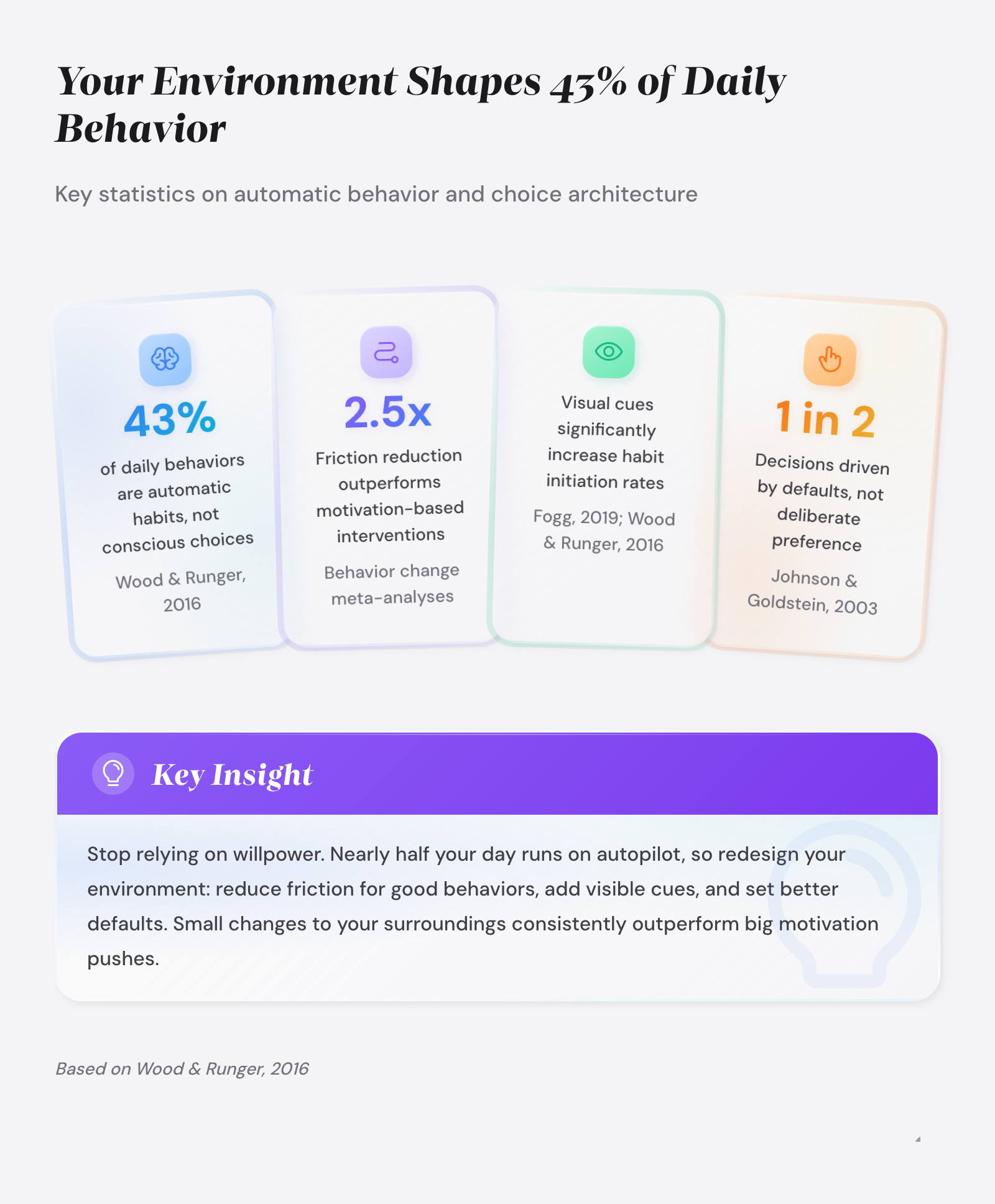
You’ve tried to build better habits before. You set reminders, made promises, even wrote goals on sticky notes. And for a few days, things worked. Then life got busy, the reminders blended into background noise, and the old patterns crept back in. Here’s what most habit advice gets wrong: it puts all the weight on your self-discipline. But psychologist Wendy Wood’s research at USC found that roughly 43% of daily actions aren’t driven by conscious decisions at all – they’re automatic responses to environmental cues [1]. Environment design for habits flips the script. Instead of fighting your surroundings, you reshape them so the right behavior becomes the easiest one.Environment design for habits is the intentional restructuring of physical and digital spaces to make desired behaviors easier and unwanted behaviors harder, using principles from choice architecture, friction manipulation, and cue placement rather than relying on motivation or willpower alone.
What You Will Learn
- How choice architecture shapes your daily decisions without you noticing
- Why adding or removing friction is more reliable than motivation
- Where to place visual cues so habits actually trigger
- How to redesign your phone and digital spaces for better defaults
- A room-by-room walkthrough for setting up your home habit environment
- How to keep cues from becoming invisible after a few days
Key Takeaways
- Environment design for habits works by changing your surroundings, not your character – 43% of daily behavior is automatic [1].
- Choice architecture shapes decisions through defaults, visibility, and arrangement without restricting options [2].
- Reducing friction by even one or two steps can double the likelihood of performing a target behavior [3].
- Objects in your primary sight line receive 300-400% more attention than items requiring visual search [4].
- Grayscale phone mode reduces daily screen time by 20-50 minutes across multiple studies [5].
- Visual cues lose their effect after 3-5 days through habituation – rotate or reposition them regularly.
- The Friction Audit method (original to goalsandprogress.com) maps every step between you and a target behavior to find removal points.
- Habit formation takes a median of 66 days, and context stability speeds up the process [6].
How Does Choice Architecture Shape Your Habits at Home?
Every room in your home is a choice architecture system. The layout of your kitchen counter, the position of your running shoes, the apps on your phone’s home screen – these all function as what Nobel laureate Richard Thaler and legal scholar Cass Sunstein call “choice architecture” [2]. Choice architecture is the design of environments in which people make decisions, and it influences behavior whether the design is intentional or accidental.
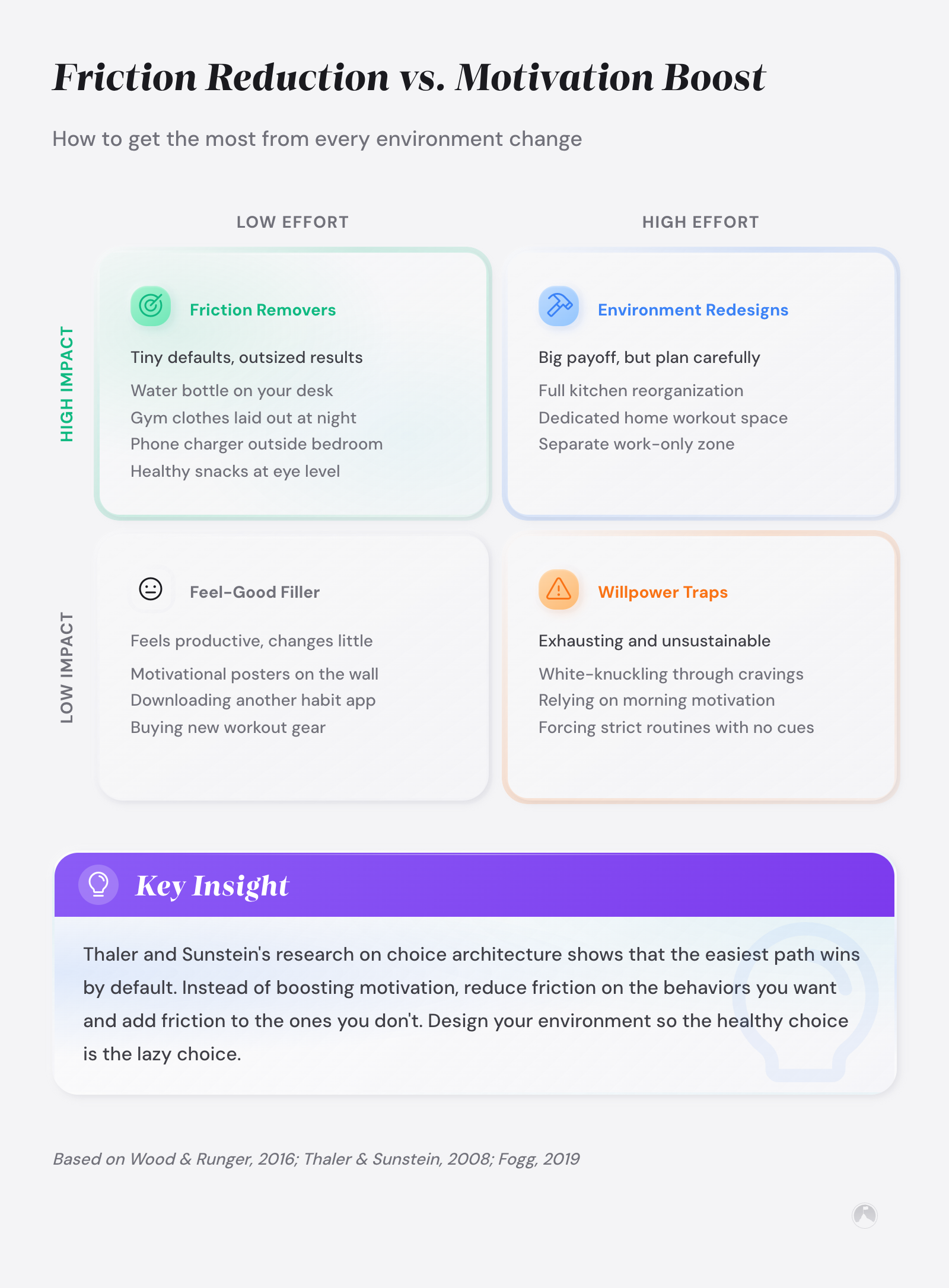
Thaler and Sunstein defined a nudge as “any aspect of the choice architecture that alters people’s behavior in a predictable way without forbidding any options or significantly changing their economic incentives” [2]. Putting fruit at eye level counts as a nudge. Banning junk food does not. This distinction matters for home habit design: you’re not eliminating choices. You’re making the better choice the easier one.
Defaults are the clearest example. When retirement plans switched from opt-in to opt-out enrollment, participation jumped from roughly 49% to 86% [2]. The behavior didn’t change. The default changed. And your home is full of defaults you’ve never questioned – where you sit, what you see first when you open the fridge, which app your thumb reaches for.
Three principles from choice architecture translate directly into home habit design:
| Principle | How It Works | Home Example | |———–|————-|————–| | Default effect | People stick with the pre-set option | Leave a book on your pillow so reading is the default before sleep | | Visibility bias | Visible items get chosen more often | Keep water bottles on the counter, hide soda in a back cabinet | | Mapping | Connect actions to outcomes clearly | Post a habit streak calendar next to your front door | | Feedback | Show progress in real time | Use a clear water bottle with hour markers |Knowing these principles is the first step. But applying them requires a practical method for finding exactly where your current environment is working against you. That method starts with friction.
Friction Manipulation: Why Fewer Steps Beats Stronger Motivation
Kurt Lewin, the father of modern social psychology, proposed a simple idea in the 1940s that still holds: behavior is a function of the person and their environment, expressed as B = f(P,E) [3]. He described behavior as sitting in a “force field” between driving forces pushing toward change and restraining forces pushing against it. Most people try to add driving force – more motivation, more reminders, more guilt. Lewin argued the smarter move was removing restraining forces. Reduce the friction.
BJ Fogg, founder of Stanford’s Behavior Design Lab, built on this insight with his Behavior Model: B = MAP, where Behavior happens when Motivation, Ability, and a Prompt come together at the same moment [4]. His central design principle is blunt: increasing ability by making a behavior easier is almost always more effective and more sustainable than trying to increase motivation. Motivation fluctuates with your mood, your energy, your sleep. Simplicity stays constant.
This is where the concept we call the Friction Audit comes in – our framework at goalsandprogress.com for applying Lewin’s and Fogg’s principles to your home. The idea is straightforward: pick a habit you want to build, then map every single physical step between your current position and doing that behavior. Count them. Then ask: which steps can I remove?
How to Run a Friction Audit
Take the example of a morning exercise habit. Here’s what the friction map might look like before any changes:
- Step 1: Wake up and decide to exercise (decision friction)
- Step 2: Walk to dresser and find workout clothes (search friction)
- Step 3: Change out of pajamas (effort friction)
- Step 4: Walk downstairs to find shoes (location friction)
- Step 5: Look for headphones (search friction)
- Step 6: Fill water bottle (preparation friction)
- Step 7: Begin exercise
After a Friction Audit redesign: sleep in workout clothes (removes steps 2-3), place shoes and headphones by the bed (removes steps 4-5), pre-fill the water bottle the night before (removes step 6). You’ve collapsed seven steps into two: wake up and start. Every friction step removed from a desired habit makes that habit roughly twice as likely to happen, according to Fogg’s research on behavior design [4].
The reverse works for habits you want to break. Want to stop scrolling social media before bed? Add friction. Move the phone charger to another room.
Log out of apps so you need to re-enter passwords. Put the phone in a drawer with a rubber band around it.
Each added step is a speed bump that gives your conscious mind time to intervene. You don’t need to ban anything. You just need to make the unwanted behavior slightly harder than the alternative.
If you’re working on building a full routine, not just a single habit, our guide on habit stacking for beginners shows how to chain individual habits into sequences that reinforce each other.
Cue Placement: Where Should You Put Visual Triggers?
Wendy Wood’s research at USC identifies context cues as the engine of habit formation [1]. When you repeatedly perform a behavior in a stable context – same place, same time, same surrounding objects – your brain builds an automatic association between that context and the behavior. The cue fires, and the habit follows without conscious effort. This is how 43% of your daily actions run on autopilot.
But not all cue placements are equal. Behavioral research shows that objects in your primary sight line receive 300-400% more attention than objects that require visual search [4]. This means the guitar propped against the couch gets played. The guitar in the closet collects dust.
Same instrument. Same person. Same intentions. The only variable is visibility.
Cue placement for habit formation follows a simple rule: the cue must sit in the natural path of an existing routine, not in a special location that requires you to remember to look for it. A vitamin bottle next to the coffee maker works. A vitamin bottle in the medicine cabinet requires you to remember – and remembering is effort, which is friction.
A 2020 qualitative study at UCL tracked 39 participants trying to build a daily vitamin habit over three weeks [7]. Researchers found that successful cue placement was shaped by three factors: desire to minimize effort, prior experience with similar habits, and beliefs about what works. The participants who kept vitamins next to objects they already used daily (coffee mug, toothbrush) had the highest adherence. Those who relied on a single reminder or loosely defined plans performed worst.
| Cue Placement Strategy | Best For | Example | |———————-|———-|———| | Path interception | Habits tied to transitions | Gym bag blocking the front door | | Object pairing | Habits tied to existing routines | Journal next to coffee maker | | Sight-line anchoring | Habits needing daily reminders | Meditation cushion visible from bed | | Absence marking | Breaking unwanted habits | Empty phone holder on nightstand (phone charges in another room) |The connection between cue placement and the broader science of how habits form in your brain is covered in depth in our article on the neuroscience of habit formation. Context cues activate specific neural pathways in the basal ganglia, which is why stable environments speed up automaticity [1].
Why Do Habit Cues Stop Working After a Few Days?
Here’s a problem most environment design advice ignores. Your brain is built to tune out stable stimuli – a process called habituation. That inspiring quote you taped to your bathroom mirror? Your brain stopped reading it after about four days.
The yoga mat in the corner of the living room? It became visual furniture within a week.
Research on visual attention shows that items blending into their surroundings become functionally invisible within 3-5 days [4]. Your brain saves energy by filtering out anything that doesn’t change. It’s the same reason you stop hearing the refrigerator hum. Good cue design has to account for this.
Three strategies fight habituation:
- Rotate cue locations every 5-7 days. Move the journal from the kitchen counter to the coffee table. Move the resistance bands from the doorknob to beside the couch. The location change re-engages your brain’s novelty detection system.
- Change the cue’s appearance. Swap the color of your water bottle. Use a different sticky note color. Put a new cover on your habit tracker. Small visual novelty resets habituation without requiring a new system.
- Pair cues with existing transitions. Instead of a static cue, tie the trigger to an action you already do. “After I pour my first cup of coffee” is harder to habituate to than a Post-it note on the coffee machine, since the action itself renews each morning.
This is exactly why habit stacking for productivity works so well – it ties new behaviors to existing action cues rather than static visual objects, making them resistant to habituation.
How to Redesign Your Digital Environment for Better Habits
Your phone is an environment, too. And it’s probably the most poorly designed one in your life – not for the app makers, who’ve optimized it for engagement, but for you, the person trying to get things done. Environment design for habits applies to screens just as much as kitchen counters.
A 2023 study by Wickord and Quaiser-Pohl tested grayscale mode on 240 smartphone users and found a meaningful reduction in usage time [5]. A separate 2024 study by Dekker and Baumgartner tracked 84 participants over one week and confirmed that grayscale reduced daily screen time by about 20 minutes and increased perceived control over phone use [8]. Removing color from a smartphone screen reduces daily usage by 20 to 50 minutes across multiple peer-reviewed studies [5][8].
The mechanism is straightforward. App designers use bright colors and contrast to trigger dopamine responses. Red notification badges, bright app icons, colorful feeds – these are engineered cues.
Grayscale removes the reward signal, making the phone less interesting to your automatic system. Same phone, same apps, same content. Just less visually stimulating.
But grayscale is just one tool. Here’s a full digital friction manipulation toolkit:
| Digital Environment Change | Friction Type | Expected Impact | |—————————|—————|—————–| | Move social media apps off home screen | Access friction | Reduces casual opens by requiring search | | Log out of distracting apps after each use | Authentication friction | Adds 15-20 seconds of effort per open | | Enable grayscale mode | Reward friction | Reduces screen time 20-50 min/day [5][8] | | Turn off all non-human notifications | Trigger removal | Eliminates automated prompts to check phone | | Set phone to charge in another room overnight | Location friction | Breaks bedtime scrolling loop | | Use “Focus” or “Do Not Disturb” schedules | Temporal friction | Blocks interruptions during habit time |One study involving pharmacy students asked participants to change their phones to grayscale, disable social media notifications, remove social media icons from the home screen, and charge their phones away from their beds for three weeks [9]. Participants reported reduced phone use, increased productivity, and improvements in sleep quality and face-to-face interactions. The combination of multiple friction layers was more effective than any single change alone.
For a deeper look at building a distraction-resistant workspace with these digital principles, see the guide on digital focus environment setup in the productivity silo.
Room-by-Room Habit Environment Setup
Theory is useful. But you live in specific rooms with specific problems. Here’s a room-by-room walkthrough for applying choice architecture, friction manipulation, and cue placement throughout your home.
Kitchen
The kitchen is where nutritional habits either form or collapse. Visibility is the dominant force here. Keep healthy options at eye level in the refrigerator and on the counter. Store less healthy options in opaque containers on higher shelves or in back cabinets.
Pre-portion snacks into single servings so grabbing a healthy amount is the default. Place a full water bottle at the spot where you stand most often – near the coffee maker or next to the stove.
Bedroom
The bedroom controls your morning and evening routines. Lay out tomorrow’s clothes the night before to eliminate morning decision friction. If you want to read before bed, put the book on your pillow – literally in the way.
Move the phone charger to another room or across the bedroom (not on the nightstand). Place workout clothes and shoes at the foot of the bed if morning exercise is your target habit.
Living Room
Living rooms default to passive consumption. Fight that by making active habits more visible than the TV remote. Leave a guitar, sketchbook, or resistance bands in your usual sitting spot. Put the remote in a drawer so watching requires a conscious choice.
Position a reading lamp with a book next to your favorite chair. The first thing your eyes land on when you sit down becomes the default behavior.
Home Office
A dedicated workspace benefits from the tightest friction controls. Keep only the tools you need for your current task on the desk surface. Close your email client during deep work blocks. Place a water bottle and healthy snack within arm’s reach so you don’t need to leave and risk a distraction detour through the kitchen.
Position a visual habit tracker on the wall where you naturally look when thinking. For a full guide to optimizing your focus environment, our article on optimizing environment for focus covers the wellbeing angle of workspace design.
What Are the Biggest Environment Design Mistakes?
Environment design for habits sounds simple on paper, and it is – until people overcomplicate it. The most common mistakes come from treating environment design as a one-time project rather than an ongoing system.
Mistake 1: Changing everything at once. Redesigning your entire home in a weekend feels productive but overwhelms your habit-forming capacity. Phillippa Lally’s research at University College London showed that habit formation takes a median of 66 days, and simpler behaviors automate faster than complex ones [6]. Start with one room, one habit, one cue. Add more once the first feels automatic.
Mistake 2: Relying on willpower as a backup. If your environment design requires you to “just resist” when the cue isn’t working, the design has failed. Redesign the space so resistance isn’t needed. Wood’s research is clear: when context cues are disrupted, goals drive behavior again – but in stable contexts, the environment runs the show [1].
Mistake 3: Ignoring the digital layer. You can have a perfectly designed kitchen, bedroom, and living room, and still lose two hours a night to your phone. The digital environment needs the same friction analysis as the physical one. If you haven’t done a diagnostic on why your habits are failing, the phone is a good place to start looking.
Mistake 4: Setting up cues without pairing them to specific actions. A yoga mat in the living room isn’t a cue – it’s decoration. A yoga mat placed in front of the TV with your favorite yoga video queued up on the screen, triggered by putting your coffee mug down after your morning cup? That’s a cue linked to a behavior. The specificity of the cue-action link matters more than the cue itself [7].
If you’ve been struggling with habit consistency and suspect it’s more than just your environment, our full habit formation complete guide covers every angle from neuroscience to accountability systems.
How Does Environment Design Compare to Other Habit Strategies?
Environment design isn’t the only approach to habit formation. But it’s uniquely effective for one specific reason: it doesn’t depend on how you feel. Motivation-based strategies work great on Monday morning. They collapse by Wednesday afternoon. Goal-setting helps with direction but doesn’t address the moment-to-moment decisions that shape your day.
The ideal approach combines environment design with one or two other strategies. Pair cue placement with habit stacking to build sequences. Use a 30-day challenge framework to give the new environment time to generate automaticity.
Add a habit tracking app for feedback, which is one of the four key principles of choice architecture [2]. Tracking gives you visibility into whether your environment changes are producing results – and feedback loops keep you iterating on the design rather than abandoning it.
Habit system design starts with the spaces you inhabit, not the goals you set. If the physical and digital spaces around you aren’t engineered for the right defaults, no amount of tracking or stacking or accountability will compensate for long. For more on how to think about the full architecture of a habit system, our guide on habit system design architecture covers the big-picture framework.
| I can see the cue from where I spend the most time | |
| All materials are within arm’s reach (no walking to another room) | |
| No decisions are required (clothes picked, app opened, page bookmarked) | |
| The cue is paired with a specific existing routine, not floating alone | |
| I’ve added friction to the competing unwanted behavior | |
| I have a plan to rotate or refresh the cue in 5-7 days |
Ramon’s Take
Swap one thing in your physical space before you close this tab. Seriously, just one thing. The research is solid but it means nothing if your phone is still charging next to your bed tonight.
Environment Design for Habits: Conclusion
Environment design for habits is the most underused tool in behavior change. It doesn’t require more discipline, more motivation, or more time. It requires a different way of looking at the rooms and screens you already live in. Every surface, every default, every arrangement is either pushing you toward the habits you want or pulling you toward the ones you don’t. Choice architecture, friction manipulation, and cue placement give you specific, research-backed methods to tilt that balance in your favor.
The space you’re sitting in right now is already shaping what you’ll do next. The question is whether you designed it that way, or whether it happened by accident.
Next 10 Minutes
- Pick one habit you want to build and count every physical step between you and doing it
- Move one object so your target habit cue is in your primary sight line
- Add one friction step to an unwanted habit (log out of an app, move the remote to a drawer)
This Week
- Run a full Friction Audit on your morning and evening routines
- Redesign one room following the cue placement strategies above
- Apply at least two digital friction changes to your phone (grayscale, app relocation, or notification removal)
There is More to Explore
For a broader look at building complete habit systems, our habit formation complete guide connects environment design with tracking, stacking, accountability, and the neuroscience behind lasting change. If you’re curious about why habits break down in the first place, the why habits fail complete guide diagnoses the most common failure points.
And for designing digital workspaces that protect your focus time, the digital focus environment setup guide applies many of the same friction principles to your work environment.
Related articles in this guide
Frequently Asked Questions
How long does it take for environment design changes to create automatic habits?
Habit automaticity takes a median of 66 days according to Lally et al.’s research at UCL, with a range of 18 to 254 days depending on behavior complexity [6]. Simpler behaviors like drinking water reach automaticity faster than complex ones like exercise. Stable environmental cues speed up the process by giving your brain consistent context to build associations with [1].
Does environment design for habits work for people with ADHD?
Environment design is particularly effective for ADHD brains since it reduces the executive function demands that ADHD makes harder – planning, remembering, and initiating. Visual cue placement puts the trigger directly in your sight line, bypassing the need to remember. Friction reduction removes the activation energy that stops task initiation. Our guide on habit building with ADHD covers additional strategies built for neurodivergent brains.
What is the most effective digital environment change for reducing phone use?
Grayscale mode has the strongest evidence, reducing daily screen time by 20-50 minutes across multiple studies [5][8]. Combining grayscale with notification removal and app relocation from the home screen produces larger effects than any single change. One multi-strategy study found that participants who applied all three changes together saw reductions in problematic use, improved sleep quality, and increased face-to-face interactions [9].
Can environment design replace willpower for breaking bad habits?
Environment design does not replace willpower entirely, but it drastically reduces how often you need it. Wendy Wood’s research shows that in stable contexts, environmental cues drive behavior more than conscious goals [1]. By adding friction to unwanted habits (logging out, relocating triggers, adding physical barriers), you create pauses that give your conscious decision-making system time to override automatic behavior. The goal is making the right choice the default, not eliminating choice altogether.
How do I keep visual habit cues from becoming invisible over time?
Habituation causes your brain to filter out stable visual stimuli within 3-5 days. Three strategies counter this: rotate cue locations every 5-7 days, change the cue’s appearance (swap colors, covers, or containers), and pair cues with action transitions rather than static placements. Event-based cues like ‘after I pour coffee’ resist habituation better than object-based cues like a sticky note on the mirror [7].
Should I focus on adding good habit cues or removing bad habit triggers first?
Start with removing bad habit triggers. Friction research suggests that removing restraining forces is more effective than adding driving forces for behavior change [3]. Clearing your environment of unwanted cues (moving the phone, hiding snacks, logging out of apps) creates immediate space for new behaviors. Once the competing behaviors lose their environmental advantages, adding cues for desired habits becomes more effective.
References
[1] Wood, W., & Runger, D. “Psychology of Habit.” Annual Review of Psychology, 67, 289-314, 2016. DOI
[2] Thaler, R. H., & Sunstein, C. R. Nudge: Improving Decisions about Health, Wealth, and Happiness. Yale University Press, 2008.
[3] Lewin, K. “Frontiers in Group Dynamics: Concept, Method and Reality in Social Science.” Human Relations, 1(1), 5-41, 1947. DOI
[4] Fogg, B. J. Tiny Habits: The Small Changes That Change Everything. Houghton Mifflin Harcourt, 2019.
[5] Wickord, L.-C., & Quaiser-Pohl, C. “Suffering from Problematic Smartphone Use? Why Not Use Grayscale Setting as an Intervention.” Technology in Society, 74, 102311, 2023. DOI
[6] Lally, P., van Jaarsveld, C. H. M., Potts, H. W. W., & Wardle, J. “How Are Habits Formed: Modelling Habit Formation in the Real World.” European Journal of Social Psychology, 40(6), 998-1009, 2010. DOI
[7] Judah, G., Gardner, B., Kenward, M. G., DeStavola, B., & Aunger, R. “Exploratory Study of the Impact of Perceived Reward on Habit Formation.” BMC Psychology, 6(1), 62, 2018. DOI
[8] Dekker, C. A., & Baumgartner, S. E. “Is Life Brighter When Your Phone Is Not? The Efficacy of a Grayscale Smartphone Intervention Addressing Digital Well-Being.” Digital Health, 9, 2023. DOI
[9] Holte, A. J., Giesen, L., & Ferraro, F. R. “Color Me Calm: Grayscale Phone Setting Reduces Anxiety and Problematic Smartphone Use.” Current Psychology, 42, 2023. DOI





