

You finished the book three weeks ago and can’t explain a single idea from it
You read the book. Highlighted passages. Told someone it changed how you think. Three weeks later, a colleague asks what you learned, and you’re searching for even one coherent thought to share.
The gap between consuming information and retaining it is the problem a personal learning system solves. Wang and colleagues found in a 2023 study published in Frontiers in Psychology that self-directed learners who structured their approach showed better retention and satisfaction than those who studied without direction [1]. The issue isn’t your memory. It’s that most people design for input when the real gains come from output.
What if every note you captured, every article you saved, every course you finished could connect directly to a goal you’re working toward right now? That shifts building a personal learning system from consumption into something that compounds. Not another app to maintain. An engine that actually works.
A personal learning system is a structured combination of tools, habits, and workflows that captures, organizes, and retrieves knowledge in service of specific goals, distinguishing it from passive note-taking or unstructured information consumption by linking every piece of captured knowledge to a concrete output or project.
What you will learn
- Why most personal learning systems collapse within two weeks
- The Input-Output Bridge framework that links what you capture to what you build
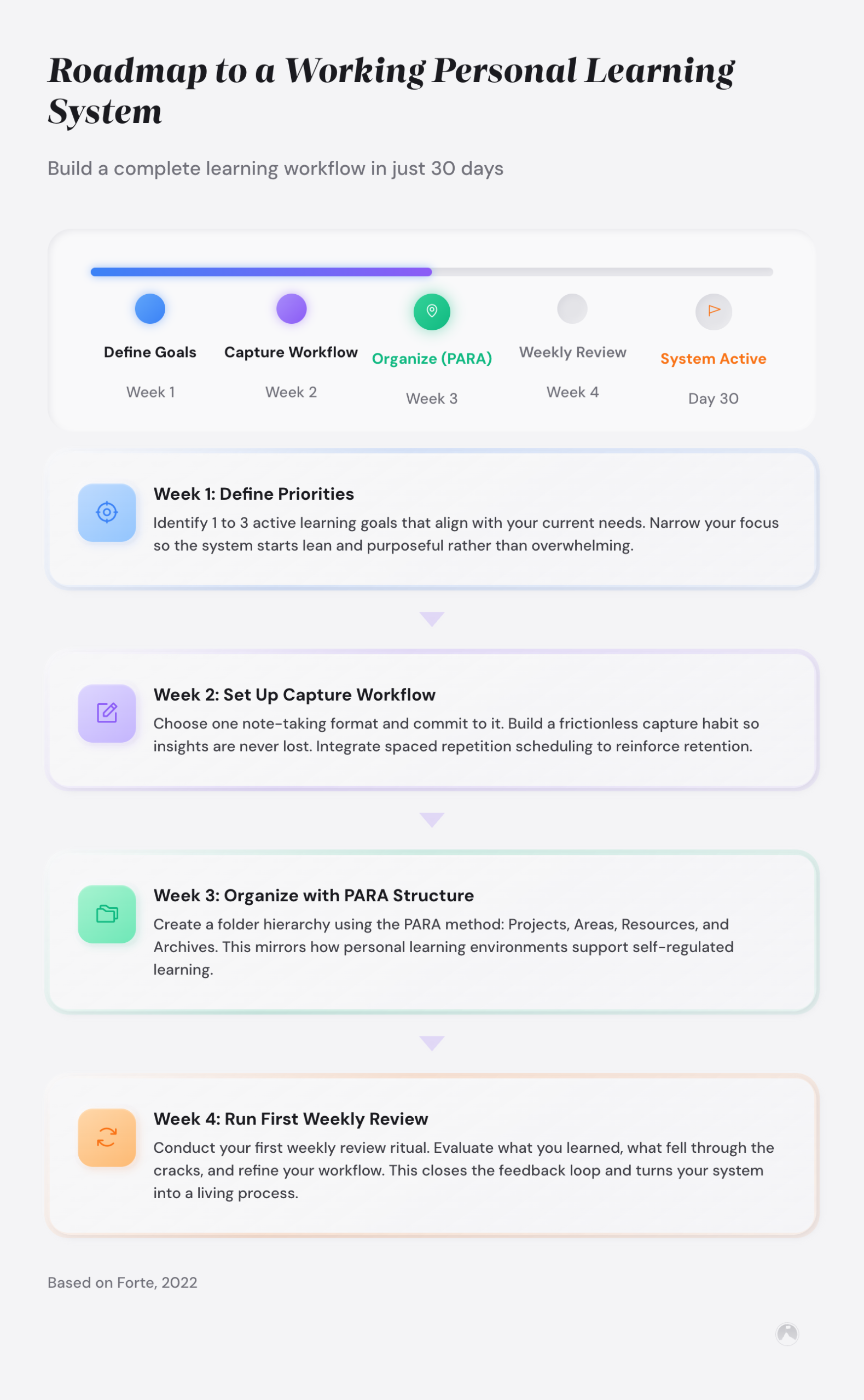
- How to build your personal learning system in four stages
- How to choose PKM tools without falling into the tool-switching trap
- What to do when the system starts gathering dust
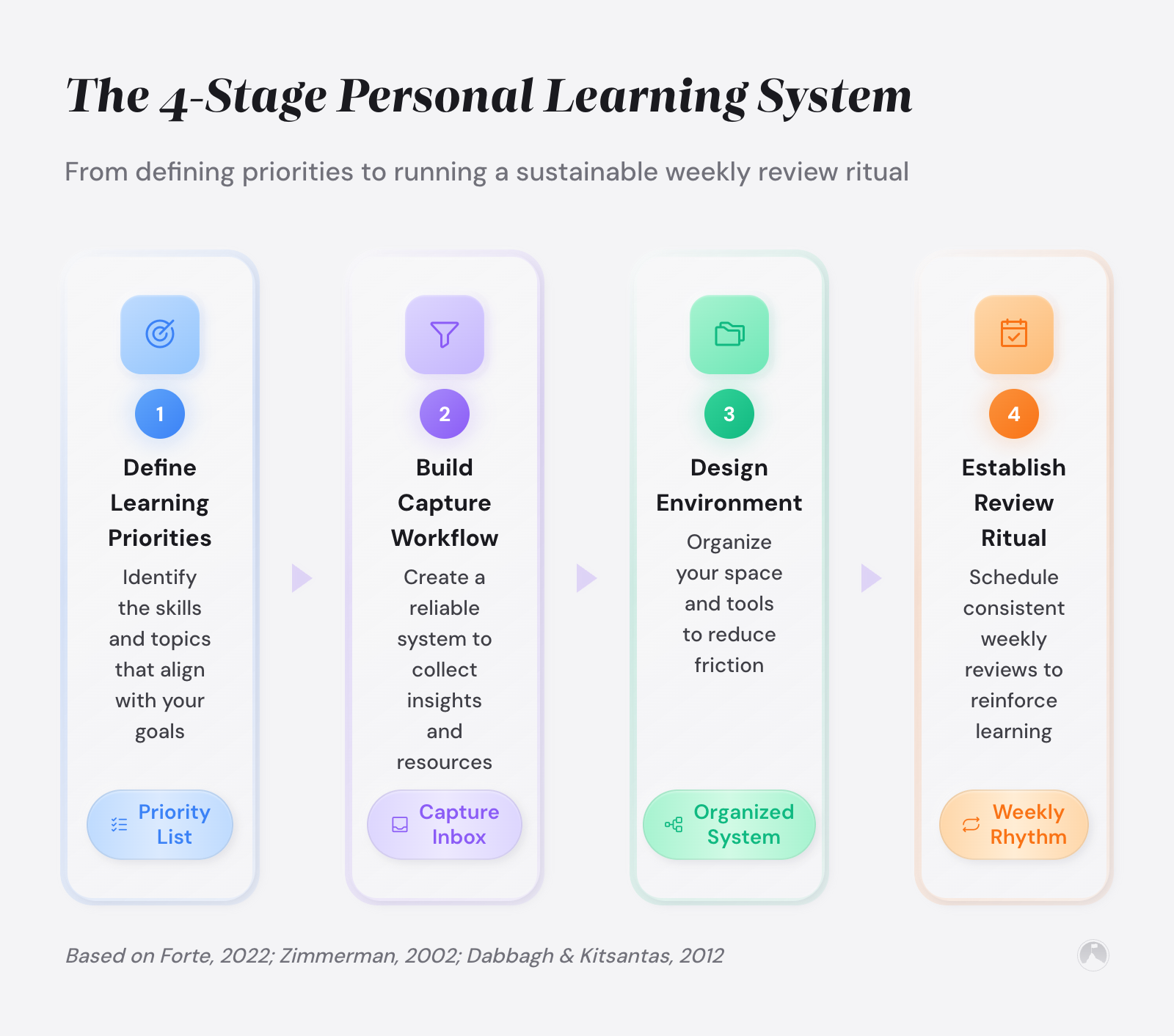
To build a personal learning system, follow four stages: (1) define 2-3 active learning goals, (2) create a single capture workflow tagged to those goals, (3) organize notes by connections rather than categories, and (4) establish a 15-minute weekly review ritual. The key principle is linking every captured note to a specific project or goal.
Key takeaways
- A personal learning system works when every captured note connects to a goal or active project.
- The Input-Output Bridge framework links knowledge capture to concrete outputs, preventing passive hoarding.
- Start with one capture tool before expanding. Tool-switching kills more systems than any design flaw.
- A weekly 15-minute review separates systems that compound from systems that decay.
- Spaced repetition, documented by Sean Kang’s 2016 review [2], and active recall are the two leading retention techniques in cognitive science.
- The zettelkasten method works by creating connections between ideas, not filing notes into rigid categories.
- Complexity is the enemy of consistency. The simplest system you’ll use beats the perfect system you won’t.
- The most productive review ritual is the one short enough that you’ll do it every week without negotiation.
Why do most personal learning systems fail within two weeks?
Most people design their learning systems backward. They pick a tool, build an elaborate folder structure, and then try to fit their actual learning into the architecture. Two weeks later the system is untouched, and they’re back to dumping notes into random text files.
The root cause isn’t discipline. It’s a structural mismatch. Dabbagh and Kitsantas demonstrated in their research on personal learning environments that systems succeed when they’re built around existing workflows rather than imposed as separate obligations [3]. So the first fix isn’t a new app. It’s working with what you already do.
But there’s a second, deeper problem. The capture habit is easy to start. The retrieval habit almost never forms.
You save articles. Highlight books. Clip podcasts. But when you sit down to write a proposal or make a decision, you don’t open your notes. You start from scratch. The system becomes a cemetery for good intentions.
A personal learning system fails when captured knowledge has no path back to the learner’s active work.
How does the input-output bridge make learning compound?
Most approaches treat knowledge like inventory. You collect it, categorize it, hope you find it later. The systems that actually work operate more like a supply chain. Every piece of knowledge has a destination before it arrives.
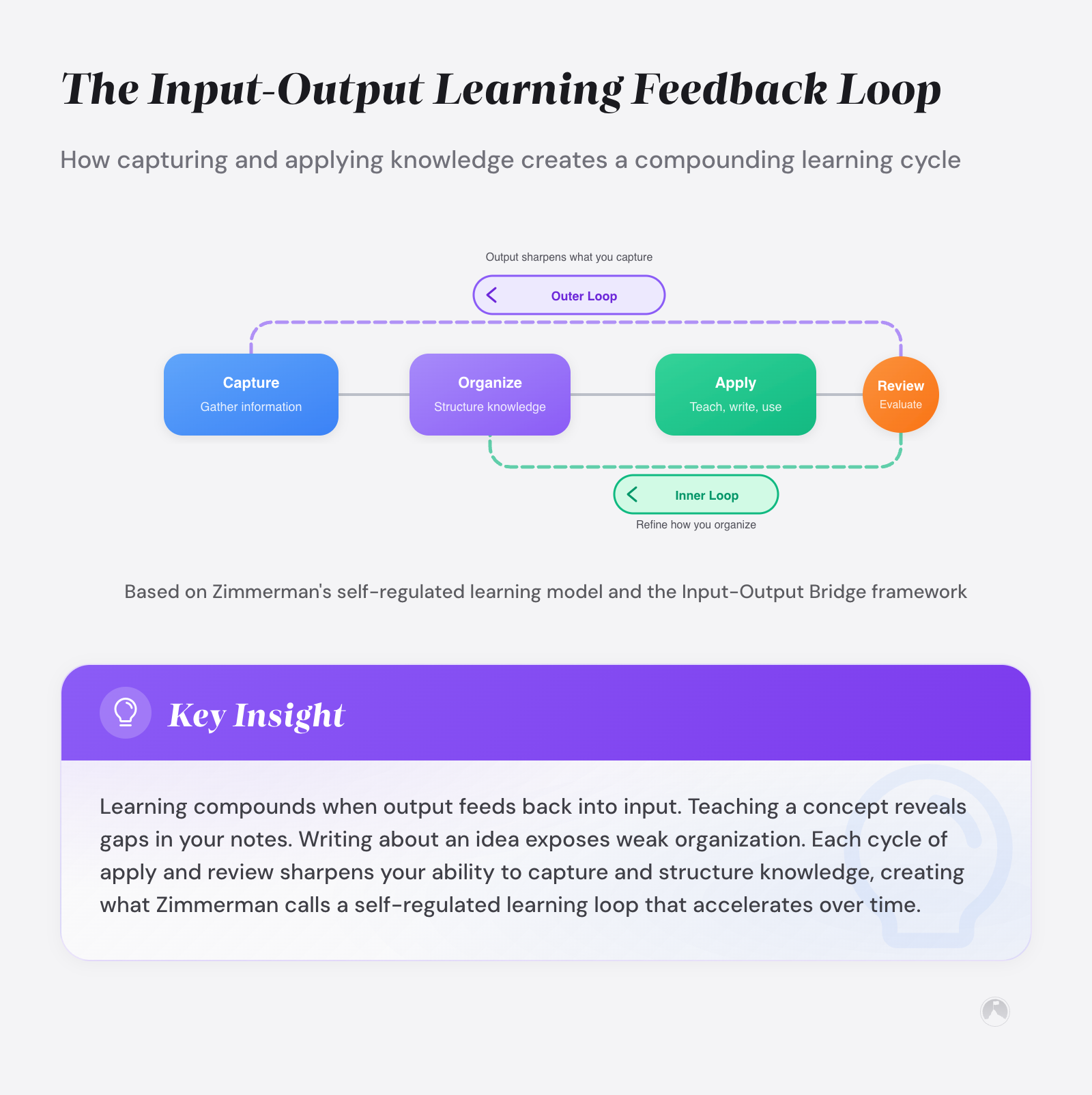
We developed a framework we call the Input-Output Bridge. Before saving any piece of information, answer one question: “Which goal or project does this serve right now?”
The framework has three parts. An input filter that catches only information relevant to your active projects. A processing step where you rewrite captured information in your own words and tag it with the specific goal it supports. And an output trigger that surfaces relevant notes when you sit down to work on a project.
The Input-Output Bridge is an original goal-linking framework that filters knowledge capture through three components: an input filter admitting only information relevant to active projects, a processing step that rewrites captured information with goal tags, and an output trigger that surfaces relevant notes at project start – distinguishing it from passive collection systems by requiring every captured note to have a destination before it arrives.
Here’s what that looks like in practice. Say you’re training for a career shift into product management. You read an article about stakeholder mapping. Instead of filing it under “Product Management” and forgetting it, you process the key ideas in your own words and tag them with your active project: “Prepare for PM interview.” Next time you sit down to prepare, those notes appear. The Input-Output Bridge pairs well with creative thinking techniques that help you draw unexpected connections between ideas.
Barry Zimmerman’s research on self-regulated learning supports this approach. Students who connected new information to specific goals showed measurably better academic outcomes than those who studied without direction [4]. The bridge between input and output is what transforms knowledge into something usable.
Quick test: Is your capture filtered?
Open your notes app right now. Pick any 3 recent notes. Can you name the specific goal or project each one serves? If you can’t connect at least 2 of 3 to active work, your capture system is running without a filter.
Knowledge without a destination is information. Knowledge with a destination is a tool.
Building a personal learning system: a four-stage process
This process works across any personal knowledge management system. Digital note-taking systems like Obsidian and Notion, the zettelkasten method, even paper-based approaches. The stages build on each other, so resist the urge to skip ahead.
Stage 1: define your learning priorities
Your learning system needs a filter. That filter is your current goals. Write down the 2-3 projects or goals you’re actively working on. These become the categories that matter. Everything else is noise, at least for now.
This is where the Input-Output Bridge diverges from other advice. Most systems tell you to capture everything. This approach says capture only what serves your active work. The difference sounds small, but it’s the reason some systems stay alive and others drown in uncategorized bookmarks. If you’re still figuring out which goals to prioritize, our guide on cultivating a growth mindset for lifelong learning can help you think through that process.
Stage 2: build your capture workflow
Your capture workflow needs to be fast and available wherever you consume information. That means one tool for capture, not five. Pick one inbox (and only one). A single note on your phone, a dedicated folder in Obsidian, or a physical pocket notebook.
Tiago Forte’s second brain methodology uses a similar principle. His PARA framework separates capture-time decisions from organization-time decisions [5]. The difference in the Input-Output Bridge approach is that you tag captured items with a goal label immediately, during capture. This prevents the pile-up of unprocessed notes that kills most information management workflows.
A capture workflow is a repeatable process for moving ideas, quotes, and insights from consumption sources into a centralized system, designed to operate with minimal friction so the learner doesn’t lose the thought between encountering it and recording it.
Stage 3: design your learning environment and organization structure
This is where people over-engineer. Elaborate folder hierarchies, color-coded tags, nested databases. They spend more time organizing than learning. Your knowledge organization system – whether digital or analog – needs exactly two layers: goals (your active projects) and connections (links between related ideas). Good learning environment design means a structure simple enough to maintain on your worst day.
The zettelkasten method is a note-taking and knowledge management system developed by German sociologist Niklas Luhmann that organizes individual ideas as atomic notes connected through explicit links rather than hierarchical folders, enabling unexpected connections to emerge between concepts across different domains.
In his 1981 essay “Communicating with Slip Boxes,” Luhmann described his zettelkasten as a “conversation partner” that could surprise him with unexpected connections, attributing much of his prolific output to the interconnections between ideas [6]. Rather than filing notes into rigid categories, he linked individual ideas to each other.
Connections between notes produce more insight than categories assigned to notes. Link a note about stakeholder mapping to one about communication frameworks, and patterns emerge that no filing system surfaces.
| Organization approach | Best for | Strengths and tradeoffs |
|---|---|---|
| Folder hierarchy | Beginners with few notes | Low setup time, medium retrieval, limited insight generation |
| Tag-based system | Category thinkers | Medium setup, fast retrieval, moderate insight generation |
| Zettelkasten (linked notes) | Writers, researchers, idea workers | Higher setup investment, fast retrieval, high insight generation |
| Goal-linked (Input-Output Bridge) | Goal-driven professionals | Low-medium setup, fast retrieval, high insight generation |
Stage 4: establish your review ritual
A learning system without a review habit is a filing cabinet nobody opens. The review ritual transforms static notes into active knowledge. And it doesn’t need complexity.
Set aside 15 minutes once a week. Do three things: revisit notes you captured that week, move processed notes into the relevant goal folder, and scan one older project folder for connections to your current work. That last step is where compounding happens. An idea from three months ago suddenly becomes relevant today.
Spaced repetition is a learning technique that schedules review sessions at increasing time intervals, leveraging the spacing effect – the cognitive science finding that distributed practice produces stronger long-term retention than concentrated study sessions.
Sean Kang’s 2016 review in Policy Insights from the Behavioral and Brain Sciences demonstrated that spaced repetition produces significantly better long-term retention than cramming [2]. John Dunlosky and colleagues’ comprehensive review of 10 learning techniques, published in Psychological Science in the Public Interest, identified practice testing (active recall) as a “high utility” technique across diverse learner ages and material types [7]. Your weekly review only needs to surface notes relevant to your active work, leveraging what Roediger and Karpicke call the “testing effect” – the finding that retrieving information strengthens memory more than additional study [8]. For deeper strategies on how the brain encodes and retrieves knowledge, our article on neuroplasticity and learning covers the underlying neuroscience.
For example, if you captured a note about stakeholder mapping three weeks ago, your spaced review might surface it during this week’s scan of your “PM interview prep” folder. Seeing the note after a gap strengthens retrieval – you’re not just filing it, you’re practicing remembering it at increasing intervals.
Wang et al. (2023) found that self-directed learning experience predicted learning satisfaction in blended learning environments, with the effect mediated through deeper learning approaches – suggesting that structured self-direction shapes how learners engage with material, which in turn drives better outcomes [1].
The most productive review ritual is the one short enough that you’ll do it every week without negotiation.
How do you choose the right PKM tools without getting stuck?
Tool selection kills more systems than any structural problem. You spend three weeks comparing Obsidian, Notion, Roam Research, and Logseq – reading threads, watching tutorials, importing sample databases. Meanwhile, you haven’t captured a single note that matters.
Here’s a faster filter. If you want linked notes with local storage, use Obsidian. If you want databases with collaboration, use Notion. If you want simplicity with zero setup, use Apple Notes or Google Keep.
| Feature | Obsidian | Notion |
|---|---|---|
| Storage type | Local markdown files | Cloud-based |
| Linking capability | Bidirectional links, graph view | Page references, relations |
| Collaboration | Limited (paid sync) | Built-in real-time collaboration |
| Mobile app | Functional, some sync friction | Polished, full-featured |
| Learning curve | Moderate (plugin ecosystem) | Moderate (database setup) |
| Price | Free core, paid sync/publish | Free tier, paid for teams |
The tool matters far less than using it consistently. Every PKM tool on the market can support a functional self-directed learning framework. None of them build the habit for you.
Personal knowledge management (PKM) is the practice of collecting, organizing, and maintaining knowledge assets for personal or professional use, distinct from organizational knowledge management by its focus on individual workflow optimization and self-directed retrieval.
If you want deeper tool comparisons, our guide on best learning apps covers the full range of digital note-taking systems. For now: pick one and start. Migrate later. You can’t migrate what you never captured.
The best PKM tool is the one you’ll open every day without being reminded.
What do you do when your personal learning system starts breaking down?
Every system decays. That’s not a design failure. It’s how life works. Your goals change, your interests shift, the knowledge organization system that worked last quarter doesn’t fit this quarter.
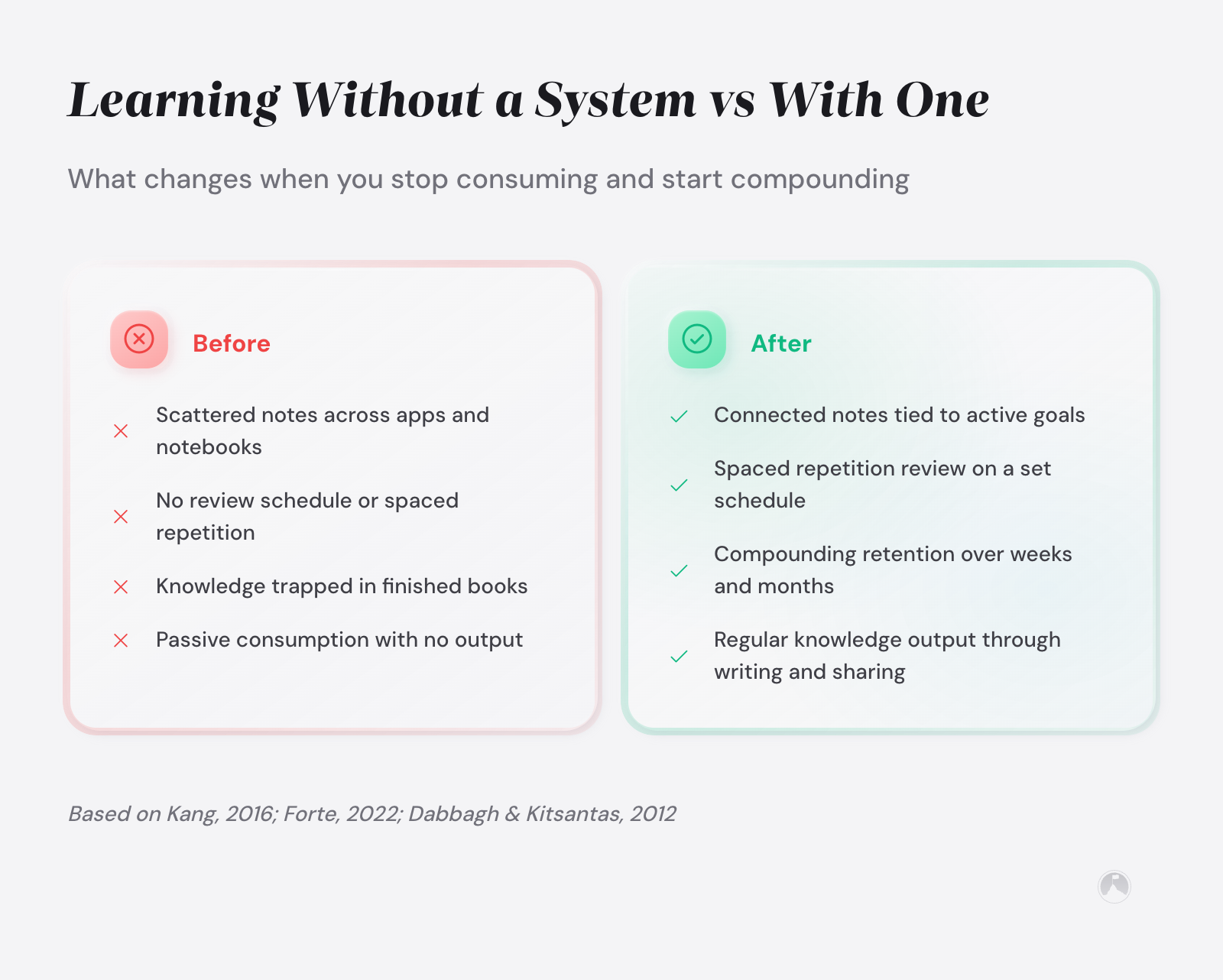
The question isn’t how to build a system that never breaks. It’s how to build one that’s easy to repair.
Here are the most common failure modes and their fixes:
The Capture Pile-Up. You’re saving everything, processing nothing. Fix: cut your capture sources to three maximum. Unsubscribe from newsletters you haven’t read in two weeks.
The Orphan Note Problem. Notes sit untagged, disconnected from active work. Fix: during your weekly review, delete or archive any note that doesn’t connect to a current goal. If it mattered, it’ll surface again.
The Tool Hop. You keep switching platforms hoping the next app fixes your inconsistency. Fix: commit to your current tool for 90 days. No migrations, no new apps. If you’re hitting creative blocks that go beyond your tools, our guide on overcoming creative blocks addresses the deeper patterns.
If you still find friction after 90 days, make one switch and lock in. The friction is almost always in the habit, not the software.
Dabbagh and Kitsantas (2012) found that personal learning environments succeed when built around the learner’s existing digital practices rather than imposed as entirely new structures, with self-regulated learning strategies bridging social media tools and meaningful academic outcomes [3].
Systems that survive real life are designed for repair, not perfection.
Making your personal learning system work with ADHD or a packed schedule
If you have ADHD or a schedule that leaves almost no discretionary time (parents, this is you), standard PKM advice can feel absurd. “Review your notes for 30 minutes each morning” assumes you own your mornings. Many people don’t.
For ADHD learners, priority one is reducing friction to near zero. Use voice notes instead of typed capture. Keep your information management workflow to one app maximum. Make your review ritual tiny – five minutes, not 15, triggered by something you already do. Your morning coffee. Your commute.
Building a personal learning network alongside your solo system can help too. Even texting a friend about what you learned that week creates an accountability loop that reinforces retrieval. For more strategies for neurodivergent learners, our guide on creative learning for ADHD goes deeper.
For working parents, the system needs to survive interruption. Every capture under 30 seconds, weekly review in a 10-minute window during naptime or after bedtime. Don’t build a system that needs an hour of quiet. Build one that works in the cracks.
Quick system health check
Answer these three questions weekly:
- Did I capture at least 3 notes this week connected to an active goal?
- Can I find a specific note from last month in under 60 seconds?
- Did I use a note from my system in real work this week?
If you answered “no” to two or more, your system needs a 15-minute tune-up, not an overhaul.
Ramon’s take
Before you design anything fancy, just pick one thing you want to actually use in the next 30 days. Capture only what serves that. Everything else is future you’s problem, and future you has way better apps anyway.
Conclusion: building a personal learning system that compounds
Building a personal learning system isn’t about finding the right app or adopting a trendy methodology. It’s about creating a bridge between what you consume and what you produce. The Input-Output Bridge gives you that structure: define your goals, capture only what serves them, connect ideas across projects, review weekly.
The research is consistent. Wang and colleagues showed that structured, self-directed learners retain more and report higher satisfaction [1]. Zimmerman’s work on self-regulated learning confirms that goal-linked approaches produce better outcomes [4]. Your system doesn’t need complexity. It needs connection.
The paradox of personal knowledge management is that the people who learn the most aren’t the ones who capture the most. They’re the ones who use what they capture.
Next 10 minutes
- Write down the 2-3 goals or projects you’re actively working on right now.
- Open one note app and create a folder or tag for each goal.
- Capture one idea from today’s reading and tag it with the goal it supports.
This week
- Set a 15-minute calendar reminder for your first weekly review session.
- Reduce your active information sources to three maximum (newsletters, podcasts, or feeds).
- Move any scattered notes from other apps into your central system with goal tags.
There is more to explore
For more on how learning connects to creativity and growth, explore our guide on creativity and learning strategies. To apply your learning system to picking up new abilities faster, see our piece on learning new skills quickly.
Related articles in this guide
- creative-learning-adhd-strategies
- creative-thinking-techniques
- cultivating-a-growth-mindset-for-lifelong-learning
Frequently asked questions
What are the core components of a personal learning system?
The minimum viable personal learning system needs only four parts: a single capture app, one tag per active goal, links between related notes, and a 15-minute weekly review. Most systems fail by over-building each component rather than getting all four operational at a basic level. The connection layer is what separates a learning system from a simple filing cabinet, since it enables ideas from different domains to inform each other.
How do I choose between Notion, Obsidian, and other PKM tools?
Choose based on your primary workflow need. Obsidian is best for linked note-taking with local file storage and works well for zettelkasten-style systems. Notion works better for database-driven organization and team collaboration. If you value simplicity above all, a basic tool like Apple Notes or Google Keep removes the friction that kills consistency. Pick one and commit for 90 days before evaluating.
What is the difference between note-taking and knowledge management?
Note-taking is the act of recording information during consumption. Knowledge management adds a processing layer: captured notes are rewritten in your own words, tagged with goals or projects, and linked to related ideas. The difference matters because raw notes decay in usefulness over time, but processed notes become more valuable as connections between them grow.
How often should I review and update my learning system?
A weekly 15-minute review handles note processing and connection scanning. A monthly 30-minute review should reassess whether your active goals have changed. A quarterly review of about an hour is where you archive completed goal folders, prune stale sources, and redefine your 2-3 active learning priorities for the next quarter. This layered cadence prevents both neglect and over-maintenance.
Should I use one tool or multiple tools for my learning system?
Start with one tool for your primary capture and organization. Adding a second tool, such as a spaced repetition app like Anki for retention-critical material, may help once your core system is stable. Three or more tools typically create integration headaches that outweigh their benefits, leading to the scattered-notes problem most people are trying to solve in the first place.
How do I avoid making my learning system too complicated?
Apply the 30-second rule: if any single step in your system takes more than 30 seconds, simplify it. Complexity accumulates through well-intentioned additions like color codes, nested tags, and elaborate templates. A quarterly simplification review where you remove any feature you haven’t used in 30 days keeps the system lean enough to survive your busy weeks.
Can I use analog tools for a personal learning system?
Analog systems work well for capture and initial processing, since handwriting has been shown to improve encoding and comprehension compared to typing [9]. The limitation is retrieval: paper notes lack the search and linking capabilities of digital tools. A hybrid approach using a pocket notebook for capture and a digital tool for organization and retrieval gives you the cognitive benefits of handwriting with the retrieval speed of software.
How long does it take to build an effective personal learning system?
A basic functional system can be operational in one afternoon. The capture workflow and goal-linked folders take about 30 minutes to set up. The real investment is building the review habit, which typically takes 4-6 weeks of consistent practice to become automatic. Resist the urge to over-build on day one. Start minimal and add structure only when you feel the need for it.
References
[1] Wang, Y., et al. “The Impact of Self-Directed Learning Experience on Learning Satisfaction in Blended Learning Environments.” Frontiers in Psychology, 2023. https://doi.org/10.3389/fpsyg.2023.1278827
[2] Kang, S. H. K. “Spaced Repetition Promotes Efficient and Effective Learning.” Policy Insights from the Behavioral and Brain Sciences, 2016. https://doi.org/10.1177/2372732215624708
[3] Dabbagh, N., and Kitsantas, A. “Personal Learning Environments, Social Media, and Self-Regulated Learning.” The Internet and Higher Education, 2012. https://doi.org/10.1016/j.iheduc.2011.06.002
[4] Zimmerman, B. J. “Becoming a Self-Regulated Learner: An Overview.” Theory Into Practice, 2002. https://doi.org/10.1207/s15430421tip4102_2
[5] Forte, T. Building a Second Brain: A Proven Method to Organize Your Digital Life and Unlock Your Creative Potential. Penguin Press, 2022. https://buildingasecondbrain.com/
[6] Luhmann, N. “Kommunikation mit Zettelkasten.” In Universitat als Milieu, edited by Andre Kieserling, 53-61. Bielefeld: Haux, 1981. English translation: https://zettelkasten.de/communications-with-zettelkastens/
[7] Dunlosky, J., et al. “Improving Students’ Learning With Effective Learning Techniques.” Psychological Science in the Public Interest, 2013. https://doi.org/10.1177/1529100612453266
[8] Roediger, H. L., and Karpicke, J. D. “The Power of Testing Memory: Basic Research and Implications for Educational Practice.” Perspectives on Psychological Science, 1(3), 181-210, 2006. https://doi.org/10.1111/j.1745-6916.2006.00012.x
[9] Mueller, P. A., and Oppenheimer, D. M. “The Pen Is Mightier Than the Keyboard: Advantages of Longhand Over Laptop Note Taking.” Psychological Science, 25(6), 1159-1168, 2014. https://doi.org/10.1177/0956797614524581





