


You downloaded three apps last month and opened none of them
You want to learn something new. Maybe a language, maybe a coding skill, maybe something you can’t quite name yet. So you search “best learning apps,” and the results hand you lists of 20 or 35 options with no real guidance on which one fits your life.
That approach creates the opposite of progress. It creates app fatigue.
The best learning apps match your specific goal – whether career advancement, creative exploration, language learning, or analytical thinking. Apps with structured feedback and active recall outperform passive video platforms. Active recall is a learning strategy in which the learner retrieves information from memory during study rather than passively reviewing material, strengthening neural pathways and improving long-term retention. And most learners benefit from stacking two complementary apps rather than relying on a single all-in-one platform.
A 2024 scoping review published in Heliyon, covering 69 studies on adaptive learning in higher education, found that apps offering real-time feedback and self-paced options produced stronger outcomes for adult learners than passive content delivery [1]. This guide sorts the best learning apps for adults by goal type, not by popularity. So you walk away with two or three tools you’ll open tomorrow instead of a bookmarked list you won’t revisit.
What you will learn
- How to choose a learning app based on your specific goal type
- Which learning apps for adults deliver career-relevant credentials
- Which apps match creative and hobby-based learning goals
- How the top language learning apps compare on fluency outcomes
- How AI-powered learning apps personalize your experience
- A side-by-side comparison of pricing, session length, and offline access
The best learning apps in 2026 are Coursera and LinkedIn Learning for career advancement, Skillshare and Domestika for creative hobbies, Duolingo, Pimsleur, and Babbel for language learning, and Brilliant for STEM and analytical thinking. The right choice depends on your goal type, daily time budget, and whether you need credentials or personal enrichment.
Key takeaways
- The best learning apps match your goal type – career advancement, creative exploration, or cognitive fitness.
- Apps with structured feedback and self-pacing outperform passive video platforms on adult retention [1].
- Micro-learning sessions of 5-15 minutes fit busy schedules and improve retention over longer formats [7].
- AI-powered learning apps adapt difficulty in real time, reducing wasted effort on material already mastered.
- Free tiers on most top platforms cover enough ground for casual learners and hobbyists.
- Goal-type matching followed by a two-app stack delivers better results than any single all-in-one platform.
- Offline access and streak forgiveness predict whether an app survives your second week.
How do you choose the right learning app for your goals?
Most listicles rank learning apps by star ratings or download counts. That tells you what’s popular. It doesn’t tell you what fits.
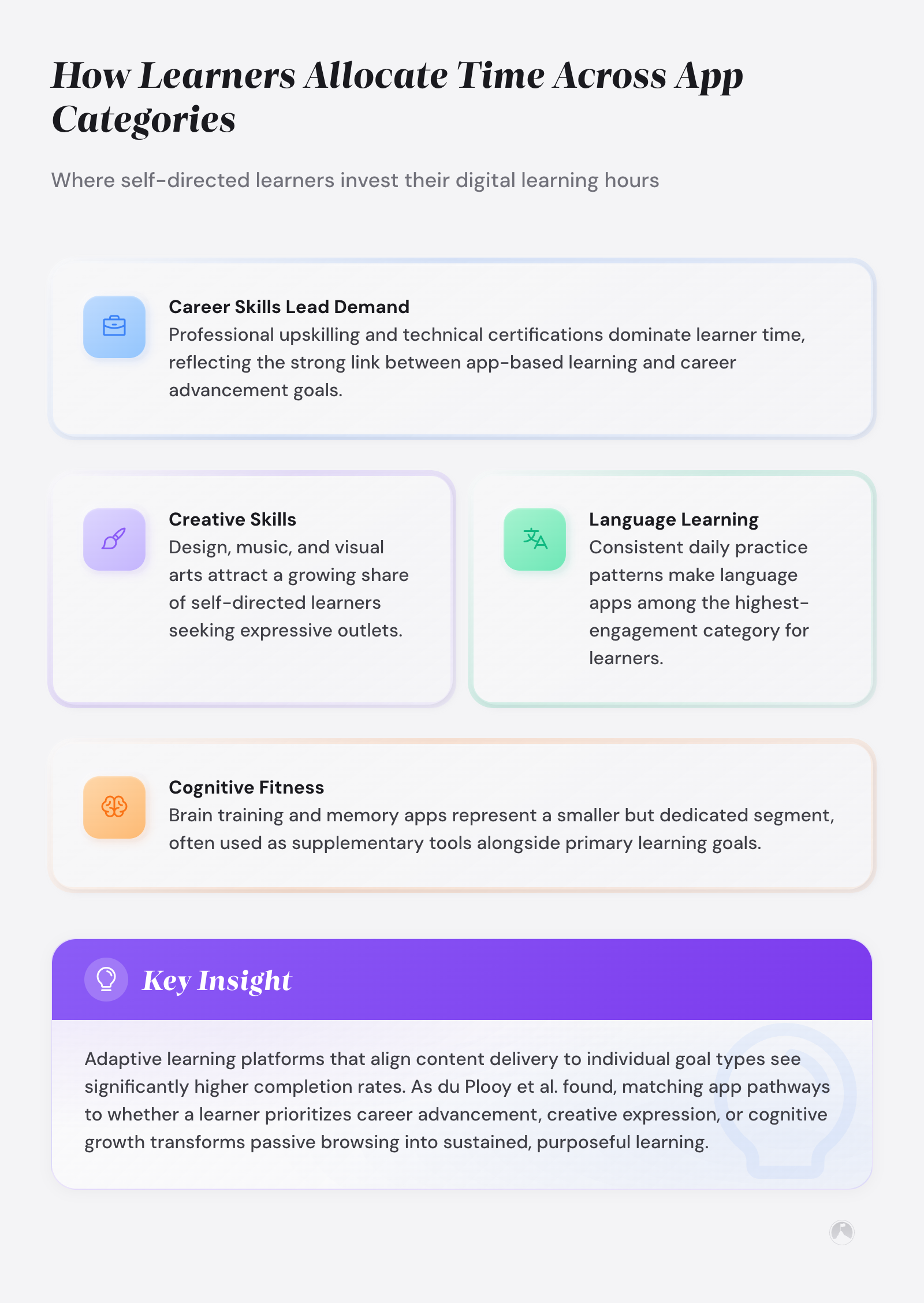
Huntington and colleagues identified the pedagogical features that separate high-performing educational apps from the rest: autonomous pacing, structured task sequences, personalization, and immediate feedback [2]. Those features matter more than brand recognition. And they show up in very different combinations depending on the app’s design philosophy.
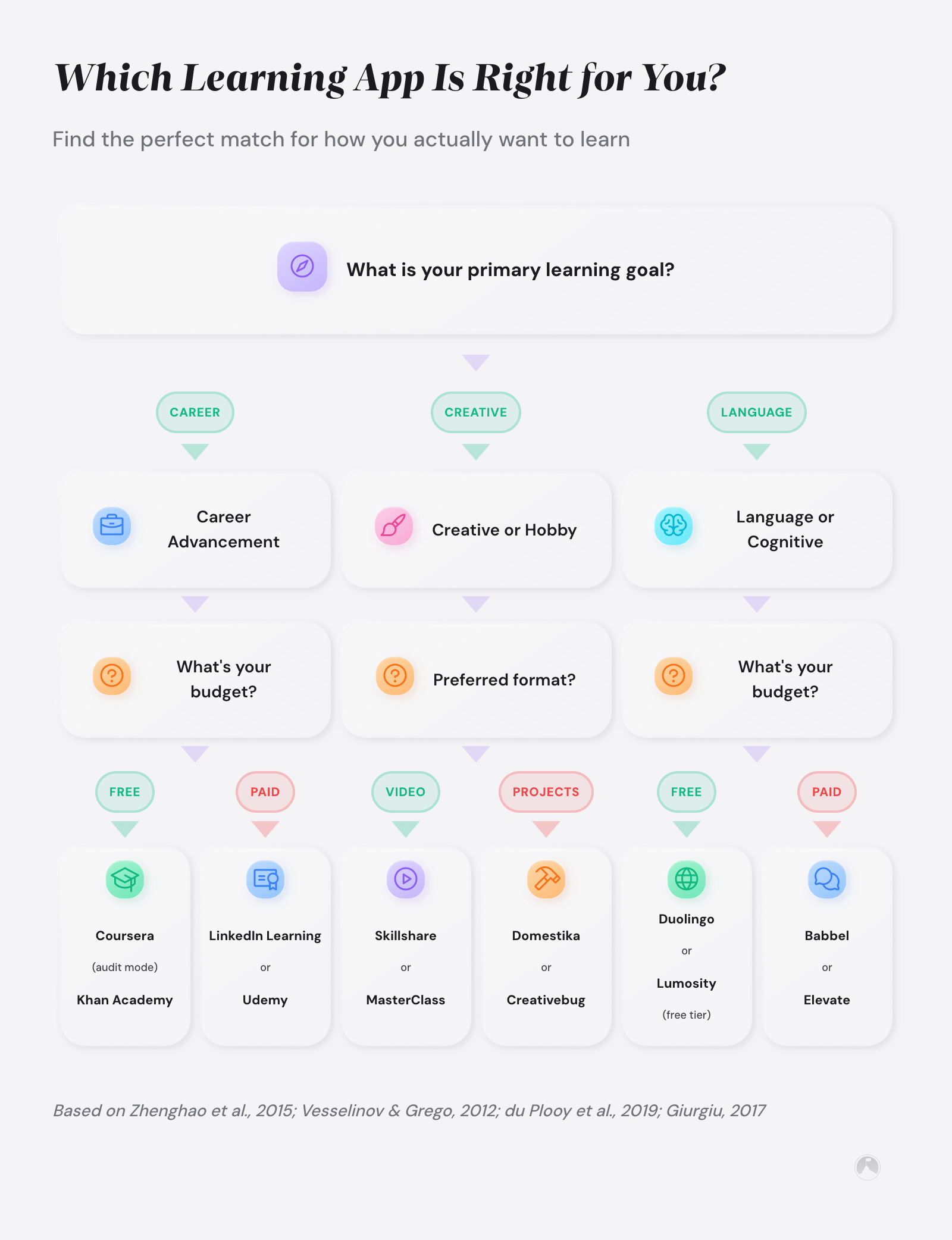
Before scrolling through recommendations, ask yourself one question: what does success look like in 90 days? If the answer is a new credential for your resume, you need a different app than someone who wants conversational Spanish for a vacation. And both of you need a different app than someone exploring watercolor painting for stress relief.
Learning apps for adults fall into four broad goal categories. Career advancement apps (Coursera, LinkedIn Learning) offer structured courses with certificates. Creative hobby apps (Skillshare, Domestika) prioritize project-based exploration. Language learning apps (Duolingo, Pimsleur, Babbel) focus on progressive fluency. And cognitive fitness apps (Brilliant, Headway) train analytical thinking through puzzles and book summaries.
The most effective approach to learning apps for adults is goal-type matching followed by a two-app stack: one deep-learning platform for structured progression and one daily micro-learning app for habit-building consistency.
“Personalized adaptive learning has a positive impact on teaching and learning outcomes, including its role in offering self-paced learning, real-time feedback, and flexibility.” – du Plooy, Casteleijn, and Franzsen, Heliyon [1]
Choosing a learning app by goal type narrows a field of hundreds down to three or four strong options in under five minutes. That’s the difference between downloading with intention and downloading with hope.
Best learning apps for career advancement: Coursera and LinkedIn Learning
1. Coursera
Coursera partners with universities like Stanford, Yale, and the University of Michigan to deliver full courses, professional certificates, and degree programs. The certificates carry weight on resumes because they come from recognized institutions. If you’re building credentials for a career pivot or promotion, this is the platform hiring managers recognize.
The free tier gives you access to audit most courses without a certificate. Paid plans start around $49 per month for Coursera Plus, which gives you certificates across thousands of courses. Sessions range from 20 minutes to several hours depending on the course structure.
But there’s a downside worth knowing about. MOOC completion rates typically fall in the single digits across platforms [5]. So the credential is valuable – if you actually finish the course. Pairing Coursera with a daily micro-learning habit (even just 15 minutes of review) dramatically improves your odds of crossing the finish line.
Best for: Professionals seeking recognized credentials. Skip if you want casual, bite-sized learning.
2. LinkedIn Learning
LinkedIn Learning (formerly Lynda.com) offers over 16,000 online course apps focused on business, technology, and creative skills. The standout advantage is integration with your LinkedIn profile – completed courses appear directly on your professional page, visible to recruiters without extra effort. LinkedIn Learning doubles as one of the most accessible productivity learning tools for busy professionals.
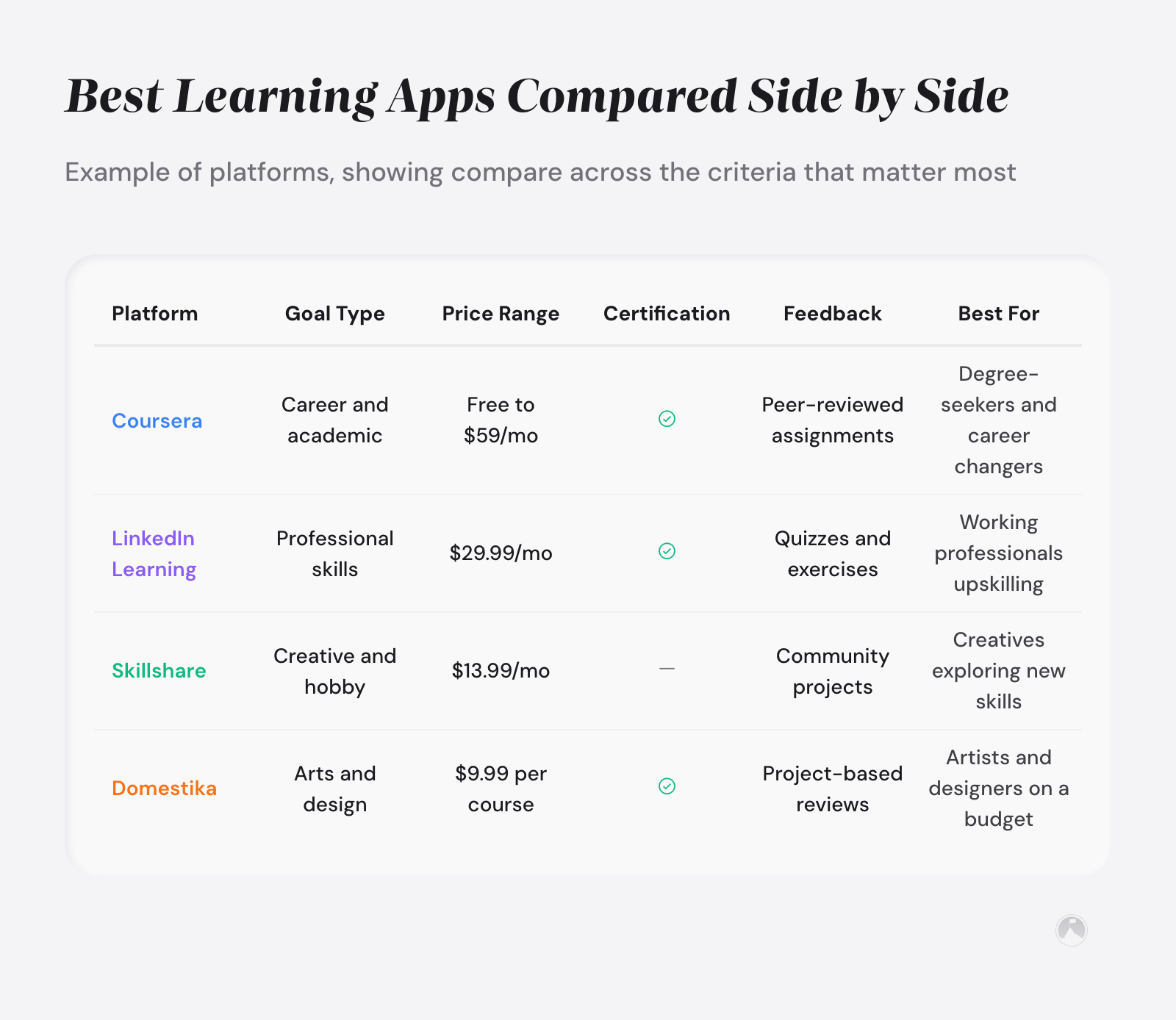
Pricing runs $29.99 per month or $239.88 annually, and many employers offer it as a workplace benefit. Courses break into short video chapters (typically 3-10 minutes each), making it friendlier for busy schedules than Coursera’s longer format.
The limitation is depth. LinkedIn Learning courses are broad introductions more often than they are deep dives. If you’re building a personal learning system, LinkedIn Learning works best as a starting point, not a destination.
Best for: Working professionals who want resume-visible skill development apps without committing to full university-style courses.
Best learning apps for creative and hobby learning: Skillshare and Domestika
3. Skillshare
Skillshare takes a project-based approach to learning. Instead of watching lectures and taking quizzes, you follow along as an instructor creates something, then build your own version. Subjects span illustration, photography, writing, animation, and music production.
The community layer is genuinely useful here. You can post your class project, get feedback from other learners, and see how different people interpreted the same assignment. That social accountability piece makes a surprising difference in follow-through.
Pricing is $13.99 per month on the annual plan for unlimited access. A free tier exists but limits your catalog significantly. Class lengths average 20-60 minutes broken into 5-10 minute segments. If you’re leveraging hobbies for a creativity boost, Skillshare’s project-first model fits better than any lecture-based platform.
Best for: Creative learners who learn by doing, not watching.
4. Domestika
Domestika focuses on creative skills with unusually high production quality. The instructors are working professionals – illustrators, designers, photographers, ceramicists – and courses follow a sequential project from start to finish.
Pricing is per-course rather than subscription, typically $9.99-$19.99 per course on sale. That removes the pressure of a monthly recurring cost.
The trade-off is limited interactivity. You watch, you follow along, you submit a final project. There’s no adaptive difficulty or AI personalization. But for the creative hobbyist who wants a polished, self-paced experience without subscription anxiety, Domestika is hard to beat on value.
Best for: Creative hobbyists who prefer one-time purchases over subscriptions and value production quality.
Best language learning apps: Duolingo, Pimsleur, and Babbel
5. Duolingo
Duolingo is the most downloaded language learning app in the world, and its free tier is genuinely generous. The gamification model – streaks, hearts, leaderboards – keeps engagement high. Lessons run 5-15 minutes, making it one of the most schedule-friendly mobile learning applications for busy professionals.
But there’s a ceiling. Research suggests that most app-only language learners plateau around the A2-B1 level on the CEFR scale (the Common European Framework of Reference for Languages, where A2 means basic conversational phrases and B1 means handling most travel situations) without supplemental speaking practice. Duolingo builds vocabulary and grammar recognition well. It struggles with conversational fluency.
The premium tier (Super Duolingo, $12.99/month) removes ads and adds progress tracking features. For learning new skills quickly, Duolingo is an ideal entry point – but pair it with a speaking-focused app like Pimsleur to break through that plateau.
Best for: Beginners who want daily consistency in a new language with zero upfront cost.
6. Pimsleur
Pimsleur takes the opposite approach from Duolingo. It’s audio-first, focused on speaking and listening from day one. Each 30-minute lesson uses spaced repetition and graduated interval recall to move vocabulary into long-term memory. Spaced repetition is a learning technique that schedules review sessions at increasing intervals based on retention strength, moving information from short-term to long-term memory more efficiently than massed practice. The method was developed by linguist Paul Pimsleur in the 1960s, and modern research continues to validate its core approach.
A 2019 efficacy study by Vesselinov and Grego found that 83% of users who completed Pimsleur Level 1 improved their oral proficiency by at least one CEFR level [3]. A 2024 systematic review and meta-analysis published in the Journal of Medical Internet Research found that spaced digital education among health professionals produces a pooled effect size of 0.63 for behavior change [6].
Pricing sits at $14.95 per month for one language or $20.95 for access to all 51 languages. Lessons work well during commutes, walks, or chores since they require no screen time. The downside is limited reading and writing practice.
Pimsleur builds conversational ability faster than any app-based competitor, but Pimsleur won’t teach you to read a menu or write an email. Pair it with Duolingo for a complete language learning stack.
Best for: Audio learners and commuters who prioritize speaking ability over reading and writing.
7. Babbel
Babbel sits between Duolingo and Pimsleur in both approach and price. Lessons blend reading, writing, speaking, and listening exercises into 10-15 minute sessions. The content focuses on practical conversational scenarios – ordering food, asking for directions, discussing your job – rather than abstract grammar drills.
Babbel’s speech recognition technology provides real-time pronunciation feedback, which Duolingo’s free tier does not offer. Plans start at $13.95 per month, with a lifetime access option around $249. Babbel covers 14 languages compared to Duolingo’s 40+, so your target language may not be available.
For the languages it does cover, the content is typically deeper and more conversation-focused than Duolingo. If you’re exploring how different learning methods compare, Babbel represents the structured middle ground between gamification and pure audio immersion.
Best for: Intermediate learners who want balanced reading, writing, and speaking practice in a major European language.
Best AI-powered learning apps: Brilliant
8. Brilliant
Brilliant takes a fundamentally different approach to learning. Instead of video lectures or flashcards, it uses interactive problem-solving. You work through visual puzzles in math, science, data analysis, and computer science, and the difficulty adapts to your performance in real time. Adaptive learning is a technology-driven method in which algorithms adjust content difficulty, pacing, and sequencing in real time based on a learner’s performance and demonstrated knowledge gaps. This is what AI-powered learning apps look like when they go beyond marketing buzzwords.
The free tier offers limited daily challenges. Premium costs $24.99 per month or $149.99 annually. Sessions run 5-15 minutes, and the platform remembers where you left off and adjusts subsequent problems based on your accuracy. A 2024 scoping review found that adaptive systems offering real-time feedback produce measurably stronger outcomes for adult learners [1].
Brilliant trains analytical thinking through doing, not watching – making Brilliant the strongest option for STEM-oriented cognitive fitness. The trade-off is a narrow focus. If you want creative skills or language learning, this isn’t your app.
But for anyone who wants to sharpen quantitative reasoning or pick up data science fundamentals, Brilliant offers a learning experience no competitor matches. The science behind neuroplasticity and learning helps explain why this problem-first approach sticks better than passive video consumption.
Best for: Analytical thinkers who want to build STEM skills through interactive problem-solving rather than video courses.
Also worth considering: Khan Academy, Udemy, and Codecademy
Khan Academy offers entirely free STEM education covering math, science, computing, and economics through short lessons and practice exercises. For learners who want structured academic content without any cost barrier, Khan Academy remains one of the strongest self-paced learning platforms available.
Udemy operates as a marketplace where independent instructors publish courses across virtually every subject. Quality varies between instructors, but sale prices ($9.99-$14.99) make it low-risk for niche topics. Udemy works best when you need a specific skill taught by a practitioner.
Codecademy focuses on coding and data science through interactive browser-based exercises. The free tier covers Python, JavaScript, and HTML/CSS. Pro plans ($34.99/month) add career paths and certification prep. For hands-on coding practice over video lectures, Codecademy fills the gap Brilliant leaves for programming-specific skills.
Best learning apps compared: pricing, features, and fit
Among the top learning platforms in 2026, these eleven stand out for matching specific goal types rather than trying to be everything to everyone.
| App | Best For | Monthly Cost |
|---|---|---|
| Coursera | Career credentials | $49 (Plus) |
| LinkedIn Learning | Resume-visible skills | $29.99 |
| Skillshare | Creative projects | $13.99 |
| Domestika | Creative hobbies | Per-course ($9.99+) |
| Duolingo | Language basics | Free / $12.99 |
| Pimsleur | Conversational fluency | $14.95 |
| Babbel | Balanced language skills | $13.95 |
| Brilliant | STEM / analytical thinking | $24.99 |
| Khan Academy | Free STEM education | Free |
| Udemy | Niche skill topics | Per-course ($9.99+) |
| Codecademy | Coding / data science | Free / $34.99 |
Beyond pricing and fit, session length and feature availability determine whether an app survives your first two weeks.
| App | Session Length | Offline Access | AI Features |
|---|---|---|---|
| Coursera | 20-60+ min | Yes (paid) | Limited |
| LinkedIn Learning | 3-10 min chapters | Yes (mobile) | Recommendations |
| Skillshare | 5-10 min segments | Yes (mobile) | No |
| Domestika | 10-20 min segments | Yes (purchased) | No |
| Duolingo | 5-15 min | Yes (paid) | Adaptive difficulty |
| Pimsleur | 30 min | Yes | Spaced repetition |
| Babbel | 10-15 min | Yes | Speech recognition |
| Brilliant | 5-15 min | Limited | Adaptive difficulty |
| Khan Academy | 10-20 min | Yes (mobile) | Limited |
| Udemy | 5-20 min lectures | Yes (mobile) | No |
| Codecademy | 15-30 min | No | Limited |
Feature data sourced from official app documentation as of March 2026. Pricing and features may vary by region and plan tier.
“Following the app’s introduction, student retention rates and academic performance increased, and there was a positive correlation between students’ scoring highly on the app and achieving higher academic grades.” – Pechenkina et al., International Journal of Educational Technology in Higher Education [8]
Two patterns stand out in this comparison. First, the most schedule-friendly apps (Duolingo, Brilliant, Babbel) cluster around 5-15 minute sessions. Micro-learning is an educational approach that delivers content in focused, bite-sized units lasting 5 to 15 minutes, designed to match adult attention spans and fit into fragmented schedules. Giurgiu’s research on microlearning confirms this is the sweet spot – short sessions improve retention compared to longer formats [7]. Second, every app on this list offers some form of offline access. If your commute or gym time is your only learning window, an app that requires constant internet is an app you won’t use.
The best learning app stack for most adults combines one deep-learning platform with one daily micro-learning app. That pairing covers both structured progression and habit-building consistency. Trying to do everything in one app usually means doing nothing well.
How do you build a learning app stack that lasts?
Most people download three learning apps in the same week, use all three for four days, and abandon all three by day ten. The problem isn’t the apps. It’s treating app selection like shopping instead of system design.
Pechenkina and colleagues studied gamified mobile app usage among university students and found that daily users showed 12% higher retention and scored 7.03% higher on assessments compared to inconsistent users [8]. The takeaway: consistency with one tool beats sporadic use of five.
Here’s a more sustainable approach. Pick one primary app that matches your biggest learning goal. Use it daily for 10-15 minutes. Add a secondary app only after maintaining the first one for two weeks.
That’s it. Adults benefit most from two learning apps maximum in active rotation, with a clear reason for each app’s role in their learning system.
If you’re interested in how to build a personal learning system beyond app selection, the companion guide covers habit triggers and progress tracking. For learners with ADHD who find conventional app routines challenging, our guide on creative learning for ADHD covers adaptations that make self-paced learning platforms more sustainable.
A learning app you use for five minutes daily beats a premium subscription you open once a week.
Which learning app should you start with today?
The best learning apps for your situation depend on three factors: your goal type, your available time per day, and whether you need credentials or personal enrichment. Career builders lean toward Coursera and LinkedIn Learning. Creative explorers thrive on Skillshare and Domestika. Language learners stack Duolingo with Pimsleur or Babbel. Analytical minds gravitate to Brilliant.
But the app itself is never the bottleneck. Consistency is. Among the top learning platforms in 2026, the differentiator isn’t features or AI – it’s whether you show up daily.
The person who learns the most this year won’t be the one with the most apps installed. They’ll be the one who got bored with their two apps and kept showing up anyway.
Ramon’s take
The single biggest mistake I see is subscription explosion – people stack five or six apps hoping one will magically stick. What actually works is boring: pick one app that matches your single biggest learning goal, use it daily for two weeks without switching, and only then add a second app if there’s a genuine gap. The differentiator is now consistency, not features.
In the next 10 minutes
- Write down your primary learning goal in one sentence (career skill, creative hobby, language, or analytical thinking).
- Pick one app from the matching category in this guide and download it.
- Complete the first lesson or module today.
This week
- Use your primary app for at least 10 minutes daily for seven consecutive days.
- After five days, decide whether you need a secondary app to fill a gap (speaking practice, deeper projects, etc.).
- Set a calendar reminder for day 14 to evaluate whether your chosen apps are sticking or need swapping.
There is more to explore
For a broader view of how learning fits into your growth system, explore our guide on creativity and learning strategies. If you’re working on cultivating a growth mindset for lifelong learning, that guide pairs well with the app selection framework here. And our roundup on creative thinking techniques covers complementary approaches to educational apps for self-improvement.
Related articles in this guide
Frequently asked questions
What makes a learning app worth using for adults?
A learning app works for adults when it respects existing knowledge. The strongest apps assess your starting level and skip material you already know, reducing the frustration of repeating basics. Look for placement tests on signup, adjustable difficulty, and the ability to test out of introductory content.
How do AI-powered learning apps personalize content?
AI-powered learning apps track your accuracy, response time, and error patterns to adjust difficulty in real time. Brilliant, for example, increases problem complexity when you answer correctly and revisits foundational concepts when you struggle. Duolingo uses a similar model to space vocabulary reviews at intervals matched to your forgetting curve.
Are free learning apps as good as paid ones?
Free tiers on Duolingo and Coursera cover enough material for casual learners and hobbyists. The main trade-offs are ads, limited offline access, and missing certificates. For professional development where credentials matter, paid plans from Coursera or LinkedIn Learning justify the cost. For personal enrichment, free versions often suffice for the first three to six months.
How much time should I spend on learning apps daily?
Research on micro-learning suggests 10-15 minutes of focused daily practice produces better retention than longer but less frequent sessions [7]. Starting with five minutes daily builds the habit without triggering resistance. Once the habit is automatic (typically after two to three weeks), gradually extend sessions to 15-20 minutes if your schedule allows.
Can learning apps replace traditional education?
Learning apps supplement but do not replace structured education for most subjects. Apps work well for vocabulary building, skill practice, and concept reinforcement. They fall short on collaborative learning, mentorship, hands-on lab work, and nuanced discussion. The strongest approach combines app-based practice with instructor-led depth when the subject demands it.
Which learning apps work offline?
Coursera, LinkedIn Learning, Duolingo, Pimsleur, Babbel, Skillshare, and Domestika all offer offline access on mobile devices, though some require paid plans to access this feature. Brilliant offers limited offline functionality. Download lessons before commutes, flights, or gym sessions to turn dead time into learning time without relying on a stable connection.
How do I track progress across multiple learning apps?
Most learning apps include built-in progress dashboards, but tracking across apps requires a separate system. A weekly five-minute review in a notes app or journal where you log completed lessons, time spent, and one thing you learned keeps you aware of momentum across platforms. Pairing this with a goal-setting framework prevents app-hopping without real advancement.
What are the best learning apps for career advancement?
Coursera and LinkedIn Learning lead for employer-recognized credentials, but the strongest career move depends on your field. Technical roles benefit more from Brilliant or Codecademy for demonstrable skills. For career changers, Google Career Certificates on Coursera provide targeted pathways that many employers now accept in place of traditional degrees.
References
[1] du Plooy, E., Casteleijn, D., and Franzsen, D. “Personalized Adaptive Learning in Higher Education: A Scoping Review of Key Characteristics and Impact on Academic Performance and Engagement.” Heliyon, 2024, Vol. 10(21), Article e39630. https://doi.org/10.1016/j.heliyon.2024.e39630
[2] Huntington, A., Goulding, J., and Pitchford, N. “Pedagogical Features of Interactive Apps for Effective Learning of Foundational Skills.” British Journal of Educational Technology, 2023, Vol. 54, pages 1273-1291. https://doi.org/10.1111/bjet.13317
[3] Vesselinov, R. and Grego, J. “Pimsleur Language Learning Program: An Efficacy Study.” Pimsleur Research Report, 2019. http://comparelanguageapps.com/documentation/Pimsleur_EfficacyStudy2019.pdf
[4] Choe, A. T. “A Critical Review of Pimsleur Language Learning Programs.” TESOL Working Papers, Hawaii Pacific University, 2016. https://www.hpu.edu/research-publications/tesol-working-papers/2016/08ChoeTaiAnn.pdf
[5] Zhenghao, C., Alcorn, B., Christensen, G., Eriksson, N., Koller, D., and Emanuel, E. “Who’s Benefiting from MOOCs, and Why.” Harvard Business Review, September 22, 2015. https://hbr.org/2015/9/whos-benefiting-from-moocs-and-why
[6] Martinengo, L., Song Peng Ng, M., De Rong Ng, T., et al. “Spaced Digital Education for Health Professionals: Systematic Review and Meta-Analysis.” Journal of Medical Internet Research, 2024, 26, e57760. https://doi.org/10.2196/57760
[7] Giurgiu, L. “Microlearning an Evolving Elearning Trend.” Scientific Bulletin, 2017, Vol. 22, No. 1, pages 18-23. https://doi.org/10.1515/bsaft-2017-0003
[8] Pechenkina, E., Laurence, D., Oates, G., Eldridge, D., and Hunter, D. “Using a Gamified Mobile App to Increase Student Engagement, Retention and Academic Achievement.” International Journal of Educational Technology in Higher Education, 2017, Vol. 14, Article 31. https://doi.org/10.1186/s41239-017-0069-7





